Mining Help
QuickMiner Profit Switching
Since QuickMiner version v0.6.1.0 onward, you can enable profit switching from the NiceHash QuickMiner tray menu.
As of QuickMiner version v06.1.11.0 profit switching is enabled by default. For older versions, you can enable it manually by following the instructions below.
How to enable profit switching?
Follow these steps to enable profit switching:
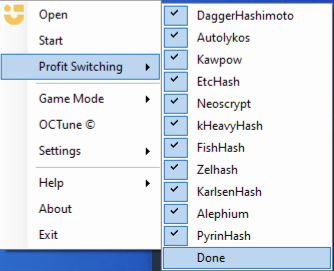
- Right-click on the QuickMiner icon in the Windows tray menu
- Mouseover the Profit Switching option
- Select the desired algorithms you want to switch between (enable only one if you want to mine one algorithm only)
- Click DONE under the algorithms (if you fail to click DONE, profit switching will not be enabled!)
How does benchmarking work?
Profit switching is done automatically based on the most profitable algorithm at the given moment. QuickMiner benchmarks the GPUs, and the values are saved in the Windows Registry. You will earn BTC while benchmarking. From time to time, QuickMiner will update the saved speeds based on the mining speeds at the given moment.
Benchmarks will be saved based on the optimization profile selected. If you are mining with the Lite profile and switch to the Medium profile, the benchmarks will be triggered again for that algorithm/optimization profile combination.
Note that optimization profiles must be applied manually for all algorithms. Otherwise, the default (last selected) profile will be used.
Does QuickMiner switch on GPU or rig level?
QuickMiner will check the profitability per GPU periodically. Even though you can only enable/disable algorithms on the rig level and not on the GPU level, the switching will work on the GPU level and not on the rig level.
How to rebenchmark the GPUs?
QuickMiner will detect speed change itself and update the benchmarks accordingly. It will trigger a benchmark for all algorithms if it detects a decent hashrate increase/decrease. You will probably not notice this, as it will look like a normal switch to another algorithm.
Although the manual rebenchmarks will not be needed, you can still delete the benchmark values in the registry editor by deleting the benchmark folder in this location: Computer\HKEY_LOCAL_MACHINE\SOFTWARE\NiceHash QuickMiner
Do I need to redo the benchmarks if I change the optimization profile?
No, QuickMiner saves speeds on GPU per profile. But you must change the profile per algorithm manually. Setting a Lite profile on Autolykos will not set a Lite profile on KawPow, for example.
What is the devfee for the new algorithms?
There is 0% Excavator devfee for all algorithms. When using Excavator, you are not paying any additional fees.