Mining Help
NiceHash Firmware installation steps based on model, stock firmware and control board
Follow the instructions below based on the combination of your device model, stock firmware release date, and control board type.
Installation for Antminer SHA256 & Scrypt models (Bitcoin & Dogecoin)
- Download the NiceHash Firmware files and NiceHashTools from the NiceHash download center.
- Install the firmware using the standard NiceHash firmware procedure:
NiceHash Firmware Installation Guide
Installation for L9 and Kaspa Antminers with CVITech control boards
- Order a Cracker Card from your preferred reseller.
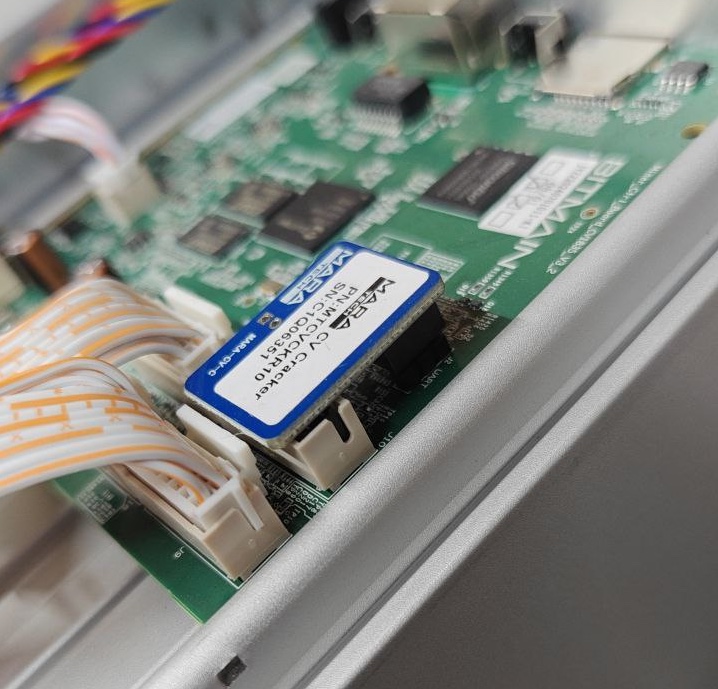
- Install the Cracker Card physically onto your ASIC device (check image below).
- Download and install the firmware using the standard NiceHash firmware installation method.
Important:
The Cracker Card is a hardware add-on required for the L9 and Kaspa ASICs with CVITech boards only. Other control boards do not require cracker cards.
Cracker card enables remote, over-the-air installation on stock firmware.
NOTE:
Farms with 150 or more ASICs can contact us to discuss the possibility of installing the firmware without Cracker Cards.
Installation for Kaspa Antminers (All other boards except CVITech)
- Follow the standard installation method for NiceHash firmware.
For additional help, check our full NiceHash Firmware Installation Guide or reach out to our Support Center.