Справка по майнингу
How to find the ASIC local network IP address?
To find the ASIC IP on your local network, make sure the PC used to find the ASIC is connected to the same local network. Normally, this means it must be connected to the same router or modem.
Method 1: Using the router or modem
Log in to the modem or router via a browser.
Note: most modems and routers can be accessed by typing 192.168.0.1 into the browser, or have the device IP printed on the device itself.
Once logged in, navigate to the DHCP, Gateway, or similarly named section and find the ASIC IP address.
Note: refer to your router or modem instruction manual for exact instructions on accessing the connected device list.
Method 2: Using NiceHashTools
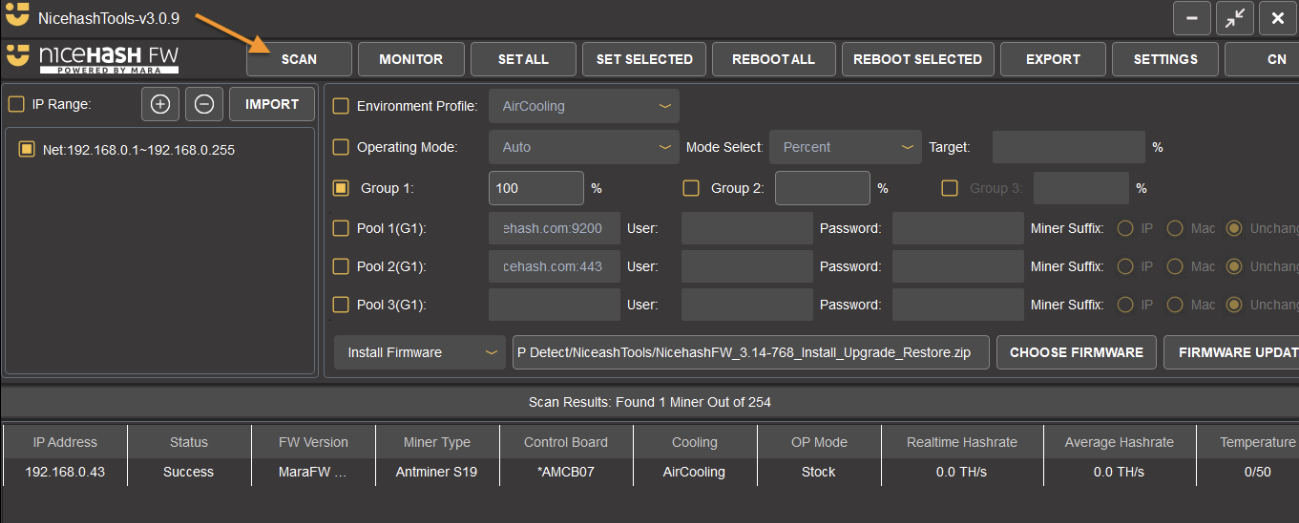
NiceHashTools has the option to quickly scan the network and detect compatible ASIC IP addresses.
Note: Set the custom IP range before scanning the network when needed.
NiceHashTools will detect the majority of Bitmain and other more popular manufacturers. Some less-known ASIC models might not be recognized. Check Method 3 for more details.
You can also use NiceHashTools to change pool settings and install NiceHash Firmware on Bitmain ASICs.
Method 3: Using network scanning programs or manufacturer-specific tools
Some ASIC models can not be detected using NiceHashTools and must use general network scanning programs or dedicated manufacturer-specific IP detectors, such as:
- Bitmain Antminer: IP reporter
- Caanan Creative Avalon: FMS
- DesiweMiner: Miner Manager Tool
- ElphaPex: ElphapexTool
- Goldshell: Find your Miner
- IceRiver: Batch Processing Tool
- iPollo: ShowIP
- Jasminer: Group control software
- MicroBT WhatsMiner: WhatsMinerTool
- Volcminer: IPReporter