Aide Pour Minage
How to check the NiceHash ASIC Manager logs?
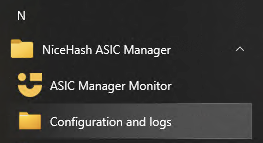
Follow these steps to check the ASIC Manager Configuration and logs:
- Navigate to the START menu.
- Search for the NiceHash ASIC Manager folder.
- Click on Configuration and logs.
- The Configuration is shown in the Configuration.json file and the logs are in the application.txt file.
Troubleshooting
Some potential errors are shown directly in the ASIC Manager browser with a ''red information icon''.
Hovering over this icon will display the error.
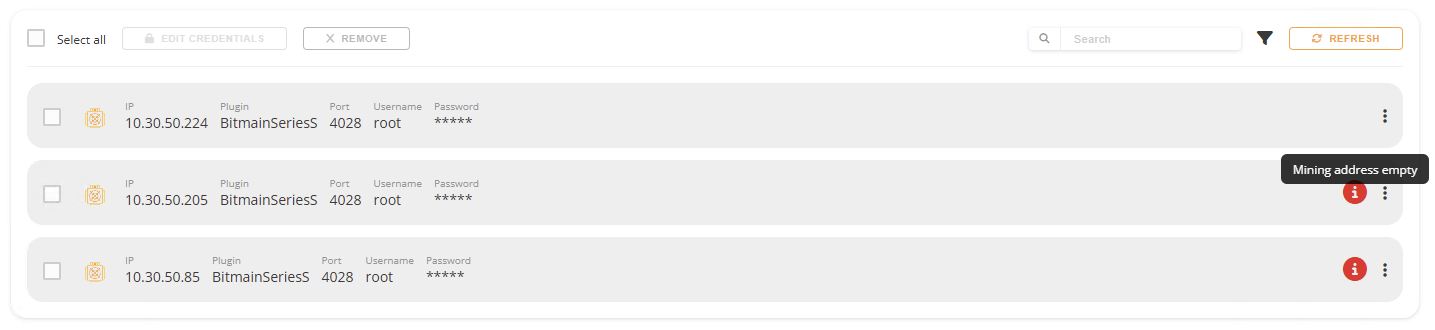
Additional troubleshooting can be performed by inspecting the logs.
For example:
One of the most frequent issues the ''[error] Data retrieval from $ASICModel 192.168.1.224:4028 'Generic error'''.
Which indicates that the ASIC manager cannot retrieve data from the ASIC. Most frequently, the issue is related to the user not inputting a username and password when scanning the network. To fix this, you manually do this after the scan for each device when using the ASIC Manager in a browser.
Minage
Ce site Web utilise des cookies pour vous garantir la meilleure expérience sur notre site Web.