General Help
How to verify a Self-Custodial wallet?
This method can be used when the self-custodial wallet does not support the Travel Rule Protocol/ does not offer a Travel Address.
To add a new withdrawal wallet address or Resolve Travel Rule Data using this method, follow the steps below.
1. Add the new withdrawal address or click on Resolve Travel Rule Data.
2. Fill out all the required data:
-
BTC, USDT, or USDC withdrawal address: enter the BTC, USDT, or USDC withdrawal address
-
Address Name: specify the name for the address
-
Address origin: select the ''Self-custodial Wallet'' option
NOTE: Only select the ''I'm paying for goods/services to a legal entity'' checkbox when necessary. For example when paying a company for goods or services or when sending funds to a legal entity. -
Sign the wallet using Wallet Signature Proof (recommended) or Visual Proof
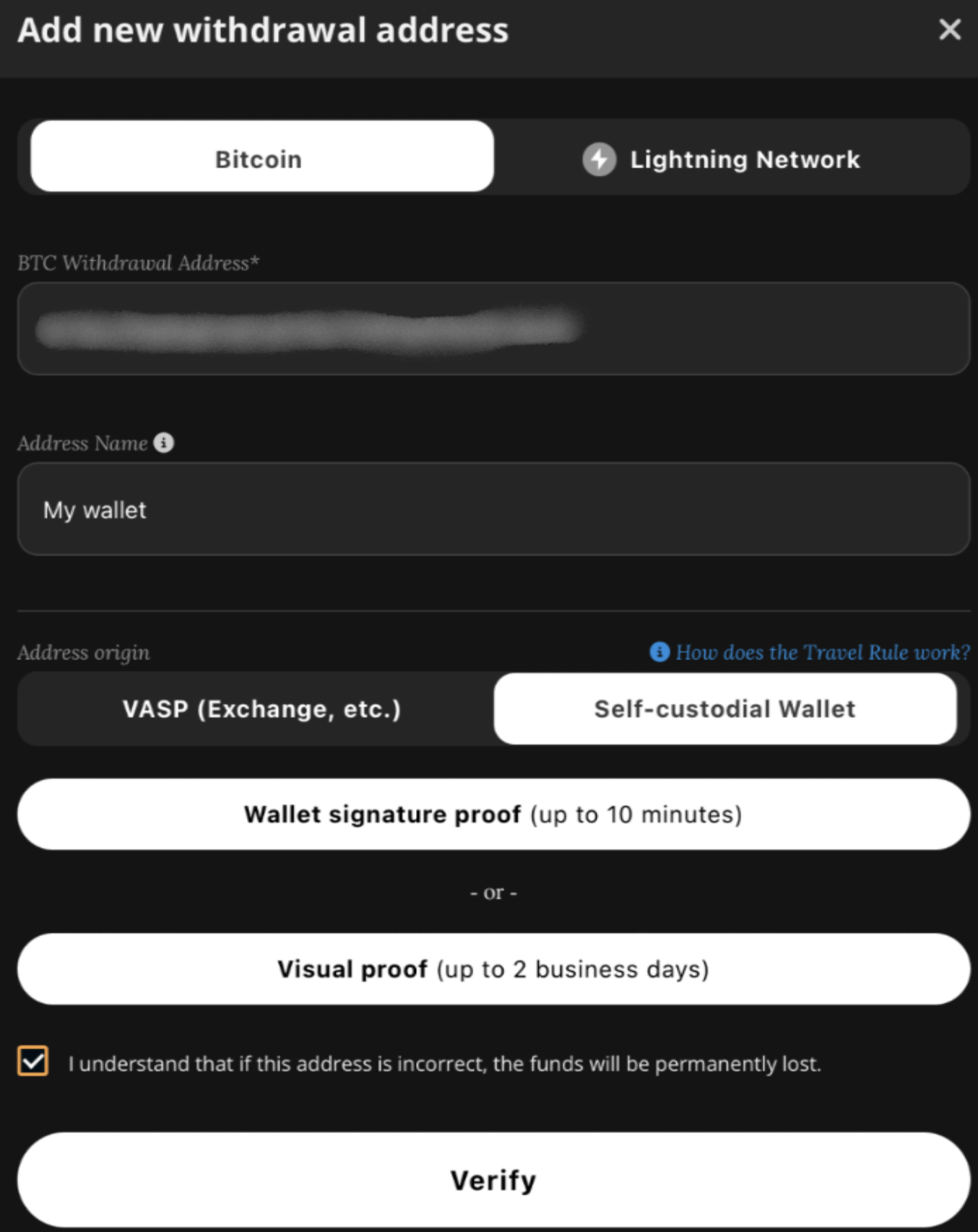
3. Double-check that the addresses match and that the data is correct. Verify this by clicking on the checkbox.
4. Click VERIFY.
5. Enter the 2FA code when prompted.
6. Enter the email confirmation code (dashes included).
*Adding self-hosted wallets is not supported on mobile devices.