General Help
How to resolve Incomplete Travel Rule Data withheld deposits?
Deposits from new wallets may get withheld until the the Travel rule data is provided.
Follow the steps below to resolve withheld deposits by providing the Travel Rule data.
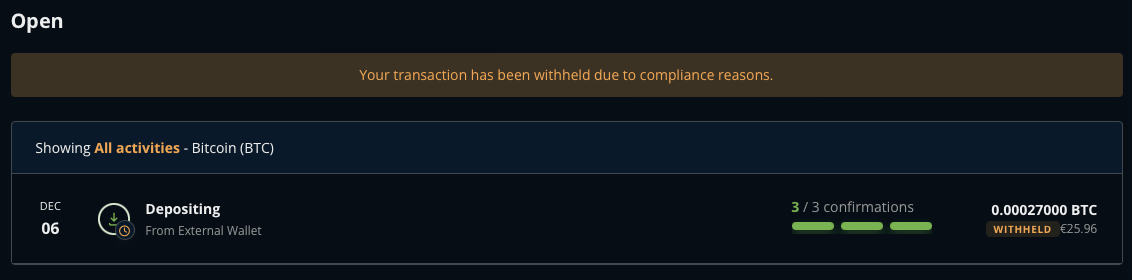
1. Go into your NiceHash BTC wallet and find the withheld deposit.
2. Click on the withheld deposit.
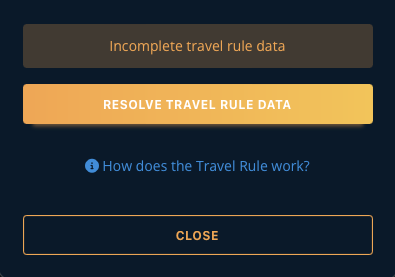
3. Select Resolve Travel Rule Data.
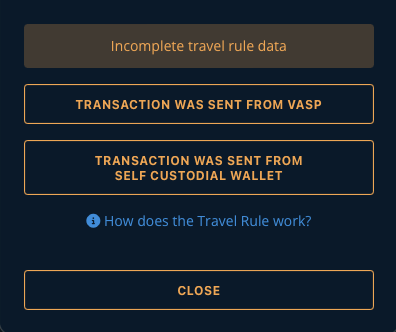
4. Select Transaction was sent from VASP when sending funds from a counterparty VASP or Transaction was sent from self custodial wallet when sending funds from a self-custodial wallet.
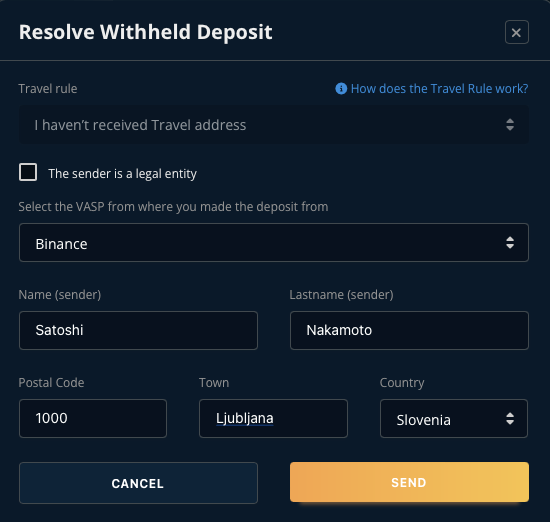
5 A. Fill out the Travel Rule data when sending from a counterparty VASP.
-
Travel rule: will be automatically selected for deposits without the Travel address data
Note: select the checkbox ONLY when sending from a legal entity. (e.g.: your business account at another vasp provider) -
Select the VASP from where you made the deposit from: select the correct VASP from the dropdown
-
Name: enter the sender's name
-
Lastname: enter the sender's last name
-
Postal Code: enter the sender's postal code
-
Town: enter the sender's town
-
Country: enter the sender's country
The example shows a deposit from Binance.
5 B. If the transaction was sent from a self-custodial wallet follow this guide to sign the wallet.