Hashrate Marketplace Help
How to properly read and understand graphs under your order details?
Detailed graphs are available for each running order, providing valuable insight into your order performance and helping you identify and address potential issues.
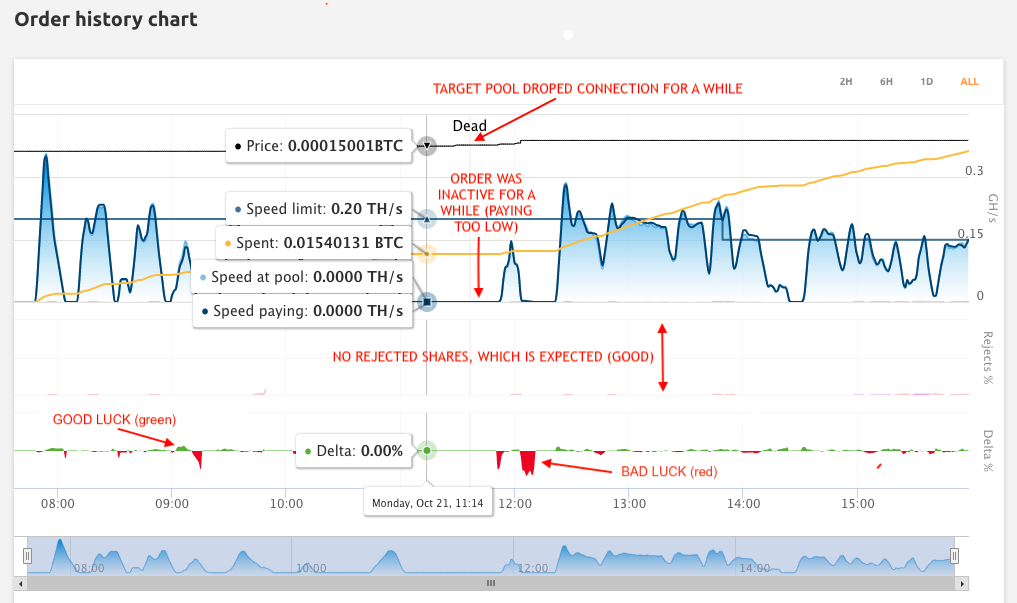
There is extensive information available, split into three major parts of the graphs:
- The upper part will show you the hashing speed of your order. First, your order must be successfully connected to the target pool specified in the order. If the connection is successful and the order pays a high enough amount (according to the current NiceHash market prices), miners start connecting and the order gains hashrate.
- The middle section shows eventual issues with pool rejects. There should be no pool rejects if the pool is working correctly and the chosen pool is close enough to the chosen NiceHash marketplace location.
- The third, lower part, shows the pool delta between the actual reported pool speed and the speed for which you are paying. Please keep in mind that the delta can swing up and down depending on your luck with the order (calculation between the shares we get from the rigs and the shares we send to the pool, which depends on luck as to how the speed comes out). The graphs are generated using data from accepted shares, and this only evens out after at least 24 hours of mining. For shorter intervals, it is not possible to create exact graphs.
Please also keep in mind that you only pay for accepted shares. If you see some rejected shares, review your selected pool performance. If you don't see any rejects, you see a low delta, which is only related to low luck. Luck determines the shares we receive from the rigs and the shares we send to the pool, which depends on luck as to how the speed is calculated. In case of a significant negative delta, you should contact the pool operator of your chosen pool.
Hashrate Marketplace
This website uses cookies to ensure you get the best experience on our website.