Hashrate Marketplace Help
How to Use Hashrate TradeView: The First Professional Trading Interface for hashrate
Hashrate is the energy that powers Bitcoin — but at NiceHash, we believe it’s more than that. Hashrate is now a market. With hashrate TradeView, you can observe, analyze, and trade it through a professional-grade trading interface, similar to what you’d expect from crypto and stock markets.
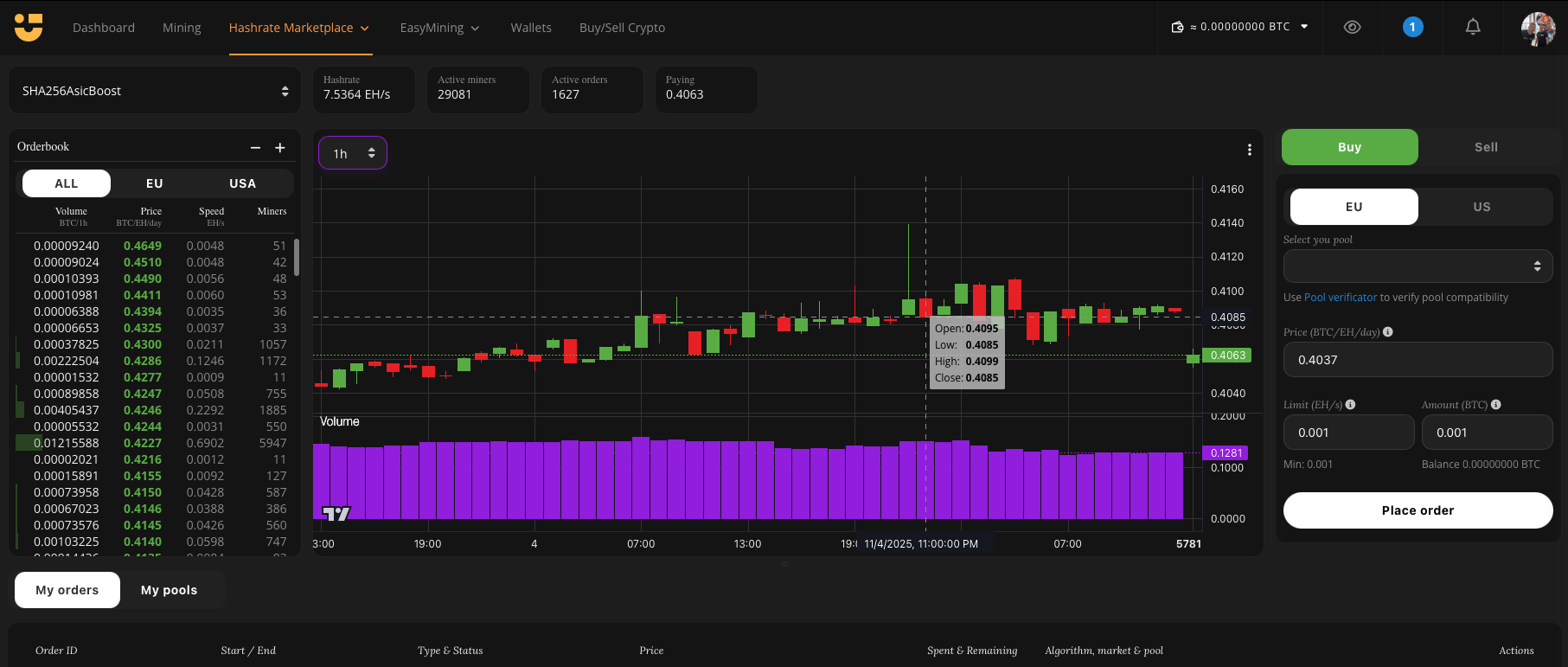
Navigating the Interface:
1. Select Algorithm (Top Left)
Choose your preferred mining algorithm from the dropdown menu. Once selected, you will see:
- Total hashrate available
- Number of active miners
- Number of active orders
- Average market price (e.g., BTC/TH/day)
2. Orderbook (left column)
- Select market (ALL, EU, USA)
- Volume over time (e.g., BTC/4h)
- Price
- Speed
- Miners
3. Buy or sell hashrate (Top Right)
- Buy - Create an order to rent hashrate. Enter the pool, price, hashrate limit, and amount you wish to spend, then click Place order.
- Sell - View configuration details for your mining devices and start selling your hashrate on the marketplace.
4. Market Chart (Center)
The live trading chart provides a professional view of the marketplace, showing:
- Price (candlestick chart) – Average order prices over time
- Volume (purple bars) – Market size in BTC over time
5. Orders and Pools Management (Bottom Panel)
Monitor and manage your trades with detailed information on:
- Order ID
- Start and end time
- Order type and status
- Price
- BTC spend and remaining balance
- Algorithm, market, and pool details
Example: Placing Your First Buy Order
Follow these steps to rent hashrate using Hashrate TradeView:
1. Select Algorithm
- From the top left dropdown, choose the algorithm you want (e.g., SHA256ASICBoost).
2. Switch to Buy Mode
- On the top, right-click Buy
3. Enter pool information
- Add your mining pool address (use the Pool Verificator tool to check compatibility).
4. Set Your Price
- Enter the price you want to pay per hashrate unit (e.g., BTC/EH/day).
- You can base this on the average price shown in the chart.
5. Define Your Order Size
- Limit (EH/s) – Maximum hashrate you want to rent.
- Amount (BTC) – The total BTC you are willing to spend.
- Example: Limit = 0.001 EH/s, Amount = 0.001 BTC.
6. Place the Order
- Click Place order. Your order will now appear under My orders at the bottom of the screen.
7. Monitor and Adjust
- Track your order status.
- You can edit or cancel your order anytime if the market price changes.
Why Use Hashrate TradeView?
- Professional, real-time trading environment
- Transparent view of supply, demand, and pricing
- Step-by-step control over buying and selling strategies