Hashrate Marketplace Help
How to Create a Business Order (UI & API Guide)
NiceHash Business Orders are designed for professional hashrate buyers who need stable, predictable hashrate delivery and more control than standard marketplace orders. For a business order, a verified organization (KYB) is required.
There are two types of business orders:
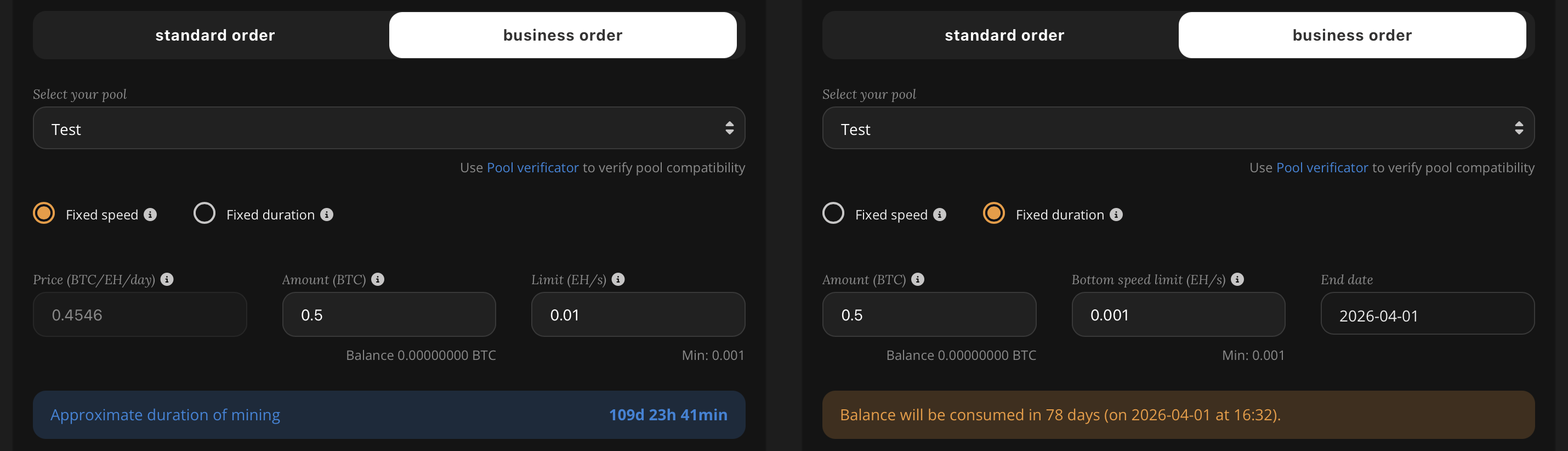
- Fixed Speed: Constant speed; completion time fluctuates based on the hash rate index price and available funds.
- Fixed Duration: Reverse logic; speed adapts to a fixed end date, influenced by the hash rate index price and available funds.
IMPORTANT: Changes are made every 15 minutes
What Is a Business Order?
A Business Order is a managed hashrate package assembled from available sellers on the NiceHash marketplace. It allows you to purchase hashrate with:
- Priority Fixed Speed delivery (stable hashrate)
- Multiple algorithms (SHA256AsicBoost, Scrypt and KHeavyHash)
- Market selection (BTC / USDT)
- Mining directly to your own pool
- Improved predictability for planning and operations
Before You Start
To create a Business Order, make sure you have:
- A configured mining pool in NiceHash (you will need the poolId)
- Selected the correct algorithm (e.g., SHA256AsicBoost)
- Chosen the target market (BTC or USDT)
- Checked the current algorithm limits via API (recommended)
Important: Check Algorithm Limits via API
Algorithm settings (limits, factors, enabled markets) can be retrieved from the official endpoint:
GET /main/api/v2/mining/algorithms
Use this endpoint to verify:
minimalOrderAmount(minimum order amount, denominated in the currency of the selected market)minSpeedLimitandmaxSpeedLimit(valid speed range)displayMarketFactorandmarketFactor(required units and scaling)
Documentation (parameter details): MINING ALGORITHMS – GET /main/api/v2/mining/algorithms.
Option 1: Create a Business Order via the Interface (UI)
Use the NiceHash interface if you want a guided, manual setup.
- Log in to NiceHash.
- Navigate to Hashrate Marketplace → Business Orders.
- Select your market (BTC / USDT).
- Choose the algorithm (e.g., SHA256AsicBoost).
- Select or add your mining pool.
- Select the type of Business order
- For a fixed speed set amount and the speed limit. For a fixed duration, set amount, bottom speed limit, and the end date.
- Review and confirm the order.
Option 2: Create a Business Order with a fixed speed via API
The API method is recommended if you want:
- Explicit selection of Fixed Speed (
subType) - Precise speed configuration (including decimal precision above the minimum)
- Automation, retries, scaling, and integration into internal tooling
Reference implementation and HMAC signing examples are available here: NiceHash REST Clients Demo (GitHub).
API Calls Used in a Typical Business Order Flow
These endpoints are commonly used when placing Business Orders programmatically:
- Read algorithm limits & factors:
GET /main/api/v2/mining/algorithms - List pools:
GET /main/api/v2/pool - Create a pool (if needed):
POST /main/api/v2/pool - Create a Business Order:
POST /main/api/v2/hashpower/business/order - Monitor order status:
GET /main/api/v2/hashpower/order/<orderId>
Fixed Speed Basics (SHA256AsicBoost Example)
For SHA256ASICBOOST, Business Orders use EH as the speed unit.
Minimum speed rule: your limit must be greater than or equal to the algorithm’s minimum (minSpeedLimit / derived minLimit). This is a minimum speed constraint, not a decimal precision limitation.
Examples (values in EH):
0.0001(minimum threshold example)0.00011(valid, higher than minimum)0.0001234(valid, more decimal precision)
Example A: Small Fixed-Speed Business Order (1 PH Equivalent)
This example demonstrates a small, precise fixed speed using decimals. (Speed values are expressed in EH.)
{
  "market": "BTC",
  "algorithm": "SHA256ASICBOOST",
  "amount": 1,
  "displayMarketFactor": "EH",
  "marketFactor": 1000000000000000000,
  "limit": 0.0001,
  "displayPriceFactor": "EH",
  "priceFactor": 1000000000000000000,
  "poolId": "your_pool_id",
  "subType": "BUSINESS_FIXED_SPEED"
}
Example B: Fixed-Speed Business Order (25 PH for 30 Days)
To target 25 PH on SHA256AsicBoost, convert to EH:
- 1 PH = 0.001 EH
- 25 PH = 0.025 EH
Use a speed window that includes your target. For example:
bottomLimit = 0.02(20 PH)limit = 0.03(30 PH)
{
  "market": "BTC",
  "algorithm": "SHA256ASICBOOST",
  "amount": 0.05,
  "displayMarketFactor": "EH",
  "marketFactor": 1000000000000000000,
  "displayPriceFactor": "EH",
  "priceFactor": 1000000000000000000,
  "poolId": "4007f83c-0b2d-49bc-b51c-584d27215f28",
  "bottomLimit": 0.02,
  "limit": 0.03,
  "subType": "BUSINESS_FIXED_SPEED"
}
Note: The amount is always denominated in the currency of the selected market – BTC for the BTC market, USDT for the USDT market. To place the same order on the USDT market, set "market": "USDT" and provide the amount in USDT.
Note: If the backend cannot allocate the full package at that moment, you may receive an allocation error. In that case, try again later, widen the speed window slightly, switch markets (BTC/USDT), or split the order into smaller ones.
Troubleshooting Common Errors
- 5068 – Invalid order market factor: Wrong unit or factor (must match
/mining/algorithms). - 2997 – Invalid order amount or limit or price: Amount too low, invalid speed window, or limit below minimum.
- 5191 – Unable to allocate hashrate: Valid request, insufficient supply; retry or split.
Additional Resources
Summary
You can place Business Orders either through the NiceHash interface or via API. The API approach is recommended for professional buyers who want automation and better control.
Always validate algorithm limits using - GET /main/api/v2/mining/algorithms. Then construct your order payload accordingly.