EasyMining
What does the graph on my EasyMining package mean?
When you purchase an EasyMining package, you will be able to click on the package and see its progress. Here is an explanation of what the different lines and colors mean, and what is happening with your mining package. You can also read our full article here about EasyMining if you don't know where to start.
Once you open up the package, you will see this:
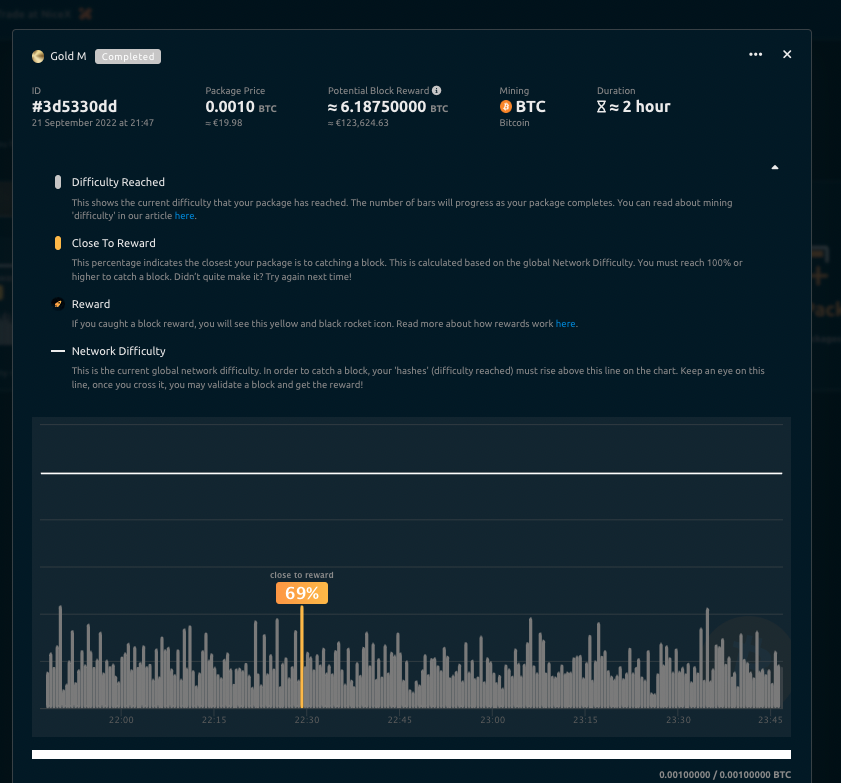
Each element indicates the progress of your package:
Difficulty Reached
This shows the current difficulty that your package has reached. The number of bars will progress as your package completes. You can read about mining 'difficulty' in our article here.
Close To Reward
This percentage indicates the closest your package is to mining a block. This is calculated based on the global Network Difficulty. You must reach 100% or higher to mine a block. (Note that it can happen that you are above 100% and not receive the block reward, this might happen if a block is 'orphaned' or another miner finds the same solution at the same time, among other reasons).
Reward
If you mine a block reward, you will see a yellow and black rocket icon. Read more about how rewards work here.
Network Difficulty
This is the current global network difficulty. In order to mine a block, your 'hashes' (difficulty reached) must rise above this line on the chart. Keep an eye on this line, once you cross it, you may validate a block and get the reward!