How to acquire Kaspa when no exchange is supporting it?
Kaspa is gaining traction. But for now not many exchanges are supporting it. Or the exchanges that support it might not be trusted enough. How could one buy Kaspa coin if there are no trusted exchanges supporting it?
In this article I am going to show you how to buy Kaspa or any other cryptocurrency for that matter.
What is the alternative to buying a cryptocurrency on an exchange?
Its NiceHash's Hashpower Marketplace
On the NiceHash marketplace you can buy hashing power that is then used to mine a specific cryptocurrency like Kaspa. It allows you to set up an order for a certain time, price and hashrate limit. Buying hashing power allows you to acquire a cryptocurrency that might not even be listed on any exchanges yet.
If you are not familiar with how NiceHash works, you can read it here.
How does NiceHash Hashpower Marketplace work?
NiceHash's Hashpower Marketplace is a marketplace where buyers compete against each other by placing orders for hashing power. The hashing power is then redirected to a pool of buyer’s choice. In our case, the buyer will place a kHeavyHash (Kaspa) order on the marketplace with a competitive price. Then that hashing power will be sent to the buyer’s pool where he will collect the mining reward from the pool.
The reward is then sent to the buyer’s wallet. Wallet can be any wallet that supports a given cryptocurrency - Kaspa in our case.
The process looks like this:
- Buyer creates an order on NiceHash Marketplace.
- Buyer sets a price for the hashing power.
- Buyer sets the limit of how much hashing power he wants to buy.
- Hashing power gets sent to the buyer’s mining pool of his choice.
- Buyer gets a reward for contributing hashing power to the pool (mining to a pool).
- The pool pays out the reward to whatever wallet the buyer used for mining on a pool.
Buyers need to deposit Bitcoin to NiceHash and then spend these Bitcoins to buy the hashing power. This means that in essence, the buyers are swapping the Bitcoin for whatever coin they are mining with the bought hashing power.
The best part is that the buyers can actually spend less Bitcoin for acquiring the same amount of Kaspa (or any other minable coin) than they would by using an exchange. This is achieved by placing orders that have a price set at below break even price. Unfortunately this is not always the case, sometimes buyers could also overpay for the hashpower if they are not careful enough.
How to get Kaspa by placing a hashing power or NiceHash marketplace?
- Create an account on NiceHash and deposit Bitcoin
- Create Kaspa wallet
- Set up a pool in NiceHash Marketplace
- Place a hashpower order
#1 Create an account at NiceHash and then deposit some Bitcoin to it.
Read this help article or this video guide for depositing Bitcoin to NiceHash - it is as straightforward as on any exchange.
Alternatively you can use Banxa to top-up your account with fiat.
You also need to complete the KYC verification.
#2 Create a Kaspa wallet
You can download a desktop wallet or use a Web/Mobile wallet provided on the official Kaspa website. Creating a Kaspa wallet is quite straightforward. Remember to save the 12-word seed phrase!
#3 Set up a pool in the NiceHash Marketplace
Navigate to the My Pools page inside NiceHash platform and click on +ADD NEW POOL
Fill out the next fields:
- Custom pool name - Custom name of the pool you are adding. Could be KaspaPool1.
- Algorithm - Choose an algorithm which is used in this pool. In our case we chose kHeavyHash which supports Kaspa.
- Stratum hostname - this is the URL address of the pool. You can find it on the pool’s website. Example of acc-pool’s stratum URL: eu1.acc-pool.pw
- Port - port of the pool. Example of acc-pools port: 16061
- Username - Use your Kaspa wallet address here. This will let the pool know where to pay the mining reward. You can add .WorkerName at the end of the wallet to identify your worker. Example (change this with your own wallet!): kaspa:qr7c9k6903nwr8qttefcsl8g78fwaz2820sf3x3l7dhrxlj6dn2e5rqkxmv08.Worker1
- Password - Should be just x
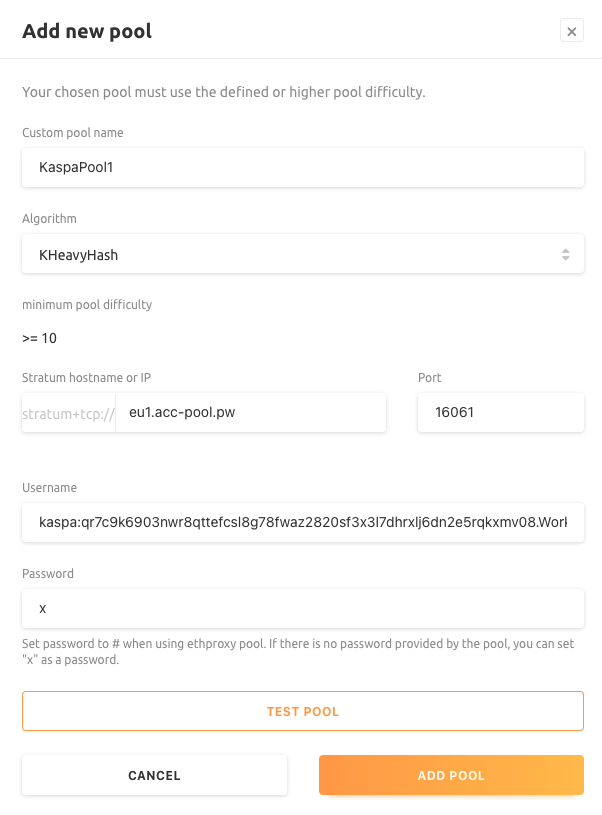
Don’t forget to test the pool. A text that says “Tested pool is compatible!” will appear if everything works as expected.
#4 Place an order
You are almost there! All that is left is to place the order with a desired spending amount, price and limit.
To set up a new order navigate to the Marketplace tab inside the NiceHash platform and follow these steps:
- Select kHeavyHash algorithm in drop down menu in the top left part of the screen.
- Select your pool that you previously created.
- Set the price you want to buy the hashing power at. If you are not sure what price to set, check below for some tips.*
- Set the upper limit of how much speed you want to get.
- Set the spending amount of BTC. How much BTC do you want to spend?
- Input the 2FA, agree with the terms and place the order.
This is it! If the price of the order is competitive enough, then you will start to see accepted speed on the pool and you will soon get your first Kaspa to your wallet.
*How to know what price to set?
This is the tricky part.
The recommended way of determining the price of the order is described here. If we translate this help article from Ravencoin to Kaspa, then we should do this:
- Open whattomine.com and navigate to the Kaspa coin via the Coins tab at the top
- Input 1000000** in the Hash rate input box
- Set power to 0
- Set fees to 5%
- Change block reward value and Difficulty value to average 1h
- Click on calculate
Now inspect the Daily revenue in BTC. This is the breakeven price for you. This is how much Kaspa in Bitcoin you would get by buying the hashing power on the NiceHash marketplace.
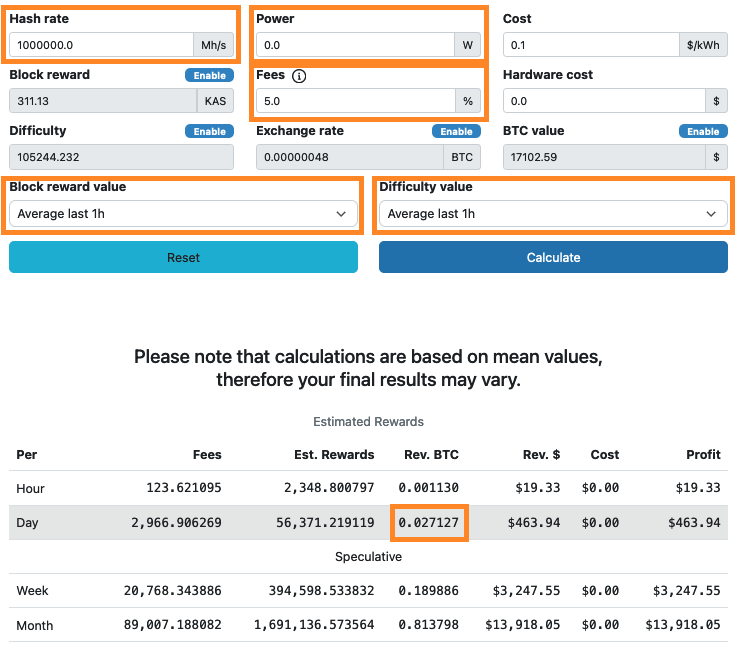
** The coefficient from Mh/s on whattomine.com to Th/s on NiceHash marketplace.
Disclaimer: This is not investment advice.