Benchmark error in NiceHash Miner
In this blog post, we will explain why and when NiceHash Miner reports a benchmark error.
Benchmark error is a message that NiceHash Miner shows when it cannot benchmark an algorithm for any of the reasons explained below:
- Overclock is too high.
- No jobs from the stratum.
- The GPU is not supported by the miner.
- There is no connection to the stratum.
- Virtual Memory is not increased.
- ISP (Internet Service Provider) is blocking miners.
- Router is blocking NiceHash.

Overclock is too high
This benchmark error can happen when you are using an overclock that is too high for a specific algorithm. As the GPU can work on some algorithms, it might fail on others.
To exclude this issue, set your overclocks to the default value and re-benchmark the miners that reported a benchmark error.
No jobs from the stratum
This kind of benchmark error often happens on newly added algorithms where there are no existing orders on the specific algorithm e.g. BeamV2.
To exclude this issue, navigate to www.nicehash.com/algorithm and look for the algorithm name that had the benchmark error inside NiceHash Miner. If there are existing miners on the algorithm, then jobs are most likely sent to your miner and the issue is not related to the jobs not arriving.
The GPU is not supported by the miner/plugin
This issue can only happen in the case where plugins (3rd party miner) code is badly written or when the NiceHash Miner filters are not set correctly. NiceHash Miner uses different filters to decide if the miner is installed for a particular GPU or not. These filters include the CUDA version for example, which should be at least 3.0 or higher. In general, NHM takes care of this, but sometimes some specific models slip past the filter and therefore use a wrong plugin (3rd party miner) which is not supported on this particular GPU.
To exclude this issue, we suggest that you open a ticket on our support channel where our support agents will be able to help you.
No connection to the stratum
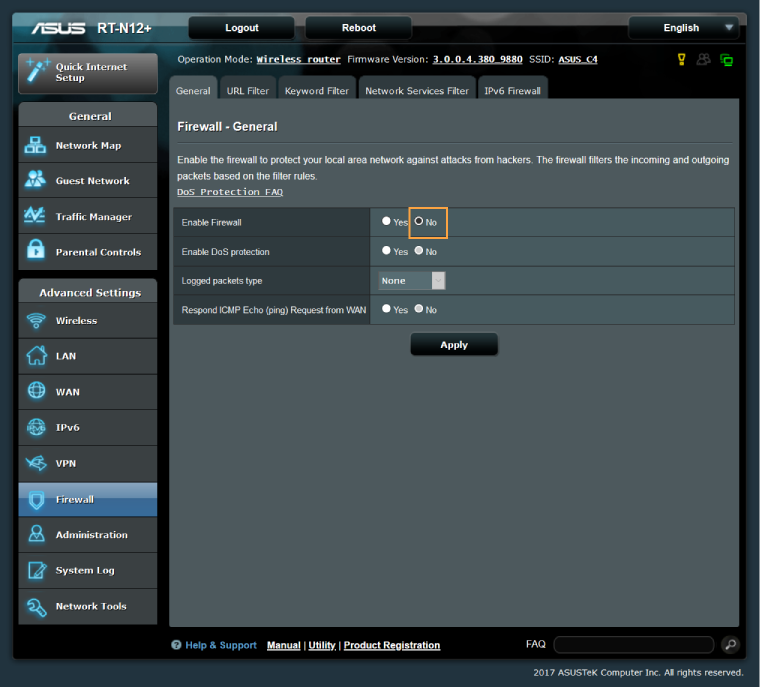
If none of the above reasons solved the issue, then most likely the miner cannot connect to our stratum server. Most of the time the ASUS router is blocking our stratum connections.
To solve this problem, open your ASUS router dashboard and disable the ASUS firewall.
Virtual memory is not increased
Virtual memory is a replacement for a physical RAM (random access memory) shortage. The operating system uses hard drive disk space instead of physical RAM.
In mining, virtual memory is required to substitute physical RAM when the spikes of workload happen. For example, if your system has 8GB of RAM and you have 6x RX 580 4GB cards, you will be only able to use 2 of these cards. This depends on the algorithm, not all algorithms fall into this category.
To learn how to increase virtual memory, check this guide.
ISP (Internet Service Provider) is blocking mining
There have been reports that some ISPs are causing issues. To make sure this is not the issue, we suggest calling your Internet Service Provider and ask if they block mining.
List of currently known ISPs that are causing issues:
- CenturyLink
To solve this issue, either use a VPN service or contact your ISP and ask them to whitelist you.
Router is blocking NiceHash
Similar to the above No connection to the stratum part of this blog, other routers could block NiceHash traffic.
For example, Trend Micro router's feature "Malicious Site Blocking" is causing benchmarking issues with NiceHash Miner.
Check your router for any similar security feature and disable it for testing purposes only then run the benchmarks and see if it helps.