Introducing the NiceHash Docker Miner! Monetize your idle HPC server time
Dear NiceHash Community,
We are thrilled to announce the launch of a groundbreaking product designed for high-performance computing environments - the NiceHash Docker Miner (NHDM). Tailored for data centers equipped with powerful GPUs, NiceHash Docker Miner allows seamless monetization of unused compute resources without interrupting main compute tasks.
What is a NiceHash Docker Miner image?
The NiceHash Docker Miner integrates effortlessly with existing compute marketplaces such as Vast.ai, ensuring that your main compute tasks continue running smoothly while transforming idle GPU power into a revenue stream. Importantly, the Docker image initiates mining with your GPUs whenever there are no renters utilizing the servers, ensuring that your resources are never wasted.
With the ability to automatically switch between seven algorithms and over 20 cryptocurrencies while getting paid in Bitcoin, NiceHash Docker Miner image ensures stable payouts and optimizes your earnings without any manual intervention. The system is designed to be user-friendly, offering detailed analytics, real-time GPU monitoring, and simplified installation processes suitable for users with minimal Docker experience.
Here are some of the key features and benefits of the NiceHash Docker Miner:
- Integrates with existing compute marketplaces.
- Operates alongside HPC images for frameworks such as Vast.ai without disrupting main compute tasks, maintaining efficiency.
- Transforms idle GPUs into revenue.
- Utilizes idle GPU power to mine various cryptocurrencies, including Ravencoin, Ethereum Classic, and more, transforming unused compute capacity into a revenue stream - Bitcoin.
- Automated profit switching between multiple minable algorithms.
- Automatically switches between seven algorithms and over 20 cryptocurrencies, ensuring stable payouts in Bitcoin only. Learn more about how NiceHash operates here.
- Monitors and reports real-time GPU data
- Connects seamlessly with NiceHash Rig Manager for real-time GPU monitoring, offering insights into hardware performance.
- Detailed Analytics and reporting
- Access in-depth mining performance reports or export the data for accounting purposes.
- Easy installation
- The installation process has been simplified to a few commands, making it accessible even to those with minimal Docker experience.
Getting started with NiceHash Docker Miner image
To get started, ensure you have a NiceHash Mining Address and a system equipped with an AMD or NVIDIA Graphics Card. The installation is as easy as running two simple commands:
NVIDIA Example:
$ docker pull dockerhubnh/nicehash:latest
$ docker run -it --rm --env MINING_ADDRESS="mining-address" --env MINING_WORKER_NAME="worker-name" --gpus=all dockerhubnh/nicehash:latest
AMD Example:
$ docker pull dockerhubnh/nicehash:latest
$ docker run -it --rm --env MINING_ADDRESS="mining-address" --env MINING_WORKER_NAME="worker-name" --device=/dev/kfd --device=/dev/dri dockerhubnh/nicehash:latest
Additional notes for executing the commands:
- Replace "your-mining-address" with your NiceHash Mining Address and "your-worker-name" with an arbitrary worker name.
- To select a specific GPU for NiceHash Miner Docker:
- for NVIDIA: change
--gpus=allto a chosen GPU UUID or index, as per NVIDIA's guidelines - for AMD: change
--device /dev/drito a chosen GPU index, as per AMD's guidelines> - Docker must be installed on your OS to execute above commands.
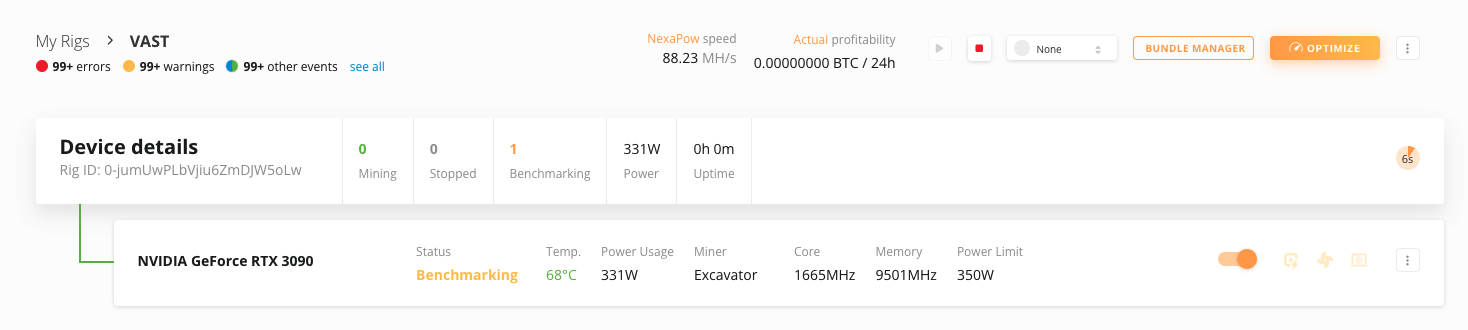
Once the Docker is started, you should see the machine online inside your NiceHash Rig Manager after a couple of minutes and in the Benchmarking state.
How to Run NiceHash Docker Miner with Vast?
You can run NiceHash Docker Miner as an idle job inside the Vast.ai platform. The process is relatively simple as all you have to do is Create a Job inside Vast platform. Find Docker Miner on DockerHub.com.
Ensure that you modify the VAST template commands according to the provided guidelines for either AMD or NVIDIA systems.
Option #1 - Duplicate & modify the template
Follow this link to copy the Docker Image Template from vast to your template automatically.
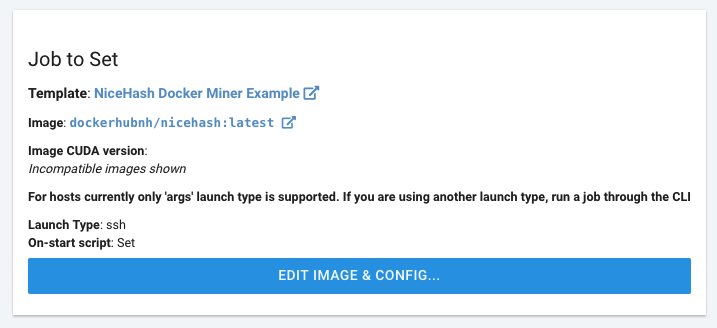
Once copied, SELECT the job and SET JOB on your machines via CREATE A JOB tab.
Additional notes for duplicating a job template:
- Replace "your-mining-address" with your NiceHash Mining Address and "your-worker-name" with an arbitrary worker name.
- To select a specific GPU for NiceHash Miner Docker:
- NVIDIA systems: add
--gpus=allto Docker Options field to choose GPU UUID or index, as per NVIDIA's guidelines - AMD systems: add
--device=/dev/kfd --device=/dev/drito Docker Options field to choose GPU index, as per AMD's guidelines - Ensure your idle job is priced high to maximize its chances of running quickly.
Option #2 - Create a new Job from scratch
Follow these steps to create an idle mining job with NiceHash Docker Miner on Vast.ai:
- Have at least 1 machine online on Vast.ai
- Navigate to CREATE A JOB tab
- Click on EDIT IMAGE & CONFIG... button
- Click on + CREATE TEMPLATE to create a new template
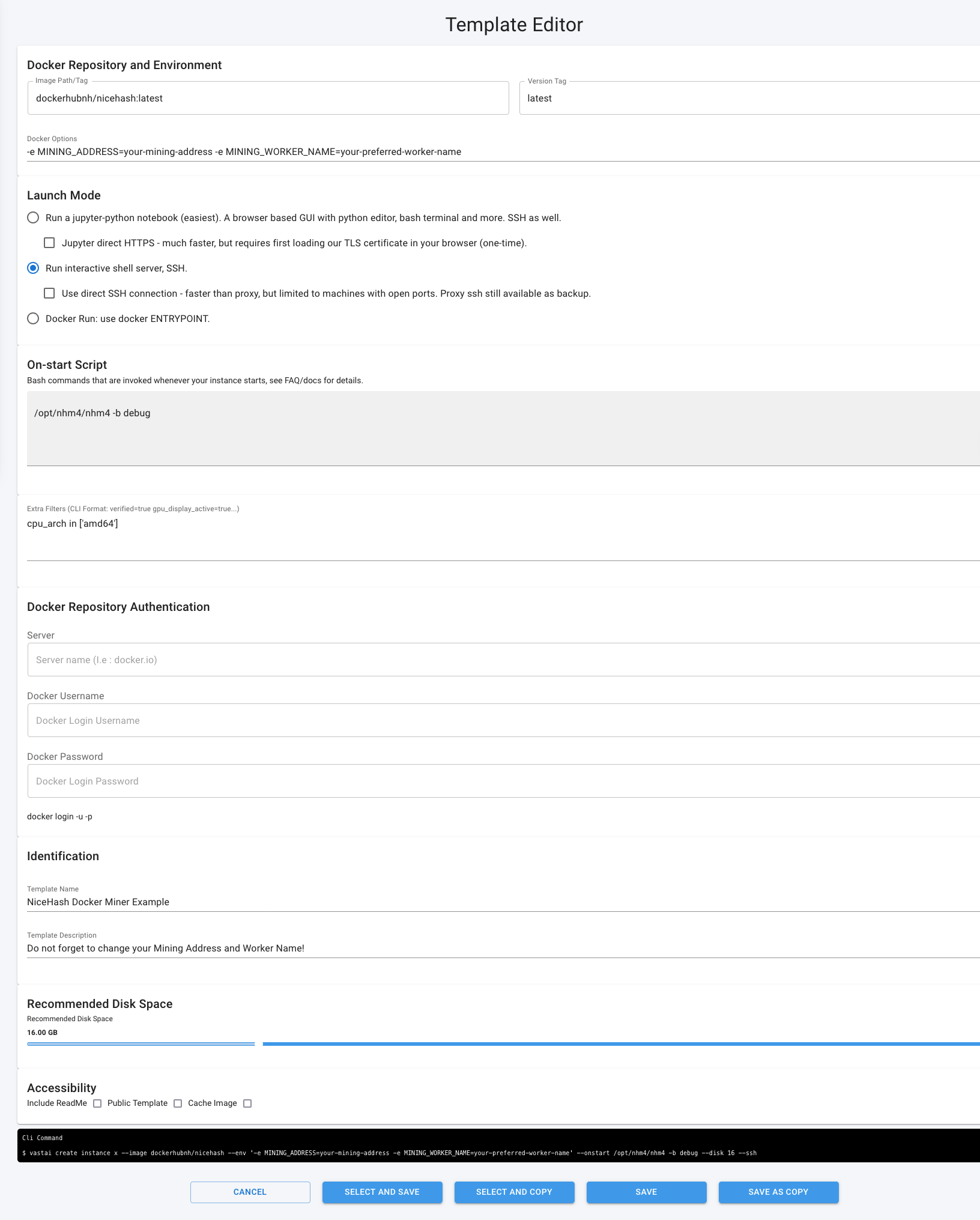
- Input these fields:
Image Path/Tag:dockerhubnh/nicehash:latest
Version Tag:latest
Docker Options:-e MINING_ADDRESS=your-mining-address -e MINING_WORKER_NAME=your-preferred-worker-nameLaunch Mode:Run interactive shell server, SSHOn-Start Script (Bash commands):/opt/nhm4/nhm4 -b debug
Template Name:NiceHash Docker Miner - SELECT AND SAVE the template
- Click SET JOB... button on each of your machines to apply the idle job
Additional notes for setting up a job template:
- Replace "your-mining-address" with your NiceHash Mining Address and "your-worker-name" with an arbitrary worker name.
- To select a specific GPU for NiceHash Miner Docker:
- NVIDIA systems: add
--gpus=allto Docker Options field to choose GPU UUID or index, as per NVIDIA's guidelines - AMD systems: add
--device=/dev/kfd --device=/dev/drito Docker Options field to choose GPU index, as per AMD's guidelines> - Ensure your idle job is priced high to maximize its chances of running quickly.
Option #3 - CLI
By using the CLI option, you can operate multiple rigs with more ease since you can programmatically name each of the workers instead of manually setting multiple templates in the Vast platform GUI. To run the above example in CLI, use this example:
--image dockerhubnh/nicehash --env '-e MINING_ADDRESS=your-mining-address -e MINING_WORKER_NAME=your-preferred-worker-name' --onstart /opt/nhm4/nhm4 -b debug --disk 16 --ssh
Additional notes:
- Replace "your-mining-address" with your NiceHash Mining Address and "your-worker-name" with an arbitrary worker name.
- To select a specific GPU for NiceHash Miner Docker:
- NVIDIA systems: add
--gpus=allto your command to choose GPU UUID or index, as per NVIDIA's guidelines - AMD systems: add
--device=/dev/kfd --device=/dev/drito your command to choose GPU index, as per AMD's guidelines> - Ensure your idle job is priced high to maximize its chances of running quickly.

How to test if requirements are met?
Run the following command to test if Docker engine is working:
docker run --rm hello-world
Run the following command to test if Docker miner is detecting GPUs:
- Nvidia: docker run --rm --gpus=all --entrypoint=/usr/bin/nvidia-smi dockerhubnh/nicehash:latest
- AMD: docker run --rm --device /dev/kfd --device /dev/dri --entrypoint=/usr/bin/clinfo dockerhubnh/nicehash:latest
Why Choose NiceHash Docker Miner?
With its innovative automatic switching feature, the NiceHash Docker Miner is set apart for GPU miners seeking efficiency and profitability without the manual hassle. In the volatile cryptocurrency market, NiceHash Docker Miner provides a significant advantage by automating the mining process and focusing on the most profitable coin at any given time, freeing you from the manual management of mining operations and providing BTC payments.
Enhance your mining strategy with NiceHash Docker Miner and enjoy a more streamlined, profitable, and hassle-free mining experience. To estimate your potential earnings of your GPUs vist our profitability calculator.
For more information, assistance, or business inquiries, please contact us at docker@nicehash.com.