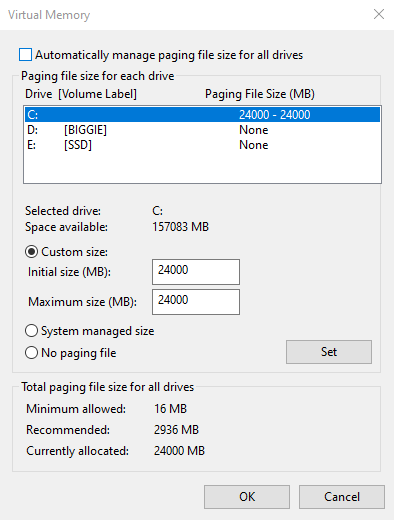
How to increase virtual memory on Windows?
Virtual memory is a replacement for a physical RAM (random access memory) shortage. The operating system uses hard drive disk space instead of physical RAM.
In mining, virtual memory is required to substitute physical RAM when spikes of workload happen. For example, if your system has 8GB of RAM and you have 6x RX 580 4GB cards, you will be only able to use 2 of these cards. This depends on the algorithm, not all algorithms fall into this category.
In order to calculate how much virtual memory to set, you have to sum all of your GPUs VRAM. For example, if your rig has 6x GTX 1080 8GB, you need 48GB of virtual memory.
To increase virtual memory follow these steps:
Open Control Panel.
Select System (make sure to change View By to Small or Large icons)
Select Advanced system settings.
Navigate to the Advanced tab and select Settings under Performance.
Navigate to the Advanced tab and select Change… under Virtual memory.
Deselect Automatically manage paging file size for all drives checkbox.
Select Custom size.
Input initial size and maximum size. Calculate this value based on your rigs total GPUs VRAM (see above). Note that the speeds are in MB, not GB.
Click Set and OKto save the changes.