Virtual Machine Mining Help
How do I manage my pools?
All your saved pools are listed in the My Pools tab, where you can add, edit and test them. These are the same pools as in the My Pools tab of the Hashrate Marketplace, so a pool you save in one product is ready to use in the other.
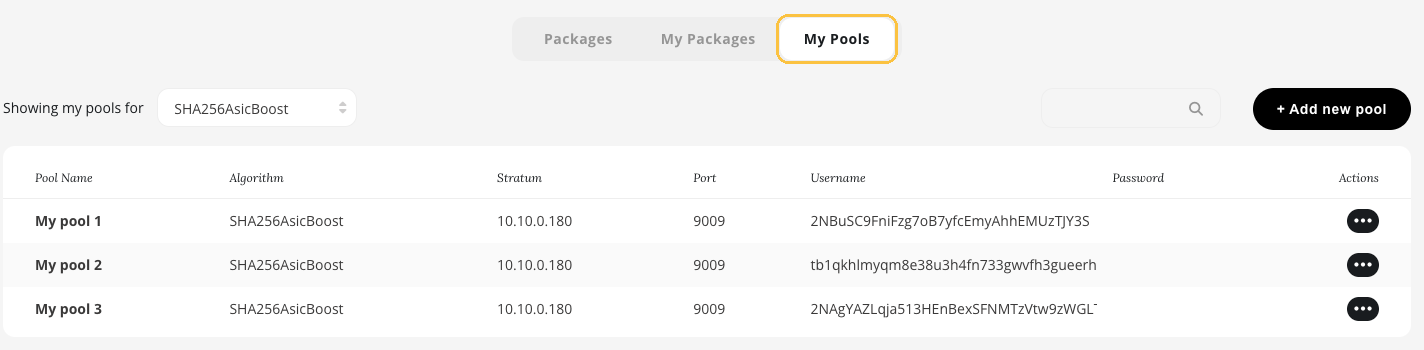
The My Pools tab with your saved pools for the selected algorithm.
Use Showing my pools for to pick the algorithm. Virtual Machine Mining uses SHA256AsicBoost. To change a pool, open its Actions menu (•••).
How do I add or edit a pool?
Pools are added, edited and verified the same way as in the Hashrate Marketplace.
- Click + Add new pool, or choose edit in the Actions menu of a saved pool.
- Fill in the pool details: a name of your choice, the algorithm, the stratum hostname or IP and port, and the username and password from your pool. If your pool gives you no password, enter "x".
- Click Test pool to check that NiceHash can connect to your pool, then Save pool.
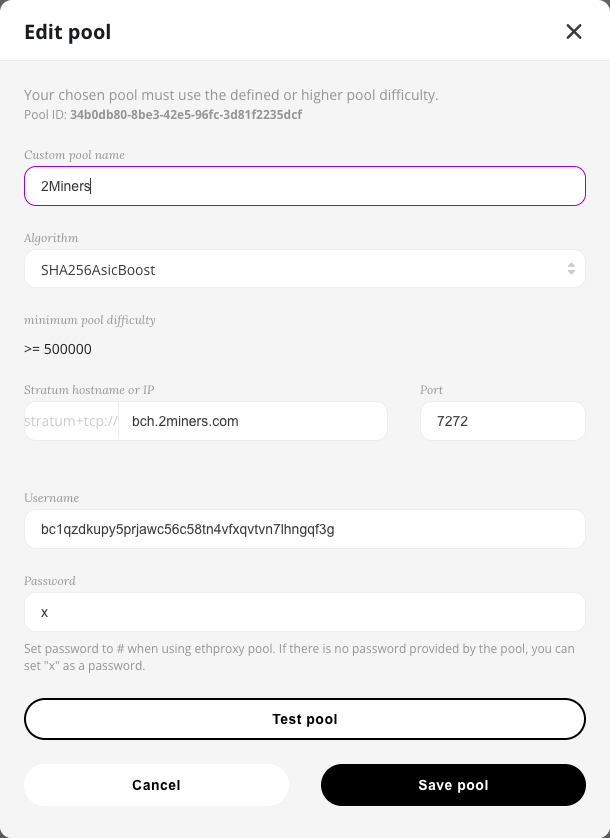
Adding or editing a pool.
Note: Your pool must accept the minimum pool difficulty shown in the window, or higher. Changes to a pool apply to new packages only, as the pool of a running package cannot be changed.
仮想マシンマイニング
本ウェブサイトではお客様に最適なサービスを提供できるよう、クッキーを使用しています。