What are Extra Launch Parameters in NiceHash Miner?
Extra launch parameters are substituted with the Extra Commands tab since NiceHash Miner v3.1.0.0. Read more about new Extra Commands here.
Extra Launch Parameters or ELP, in short, are extra parameters (or commands) that are added to the 3rd party miner command line when the 3rd party miner is started. Extra Launch Parameters can change the miner behaviour or tell the miner to do something differently. For example -di
NiceHash Miner uses the command line to start the miner. Example of the command line for Claymore Miner within NiceHash Miner:
-di 0 -epool stratum+tcp://daggerhashimoto.eu.nicehash.com:3353 -ewal 34BMaDrcaQH8Jp5WKFnxZ17fVdqTUqF15G$0-U0ZlrEGp6Fi6YzYS69CfWQ -esm 3 -epsw x -allpools 1 -wd 0 -mport 127.0.0.1:-4000
Each word after the - sign, tells Claymore Miner something. Few examples:
- di -> enables only GPU 0 (If you have 6 GPUs in your rig, they will be indexed from 0 to 5)
- epool -> the address of the pool you want the miner to connect to
- ewal -> the wallet address you want the rewards from mining to go
There are a lot more parameters available for 3rd party miners like Claymore, Phoenix Miner, LolMiner, etc., which can be found on the miners' website or locally in bins folder.
Here is the list:
How to use Extra Launch Parameters in NiceHash Miner?
ELPs are intended for advanced users - if you think that you are not advanced user, do not worry, we will explain how to use ELP here.
First of all, you need to know what do you want to achieve with ELP. Generally, NiceHash Miner launches 3rd party miners without the need of ELP. But in some cases, you might want to set ELP anyway. Good examples are Claymore’s -rx boost and -strap parameters which increase hashrate on some GPUs.
Follow these steps to use Extra Launch Parameters:
1. Launch NiceHash Miner.
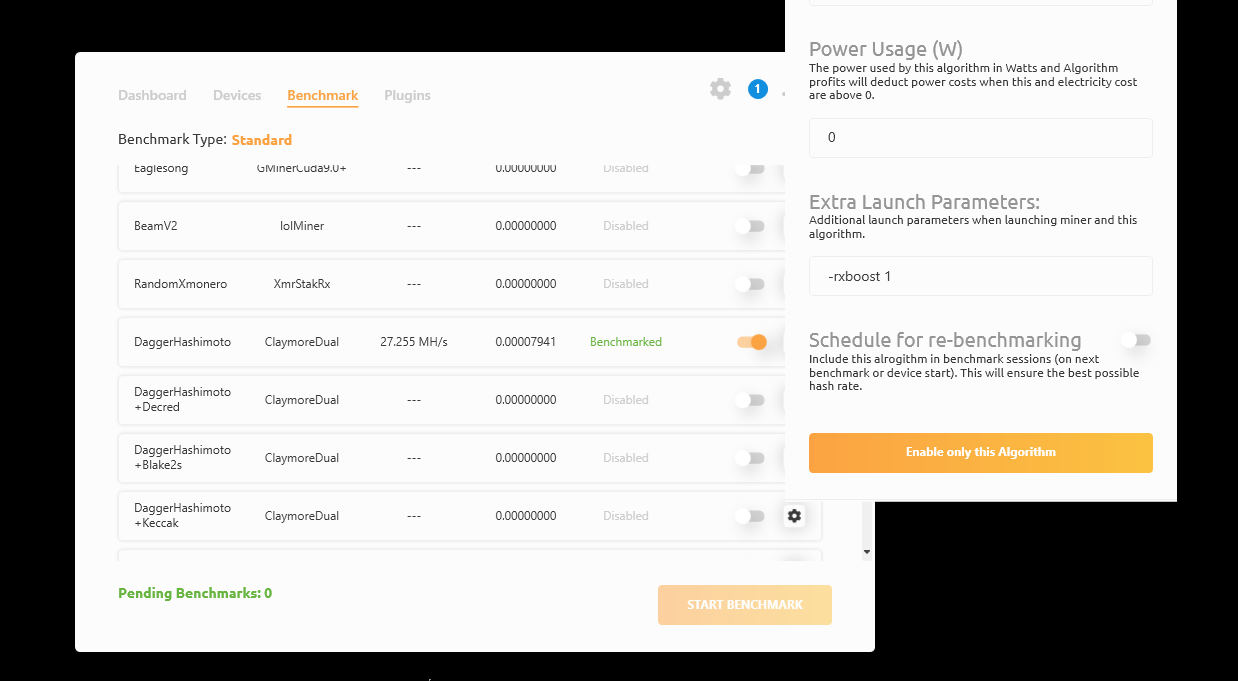
2. Navigate to the Benchmark tab.
3. Navigate to the 3rd party miner and algorithm that you want to set the ELP to.
4. Click on the Gear icon on the far right.
5. Click in the Extra Launch Parameters text box.
6. Type - (hyphen) in the text box. All supported parameters by NiceHash Miner will be shown (some parameters might be missing due to not being supported by the NiceHash Miner).
7. Close the settings, all the inputs will be saved automatically.
Extra Launch Parameters will be used on the next miner start.