The world first firmware for Antminer Kaspa ASICs!
Dear NiceHash Miners!
After announcing NiceHash Firmware, we are excited to announce the launch of the world's first NiceHash Firmware for Kaspa!
This new firmware is designed to optimize the performance of your Antminer KS series ASICs, ensuring you get the most out of your mining operations. Real-world tests showed that using NiceHash Firmware for Kaspa ASICs increases performance by up to 20%.

NiceHash Firmware for Kaspa Antminer KS series
The NiceHash Firmware for Antminer Kaspa ASICs is carefully optimized to ensure that your Antminer KS series ASICs deliver peak performance and efficiency.
Benefits of using custom firmware for the Antminer KS series:
- Performance Increase: Increase the performance of your Kaspa ASICs by up to 20%
- Efficiency gains: Increase efficiency by lowering power consumption.
- Thermal Protection: Intelligent thermal protection prevents overheating of your machines.
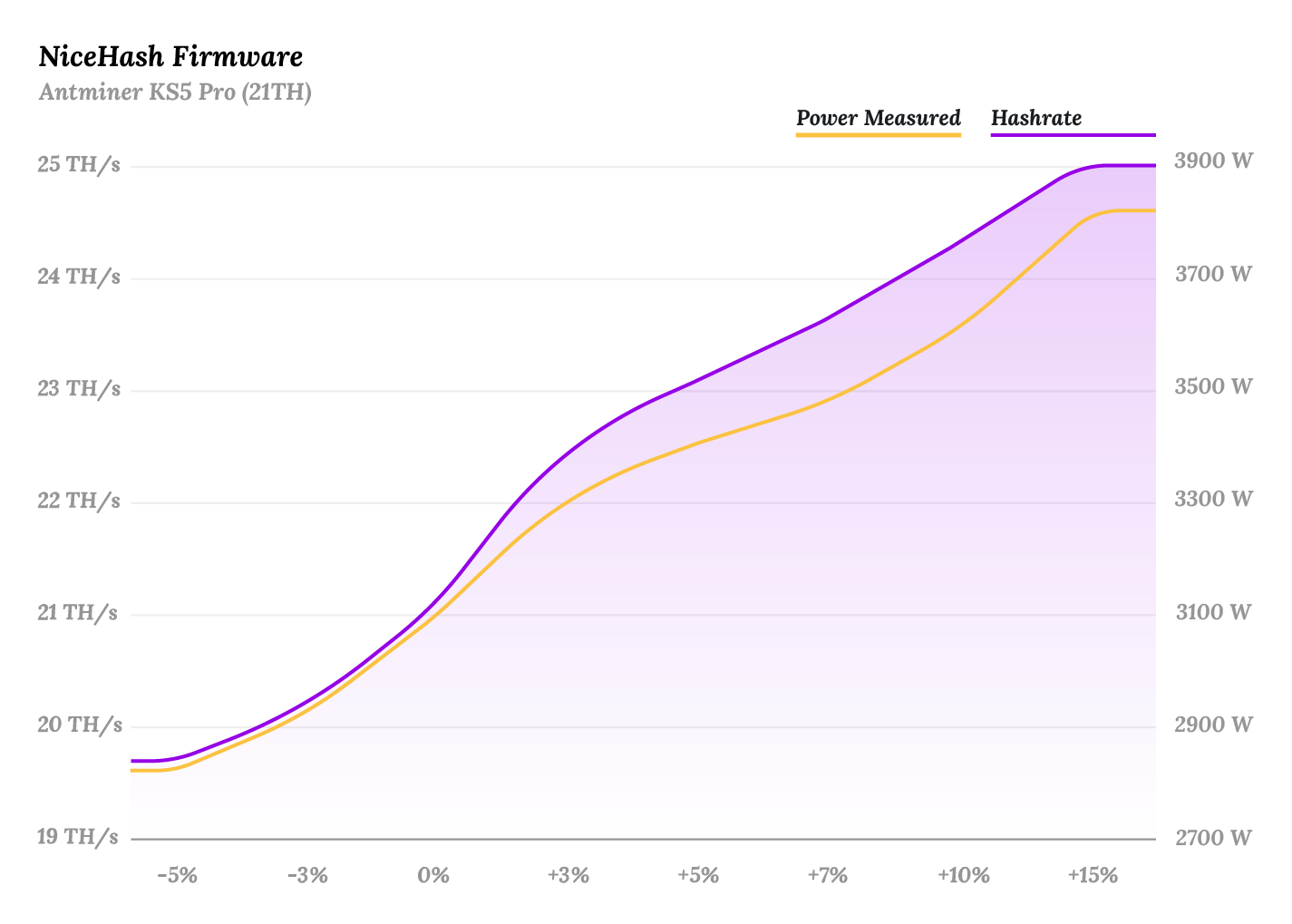
Supported Models:
- Antminer KS5 Pro
- Antminer KS5
- Antminer KS3 (9.4 TH)
- Antminer KS3 (8.3 TH)
How to get started?
Most Kaspa Antminer models use CVITech control boards, which do not support persistent custom firmware installations.
To install NiceHash Firmware for Kaspa, users must first connect a hardware add-on called the Cracker Card to the control board. Cracker Card is physically attached to the CVITech control board and enables the installation of custom firmware using the standard installation method described here.
How to get a Cracker Card for installing NiceHash Kaspa Firmware?
The Cracker Card is a hardware add-on for CVITech control boards, enabling remote, over-the-air installation of custom NiceHash Firmware for Kaspa on ASIC machines using stock firmware.
Cracker Card and the NiceHash Kaspa Firmware are exclusively available to NiceHash users. To request a Cracker Card, please contact us at firmware@nicehash.com or submit a support ticket under the “Mining -> Big Farm” category in our support system.
For orders under 100 pcs, reach out to our reseller partners or enquire at your preferred mining shop.
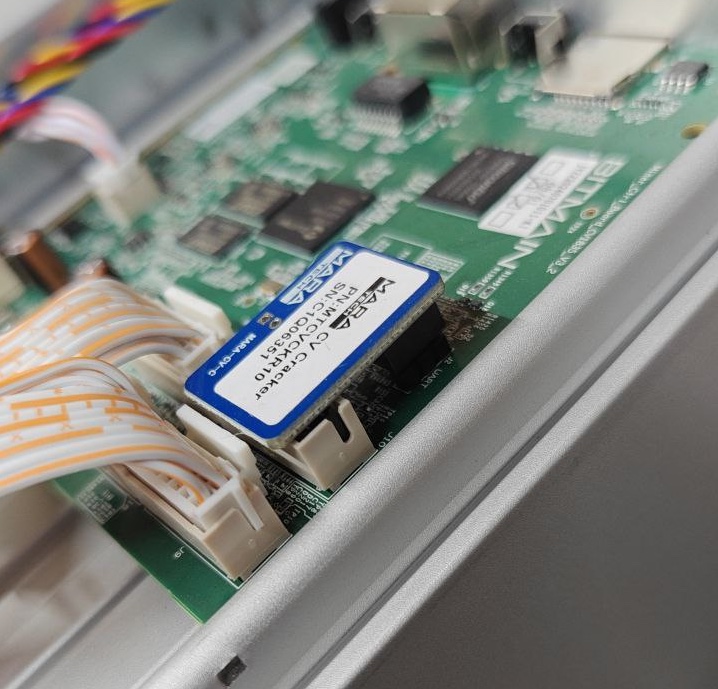
How to connect a Cracker Card to the Antminer CVITech control board?
Follow these simple steps to connect the Cracker Card to the control board:
- Shut down the Antminer KS3 or KS5 ASIC device
- Remove the lid of your ASIC device
- Connect the Cracker Card to the control board slot as shown on the picture below
- Place the lid back on device
- Start the ASIC device
After installing the Cracker Card in your ASIC, you can upgrade to NiceHash Kaspa Firmware using the standard installation method. The firmware files are available in our Download Center.
FAQ
What is the fee for using NiceHash Firmware for Kaspa?
The fee is dynamic, ranging from 1% to 4%, depending on the overclock level.
| Overclocking | License Fee |
|---|---|
| 0 – 4% | 1% |
| 4 – 6% | 1.5% |
| 6 – 8% | 2% |
| 8 – 10% | 2.5% |
| 10 – 12% | 3% |
| 12 – 14% | 3.5% |
| 14% + | 4% |
What pools are supported?
NiceHash Firmware for Kaspa can only be used on NiceHash.
How to connect to NiceHash?
Follow this guide to connect to NiceHash.
For any questions or assistance, feel free to reach out to our support team via support@nicehash.com or through our support system. You can also connect with our community on Discord, Reddit, and Telegram.