Notice for miners: XNSUB support
Dear NiceHash Miners,
On Thursday the 22nd February, we will be conducting a technical update on our servers. We urge you to make sure your rigs support the XNSUB extension before this date.
The update will only affect rigs not utilizing the extranonce subscribe extension (XNSUB) on SHA256AsicBoost and Scrypt algorithms.
Rigs will be expected to understand 'mining.set_extranonce' messages even if they did not subscribe to them with a 'mining.extranonce.subscribe' message.
Rigs that will not understand the message are effectively incompatible with us, and they will get a majority of their shares rejected with reject type 'Above Target'.
Fortunately, the majority of SHA256AsicBoost rigs are already equipped to handle XNSUB messages. However, we anticipate a higher rate of incompatibility with rigs operating on the Scrypt algorithm.
Notice: XNSUB support can help improve the earnings of your operations due to less stale rejects and is recommended nevertheless.
Verifying XNSUB support on your NiceHash Workers
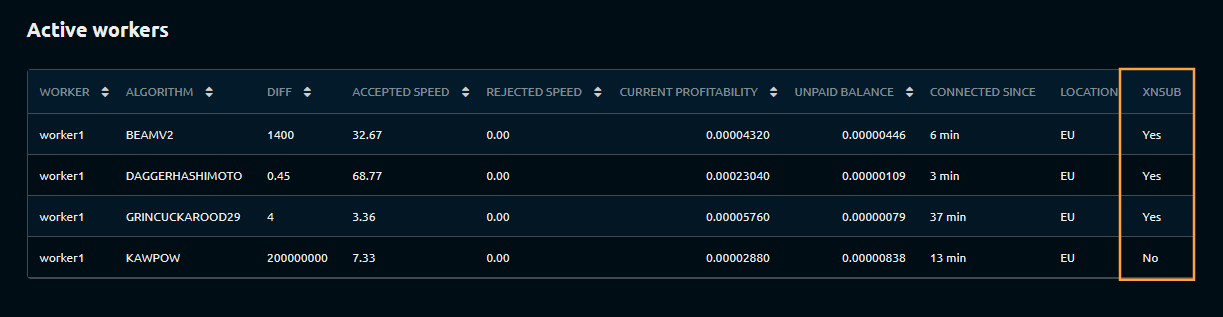
To check whether your workers are XNSUB-compatible, please visit your Rig Manager dashboard and navigate to the History & Stats section.
Within the Active Workers table, check the XNSUB column located on the far right.
Addressing XNSUB Incompatibilities on NiceHash
Your rig may not support XNSUB due to the following reasons:
- The ASIC supports XNSUB, but the user has not enabled it
- The ASIC lacks XNSUB support
1. Enabling XNSUB on your ASIC for NiceHash
To enable the extranonce subscribe extension (XNSUB) on your ASIC, append the XNSUB extension at the end of your stratum line. This is usually done using the # or / command as demonstrated below:
stratum+tcp://scrypt.auto.nicehash.com:9200#xnsub or stratum+tcp://scrypt.auto.nicehash.com:9200/xnsub
*Please note that some machines may need both the hashtag and slash: stratum+tcp://scrypt.auto.nicehash.com:9200/#xnsub
2. The #xnsub string fails to enable XNSUB
If appending #xnsub does not activate XNSUB, it likely indicates that your ASIC does not support this extension. In this scenario, we recommend updating your ASIC's firmware to the latest version. Recent updates from manufacturers like Whatsminer and Vnish have included XNSUB support.
Additional support
Should you continue to face issues post-firmware update, please contact our support team (support@nicehash.com) for assistance. We encourage you to also consult with your ASIC's manufacturer or firmware developer regarding XNSUB support implementation. Technical documentation can be found here.