What is extranonce subscribe extension (XNSUB)?
In this short guide, we will get a bit more technical. We will explain what the extranonce subscribe extension (XNSUB) is and why it is important for a miner software to support it on NiceHash. You can find the extranonce subscribe extension specifications here.
Extranonce subscribe extension was developed by NiceHash back in 2016. NiceHash moves miners from one order to another to make sure miners are mining for the highest paying order. Because orders send hash-power to different pools, they have jobs with different extranonce1 as other orders. Extranonce1 is exchanged during the miner subscribe/authorize process. For the new extranoce1 exchange, this process needs to be reinitiated. This requires a miner to re-establish the connection. Once a miner reconnects, it is placed on the highest paying order and receives new extranonce1 during the subscribe/authorize process. This causes a few seconds of unnecessary downtime between each order to order move.
You can imagine moving miners from order to order is like moving your miner from one pool to another. The miner needs to disconnect from the first pool and then reconnect on the second pool which has a different extranonce1 value than the previous one. If the miner supports the XNSUB extension, the miner does not have to reconnect. NiceHash sends the new extranonce1 value, and the miner continues to mine as if nothing has happened. In other words, XNSUB is lowering the downtime of the miner.
Most modern 3rd party software miners support XNSUB, including Claymore, Phoenix Miner, NBminer, and others since it is very easy to add the support. You can check if XNSUB is enabled by simply navigating to your NiceHash account > Mining > History & Stats and look for Active workers > XNSUB.
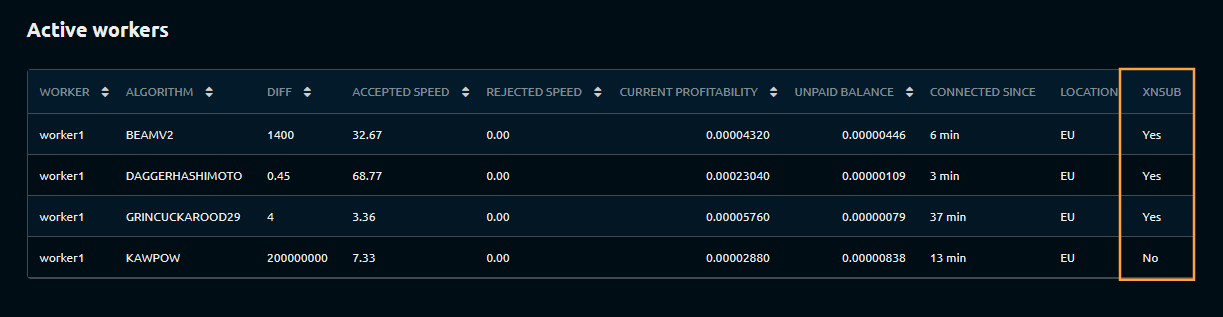
If the worker shows XNSUB = No it means that the extranonce subscribe extension is not enabled/supported. We recommend using another miner assuming that the other miner performs with the same hash rate. If another miner performs worse, we recommend mining with the same miner even if the XNSUB is not enabled.
To activate the extranonce subscribe extension (XNSUB) on an ASIC, add the XNSUB extension at the end of the stratum. For most ASICs, this is done with the use of the # or / command as shown in the example below.
stratum+tcp://scrypt.auto.nicehash.com:9200#xnsub or stratum+tcp://scrypt.auto.nicehash.com:9200/xnsub