NiceHash Firmware Update - Hashrate Splitting (Hotel Fee) now supported!
Dear NiceHash miners,
We are excited to announce the latest update, NiceHash Firmware v3.14_597. This new version features several fixes and improvements, including new feature, hashrate splitting, which allows splitting the hashrate from one machine to multiple accounts or pools.
Additionally, fast curtailment is supported, allowing users to resume or pause mining within seconds!
Download the latest version directly from our Download Center.
Changelog from NHFW v3.13_538:
- Improvement: UI/UX improvements
- Improvement: Patched several potential code vulnerabilities
- Fix: LEDs now correctly blink upon pressing the IP report button
- Fix: Low hashrate on KS5 series in some edge cases
- Fix: Fixed occasional deadlock when initializing the temperature sensor
- Fix: API call miner_config reports configured work mode instead of running work mode
- Fix: Added quality score reporting for individual ASICs
- Fix: Resolved issue preventing MARAFW installation on selected old stock firmware versions
- Feature: Ability to roll back using API, even with MARA CVcracker installed
- Feature: Added support for S21 Pro mining
- Feature: Added restart mining OS API endpoint
- Feature: Lower minimum performance limit for heavy under-clocking
- Feature: Individual ASIC temperature monitoring for S21/T21
- Feature: Auto-removal of invalid characters (\r, \n, space, tab) in pool URL and username
- Feature: Added support for Antminer S21 BHB68603P chip variant
- Feature: Configuration changes are recorded in the log (e.g., pool changes, work mode changes)
- Feature: Hash rate splitting feature - users can now split total hash rate and distribute it to up to 3 different pools
- Feature: Fast curtailment options - users can customize the curtailment API call to resume/pause mining within seconds using the "fast" parameter
- Feature: Added support for new MARA UCB
How to enable hashrate splitting (hotel fee) on NiceHash Firmware (NHFW)?
NiceHash Firmware allows up to 3 pool groups for hashrate splitting. Each group has a different hashrate split percentage, pool, worker name and password setting.
You can enable hashrate splitting via NiceHashTools (recommended) or via ASIC browser dashboard.
Follow these steps to enable hashrate splitting via NiceHashTools:
- Install NiceHashTools by following the installation guide.
-
Enable Groups:
- Enable Group 1 and Group 2 for splitting the hashrate into two parts.
- For splitting the hashrate into three parts, enable Group 3 as well.
- Set preferred percentage for each Group.
- Configure each group by setting a unique pool URL, Worker Name, and password.
- You can also use the same pool URL across all groups and only modify the Worker Name.
- Select the machines you want to configure for hashrate splitting.
- To save the settings, click on either SET ALL or SET SELECTED button.
Tip: To switch between groups, click on the group name in the interface.
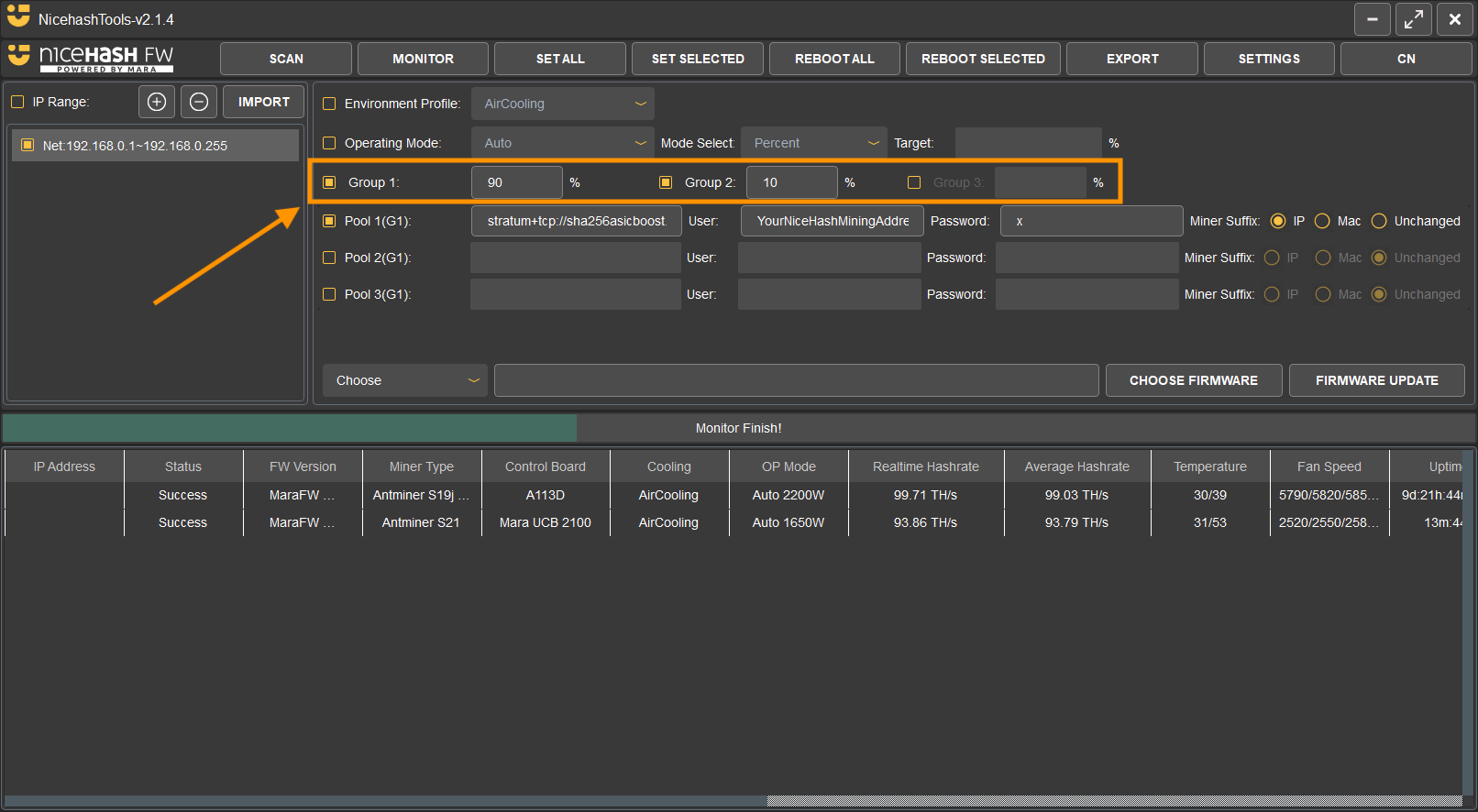
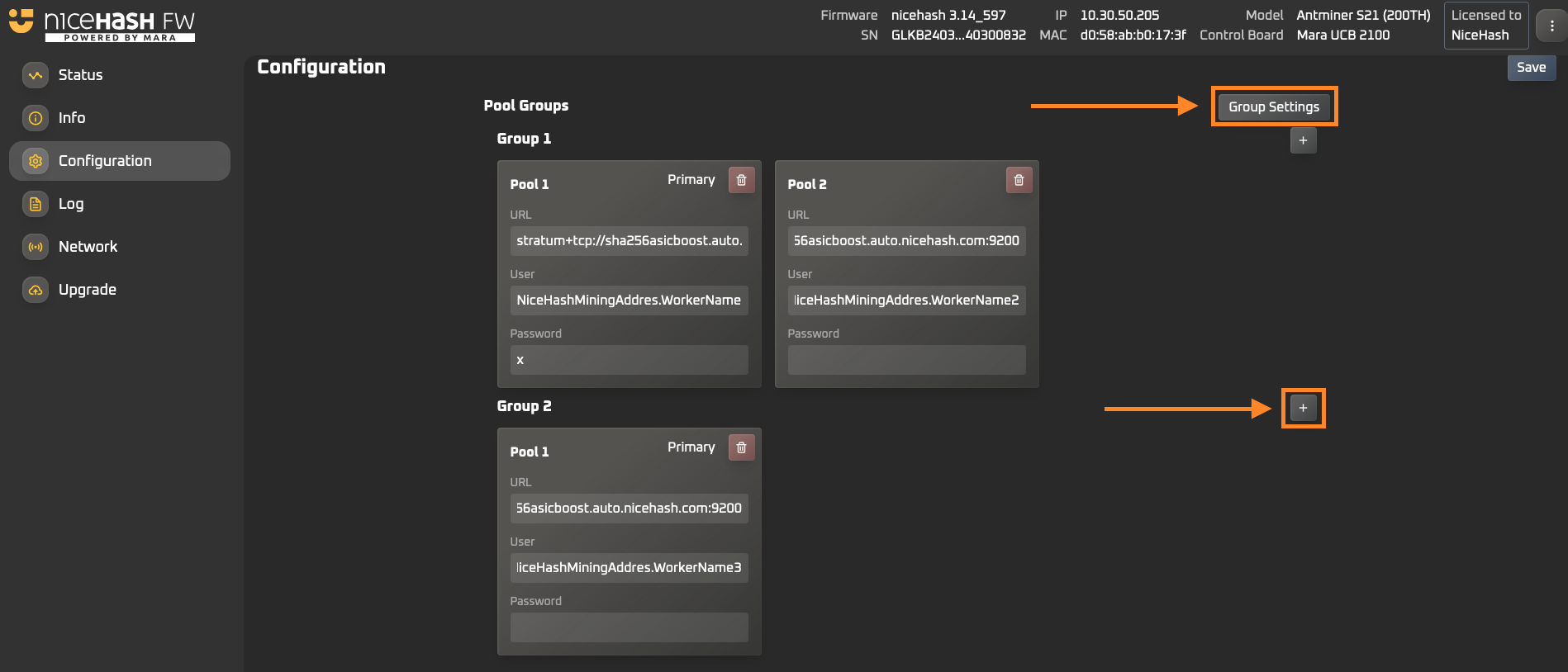
Follow these steps to enable hashrate splitting via the ASIC browser dashboard:
-
Open your ASIC browser dashboard by entering your ASIC machine's local IP address in the browser.
- Use "root" as both the username and password to log in.
- Navigate to the Configuration tab on the left side.
- To create a new group, click on Group Settings.
-
In the Group Settings popup:
- Set up new groups by clicking the "+" button.
- Adjust the percentage of the hashrate split for each group.
- Close the popup once you’ve completed the setup.
- To add a new pool settings to a group, click the "+" sign next to Group 2 or Group 3.
- Click the Save button located at the top-right corner of the dashboard.
How to update the NiceHash Firmware (NHFW)?
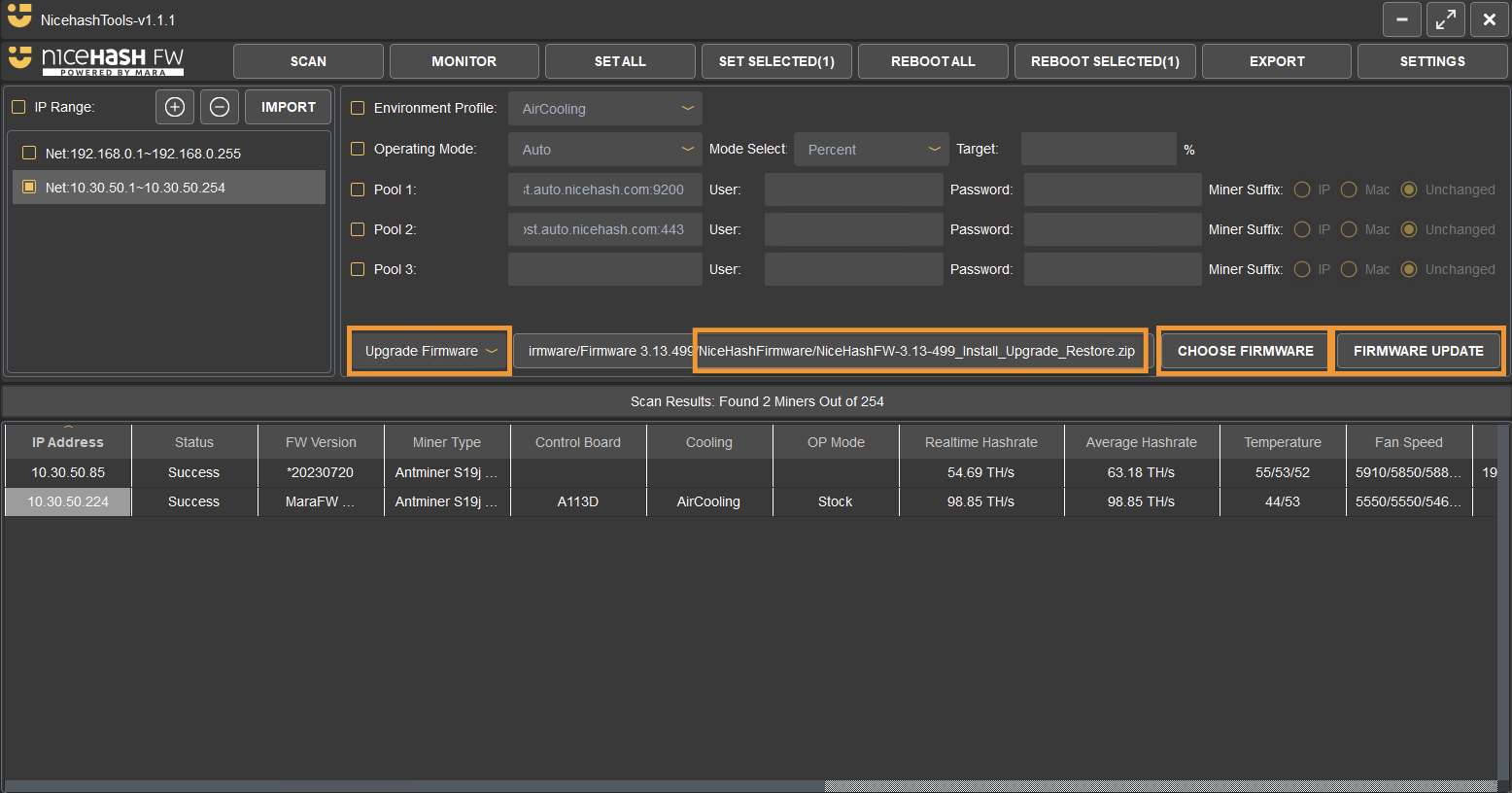
Follow these steps to update the firmware:
- Download the new NiceHashTools and NiceHash Firmware versions from our Download Center
- Scan the network using NiceHashTools
- Select Update Firmware operation from the dropdown menu
- Select the new Firmware version
- Click firmware update and select the ASICs
FAQ
Who can use NiceHash Firmware?
NiceHash Firmware is intended for all Bitcoin miners with supported ASIC models.
What are the fees for NiceHash Firmware?
NHFW default fee is 2% and only 1.4% when using the NiceHash pool.
What features does NiceHash Firmware offer?
Among others, the most important ones are:
- Auto-tune based on Power Target, Hashrate Target, or Percentage Adjustment
- Tailored Environment Profiles for Air, Hydro, Single or Two Phase Immersion Cooling
- Intelligent thermal protection to prevent overheating
- Hashrate Splitting for splitting the hashrate of one machine between multiple accounts.
- Custom Hashboard detailed view
- Compatibility with NiceHash ASIC Manager, Foreman, Awesome Miner, BTCtools and others.
What ASIC models are supported on NiceHash Firmware?
- S19
- S19J
- S19 Pro
- S19J Pro
- S19 XP
- S19 Pro+
- S19K Pro
- S21
- S21 Pro
- T21
What pools are supported?
All mining pools are supported. Note that the firmware fee is 2% when using any other pool than NiceHash, where the fee is only 1.4%.
I have thousands of machines. Where can I contact you?
Contact us at farm@nicehash.com.