How to use Bitcoin Lightning Network?
You must have heard about the Lightning Network already. Lightning Network allows Bitcoin users to send transactions with blazing speed and almost zero fees. With these two solutions, it brings Bitcoin closer to everyday usage.

But to some, the Lightning Network might still seem like an advanced technology that only advanced users use. Let me guarantee you that using the Lightning Network is very easy. Once you try it, you will be amazed how fast the Lightning Network transactions are. NiceHash makes Lightning Network usage simple for everyone.
Does NiceHash support the Lightning Network?
Yes! NiceHash does support Lightning Network!
You can find NiceHash node information here. NiceHash’s node is actually one of the biggest nodes out there. By using the NiceHash node, you will be able to send BTC to the majority of LN nodes around the globe.
What wallets to use with the Lightning Network?
Wallets are generally split in two categories:
- Custodial
- Non-custodial
A custodial wallet is a wallet that keeps the private keys for you. This means that a 3rd party is keeping your funds safe. Think of the custodial wallet somewhat as a bank. Bank takes care of your balance. If they get robbed, you lose the funds.
A non-custodial wallet is a type of wallet that requires people to take care of their own private keys and assets. Think of it like storing your money at home in a safe.
In this article we are going to focus on custodial wallets. Custodial wallets are generally more user friendly when it comes to user experience and onboarding.
Browser (Desktop)
For browsers, I recommend the NiceHash wallet. Because it is one of the biggest nodes it has many open channels with other big nodes around the globe. This allows users to send Bitcoins to the majority of other LN (Lightning Network) users.
Remember, LN transactions are only possible if a path from user A to user B is possible. You can read more about Lightning Network here.
NiceHash will also allow you to exchange and trade more than 50 cryptocurrencies through NiceX exchange.
Mobile apps
Of course, I will recommend you a NiceHash mobile app again (disclaimer, you are reading this post on NiceHash blog). NiceHash mobile app will allow you to deposit and withdraw Bitcoin through the Lightning Network with ease.
Other examples of good and popular mobile apps are:
- Wallet of Satoshi
- Blue Wallet
How to use the Lightning Network on NiceHash?
With NiceHash, you can simply deposit and withdraw Bitcoin from or to the NiceHash wallet. You can withdraw it to any Lightning Network wallet that is connected directly or indirectly to the NiceHash LN node.
What is a Lightning Network invoice?
Lightning Network invoice has a very similar functionality as Bitcoin wallet. You should be able to see your invoice by going to Deposit Bitcoin via Lightning Network on your preferred application.
Example of Lightning Network invoice:
lnbc1p3zwav9pp5r5c3z5x90e9qar3gn26r82xvp5g4mpru449f80wfutvgchegau9qdqu2askcmr9wssx7e3q2dshgmmndp5scqzpgxqyz5vqsp53799pvpz3csnzel9wj3uc3xf0629kryjg8sup5zc2eq6gzz3sqaq9qyyssqjskj6hq9fd4ft6c0p9kuqsqwkvl38ezzxc25n80t3aue6gmhr6z9sukg26u4fx3njlklpnsjsatq5av7uv7t4g7earawq7p2wlqhwscqzcv8vk
Do not send any funds to the above invoice!
When withdrawing or depositing via Lightning Network, you will need to use LN Invoice and not your ordinary Bitcoin address. Only selected wallets and platforms support the Lightning Network.
Withdrawal from NiceHash via Lightning Network
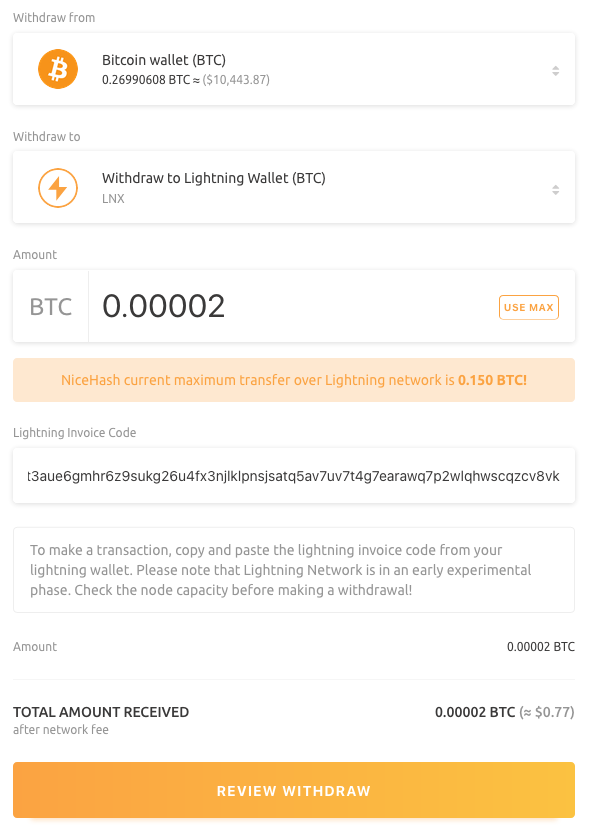
Follow these steps to withdraw BTC via the Lightning Network from NiceHash.
- Navigate to the Wallet tab and click withdrawal Bitcoin
- In the Withdraw to field, scroll down to Other options and click on the Withdraw to Lightning Network (BTC) option
- Enter the amount of BTC you want to withdraw
- Enter Lightning Network invoice from a destination wallet
- Review the withdrawal and complete it
You should see the balance on your destination wallet in a couple of seconds.
Deposit to NiceHash via Lightning Network
Follow these steps to deposit BTC via the Lightning Network to NiceHash.
- Find NiceHash Lightning Network deposit invoice by navigating to the Wallet tab and click on the deposit Bitcoin
- Select deposit with Lightning Network
- Enter the amount of deposit
- Scan or copy and paste the invoice to your external Lightning Network wallet provider
- Your external wallet provider should automatically create a withdrawal. Confirm it.
- You should see the BTC in the NiceHash wallet in a couple of seconds.
