How to start mining VerusCoin (VRSC) on NiceHash?
VerusCoin (VerusHash algorithm) is supported in NiceHash Miner!
For this guide, you do not need to create a separate VerusCoin wallet, but you can use the existing NiceHash mining account!
Note that Celeron and Pentium CPUs are not supported on NanoMiner. Only CPUs that support the ACX instructions are supported on NanoMiner.
How to start mining VerusCoin (VRSC) on Windows?
If you are interested in mining the VerusHash algorithm on NiceHash with your CPU, you can do this by using NiceHash Miner. Follow these steps to enable VerusHash algorithm on your CPU:
- Install NiceHash Miner by following this guide
- Download and install NanoMiner Plugin from the Plugin tab inside NiceHash Miner. See this guide for more information.
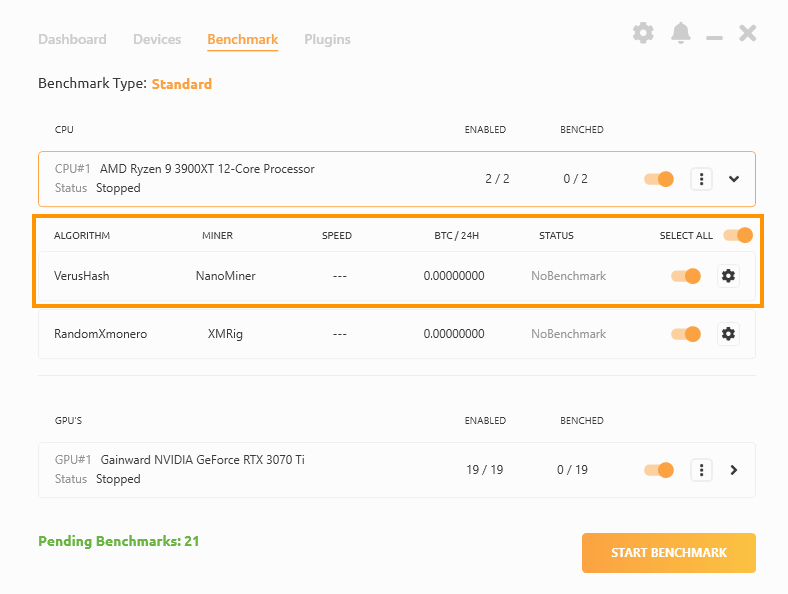
- Navigate to the Benchmark tab and expand your CPU device
- Enable the NanoMiner/VerusHash algorithm
How to start mining VerusCoin (VRSC) on HiveOS?
#1 Create a new wallet and flight sheet in HiveOS
You can follow this guide if you are unfamiliar with setting up a flight sheet and wallet.
#2 Add NanoMiner to the flight sheet
- Navigate to the flight sheets and edit the preferred flight sheet
- Click on Add Miner
- Select NiceHash-VerusHash in the Coin field (if it is not available, skip to #2.1.)
- Select NiceHash wallet (mining address) in the Wallet field
- Select NiceHash as a pool, if not, use this: stratum+tcp://verushash.auto.nicehash.com:9200
- Select NanoMiner as a Miner.
- Name your flight sheet and select UPDATE to update the flight sheet.
This is it, you should now be mining VerusCoin besides mining whatever GPU coin you are mining.
#2.1
When writing this article, HiveOS has not added the NiceHash-VerusHash algorithm. Follow this steps to add the algorithm manually:
- Navigate to the flight sheets and edit the preferred flight sheet
- Click on Add Miner
- Select NiceHash-Autolykos
- Select NiceHash wallet (mining address) in the Wallet field
- Select NiceHash as a pool - VerusHash algorithm will not be available, we need to set a custom URL
- Click on Configure pool
- Uncheck the AUTO checkbox
- Click on Enter URLs manually (advanced) and input this as the URL: stratum+tcp://verushash.auto.nicehash.com:9200
- Select NanoMiner as a Miner.
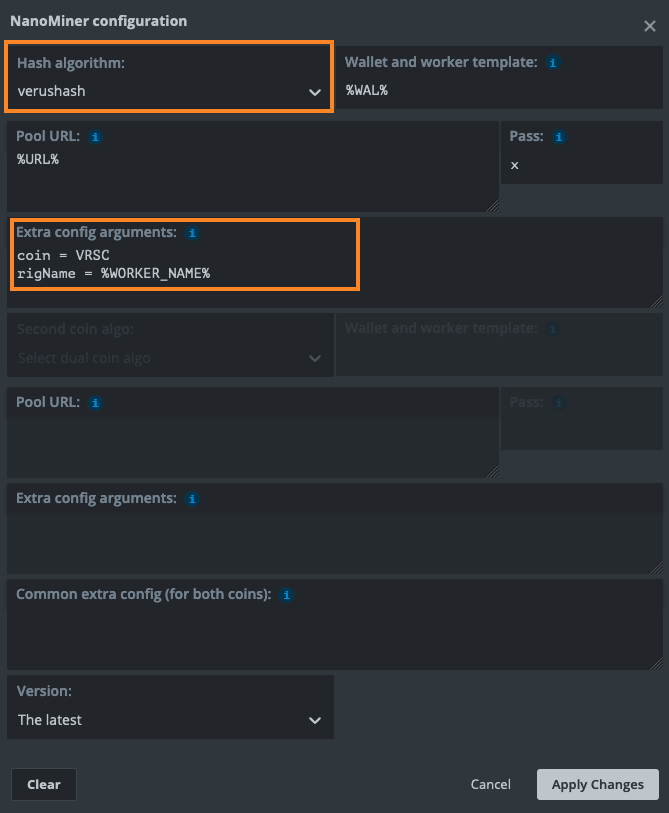
- Click on Setup Miner Config
- Change the Hash algorithm to verushash
- Change coin = ERG to coin = VRSC. Leave everything as it is and Apply Changes
- Name your flight sheet and select UPDATE to update the flight sheet.
For help and assistance with mining, make sure to join our Discord or Reddit community.