Troubleshooting Guide: GPU not recognized?
In this blog post, we will explain possible reasons why your GPU might not be recognized by NiceHash Miner.
There are three levels of recognition.
- The first layer is the recognition by the system.
- The second layer is recognition by the Windows.
- Third and last layer is recognition by the NiceHash Miner.
There are also 3 possible points of failure for the successful recognition of the GPU:
- GPU is not recognized by the System.
- GPU is not recognized by the Windows.
- GPU is not recognized by the NiceHash Miner.
We will explain why some failures happen and how to solve them below. Note that this is general troubleshooting and your issue might be something completely different. Always think outside the box when troubleshooting. You are welcome to join our Discord server where other miners help each other.
The GPU is not recognized by the System
Once the rig boots up, the system will initialize a whole bunch of processes. One of them will be the initialization of the discrete GPUs.
Common symptoms of the GPU not being recognized by the system are:
- Faulty GPU
- Bad risers
- GPU not connected properly
- Disabled 4G Decoding in BIOS
The easiest way to make sure that the GPU is recognized by the system is to plug the monitor into it and wait for the BIOS boot screen. If you can see it, then the GPU is working.
You can simply check if the GPU USB riser is working by looking at the GPU fans. If they do not spin at all on the boot, most likely there is a faulty USB riser.
If you are using 4 GPUs or more, and less than 4 GPUs are recognized, but once you connect more than 4 GPUs none of them are recognized the issue could be related to a disabled 4G decoding setting in BIOS.
The GPU is not recognized by Windows (OS)
After the system boots up and the GPU is recognized by the system, the operating system takes over. In our case, that will most likely be Windows.
Once Windows is loading, it loads GPU drivers too if they are installed. If not, Windows will install DCH drivers by default if the Internet is connected. There is nothing wrong with DCH drivers, but we still recommend this guide to correctly install GPU drivers.
You can check if the GPU is recognized by Windows by following these steps:
- Right-click on the Windows start button in the far bottom left corner.
- Click on Device Manager.
- Locate Display adapters.
If you see that your GPU is displayed as shown in the picture below, then the GPU is working correctly.
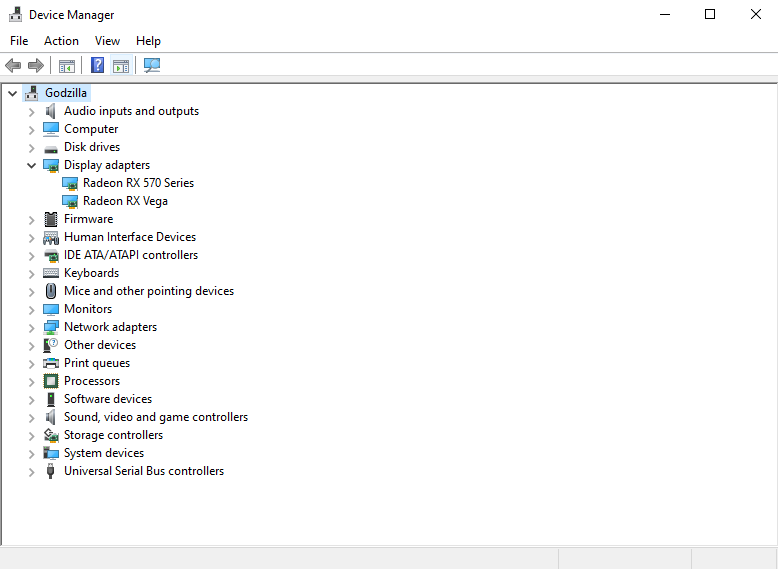
If you see “!” mark (Code 43) next to the GPU name, then the GPU has either a driver issue or a partly working USB riser.
First, reinstall the GPU drivers with the help of this guide. If this will not help, then try changing the USB riser.
The GPU is not recognized by the NiceHash Miner
This kind of issue often happens when the GPU is older, for example, NVIDIA GT 630. The minimum CUDA version required for NVIDIA cards is 5.2 or higher. This issue can also happen when a GPU is not a discrete GPU. Laptop (mobile) GPUs are not supported.
Note: Your GPU needs to have at least 3GB of VRAM or the GPU will not be able to mine.
A common symptom of a GPU not being recognized by the NiceHash Miner is that the GPU is shown as normally working in Device manager > Display adapters, but will not be displayed in NiceHash Miner.
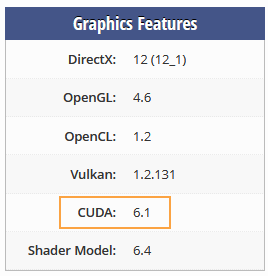
Make sure that your GPU does support CUDA version 5.2 or higher (only NVIDIA GPUs). You can do this by following these steps:
- Navigate to https://www.techpowerup.com/gpu-specs/.
- Select your GPU manufacturer (NVIDIA).
- Select your GPU generation.
- Locate your GPU model in the table below and click on it.
- Locate Graphics Features table.
- You will find the CUDA version here.