Introduction to Buying Hashrate for Mining Bitcoin and Other Cryptocurrencies
NiceHash is the largest hashrate marketplace, connecting miners of hashrate with buyers. Hashrate is a measure of the computational power that your computer or hardware uses to run and solve various cryptocurrency Proof-of-Work hashing algorithms. The NiceHash service is unique in that it only connects different end-users. It does not offer any cloud mining options, meaning that NiceHash neither owns nor rents any mining equipment.
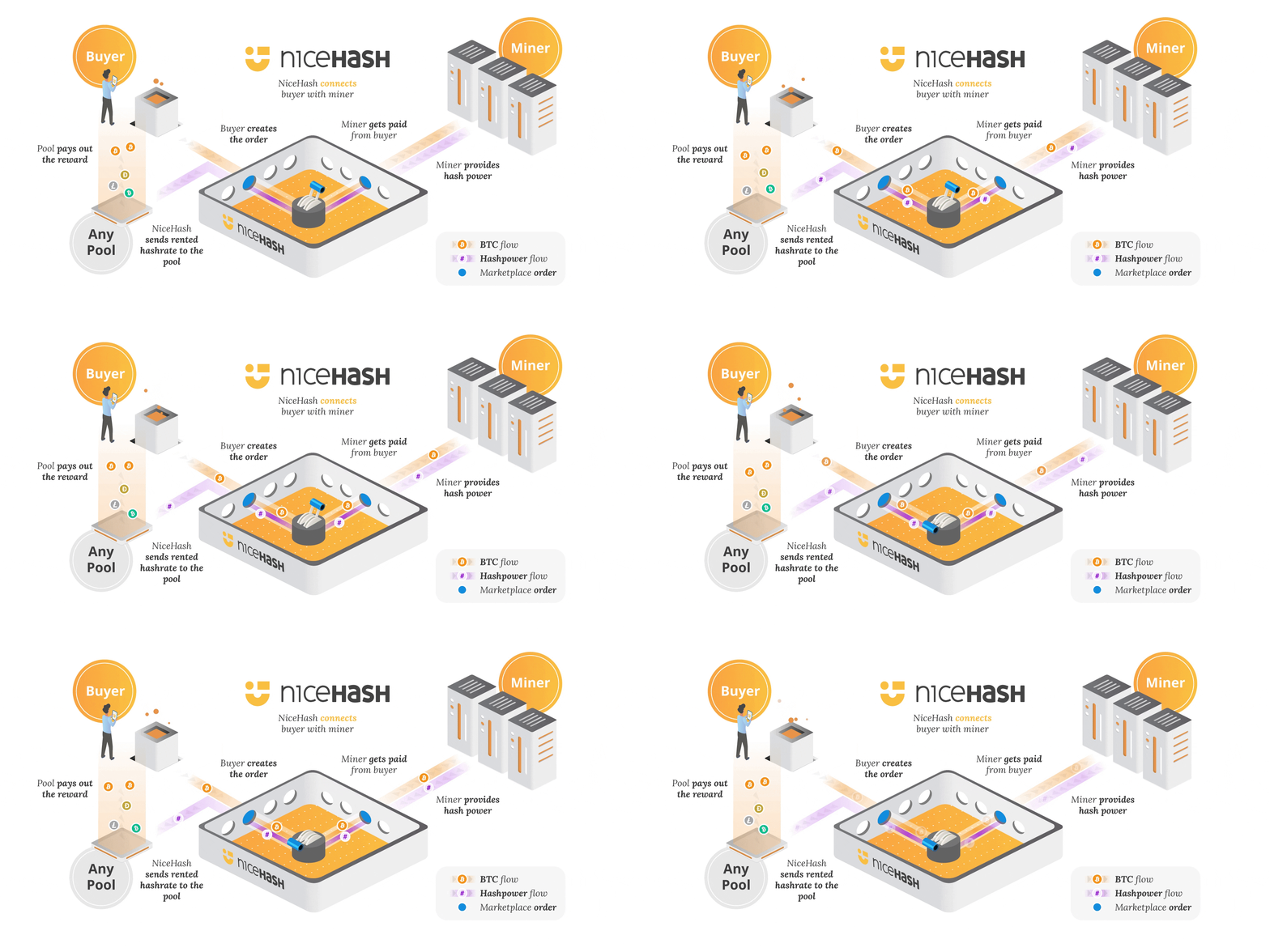
Buying hashrate at NiceHash has several benefits. The most notable is the massive hashing power available and the fast delivery time. Unlike classical cloud mining, where you purchase long-term contracts on private mining farms that typically yield no return, NiceHash offers dynamic and fully autonomous on-demand hashrate delivery on your terms. You dictate the price of hashrate and decide for how long and where you want to use it. It’s a bit like having your own personal on-demand mining farm.
The following table outlines the primary differences between classical cloud mining contracts and purchasing hashrate at NiceHash.
| Classic Cloud Mining | Buying Hashrate at NiceHash | |
|---|---|---|
| Type | Long-term mining contracts with a centralized provider | Short-term hashrate (bid) orders on an open marketplace |
| Duration | Months, years, or “lifetime” (as long as it stays profitable) | From a few minutes to unlimited time |
| Payment | Upfront (prepaid contract) | Pay-as-you-go (you pay only for the delivered hashrate) |
| Price | Set by the cloud mining provider, not market-based | Determined by supply & demand on NiceHash (NiceHash does not influence price) |
| Strategy | A small amount of hashrate over a long period | A burst of hashrate to any pool, for a short time |
| Transparency | Often, low – you don’t see actual hardware or pool | High – you pick the pool, algorithm, and see the hashrate delivered |
| Control & payouts | Provider controls the pool and pays you on their schedule | You control the pool; rewards go directly to the pool/wallet you set |
| Fees | Possible hidden/maintenance fees deducted from earnings | No maintenance fee – you only pay for the hashrate |
| Risk | You are locked in, even if mining becomes unprofitable or the provider goes out of business. | You can stop at any time if profitability drops. |
Detailed instructions on how to get started
This guide has prepared different tips and knowledge you need when buying hashrate for mining your favorite coin.
Getting started
Log in to your account and deposit some bitcoins to your NiceHash wallet address. Please note that you can only purchase hashrate with Bitcoin.
Deposits to the NiceHash wallet are subject to a deposit fee, which varies depending on the amount deposited. Learn more about this here: https://www.nicehash.com/support/general-help/service-fees/deposit-fees
You can withdraw the balance from your NiceHash wallet at any time.
Which coin to choose?
One of the most common questions is which algorithm/coin to choose. We cannot provide you with investment advice, but we suggest researching the general market to determine what you want to achieve, and then purchasing hashrate accordingly.
You can find the minimum prices for some hashrate and average prices for maximum hashrate for each algorithm on our pricing page: https://www.nicehash.com/pricing
If you are also a seller of hashrate and plan to buy it, we suggest you mine it directly into your NiceHash Wallet. That way, you will avoid additional transaction fees and will be able to spend mined bitcoins to buy more hashrate.
Each coin can be mined on the pools that support the coin's algorithm. Here is a list of more popular coins and their corresponding mining algorithms (correct as of the time of writing this Guide).
| Coin | Algorithm |
|---|---|
| Bitcoin (BTC) | SHA256 & SHA256AsicBoost |
| Litecoin (LTC) | Scrypt |
| Bitcoin Cash (BCH) | SHA256 |
| Dogecoin (DOGE) | Scrypt |
| Monero (XMR) | RandomX |
| Ravencoin (RVNM) | KawPow |
| Kaspa (KAS) | kHeavyHash |
Choose your favorite pool provider.
We are working hard to deliver excellent service to our buyers of hashrate. Here you will find a list of pools that are known to work well with our service. You can use them with peace of mind when mining coins with the hashrate bought through our service. You can, of course, also use any other pool of your choice. However, please choose your pools at your own risk and judgment.
Please note that NiceHash is not affiliated with any of the pools listed on this page and takes no responsibility for a particular pool should it not fulfill your demands or expectations.
Register at a pool
After registering, you need to create a worker for mining your coin, setting the worker's name and password.
Some pools support anonymous mining, where you don’t need to create an account; you need to use a wallet address as your worker.
Example: “SiZEWnivGJv49dHV7xFdqCf.nicehash”
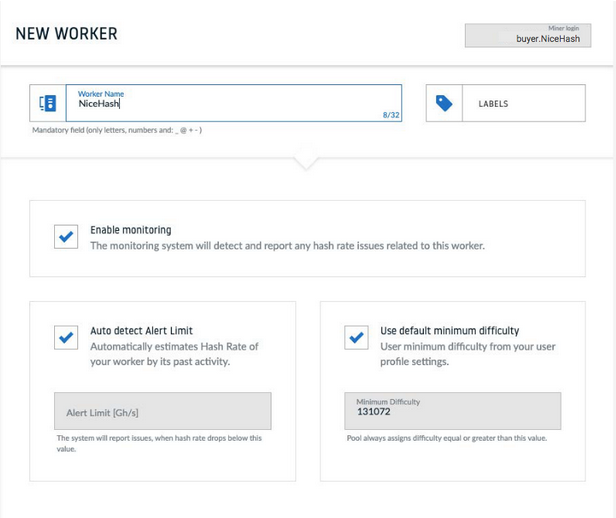
Save your chosen pool in your NiceHash dashboard.
The first step before placing a new order is to set up your favorite pools in the NiceHash dashboard. You can do that by following the navigation Hashrate Marketplace > My pools: https://www.nicehash.com/my/marketplace/pools) > Add new pool. Here, you need to enter your pool settings.
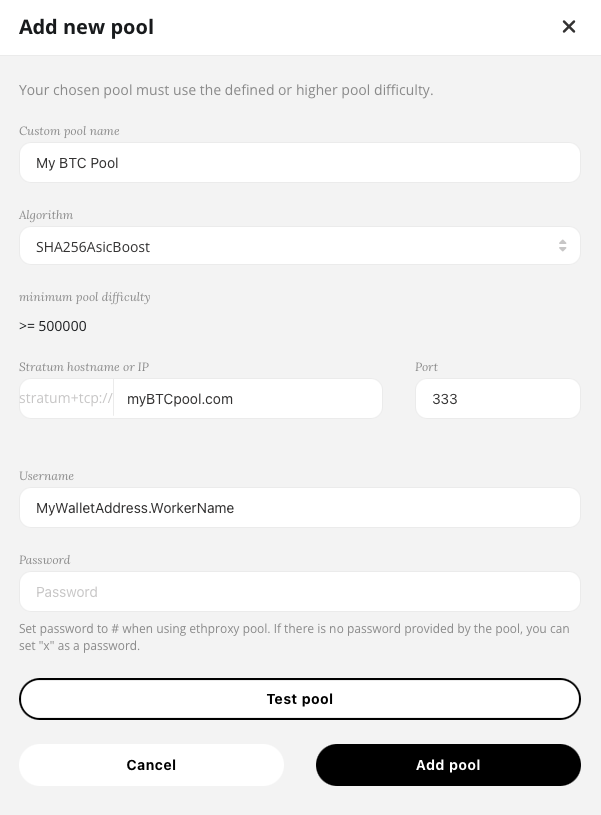
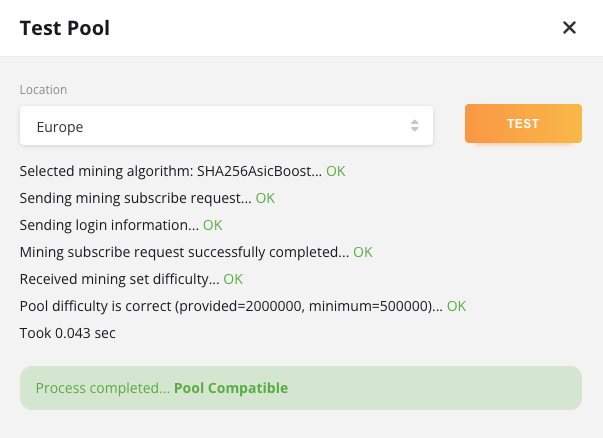
Once you have entered the correct pool settings, we recommend verifying them with the pool verification. If the pool is compatible with NiceHash, you should get this result:
Creating and placing an order
Once you have deposited bitcoins on your NiceHash wallet and saved your pools, you are ready to place your first order. You can do that by going to the Marketplace: https://www.nicehash.com/my/marketplace
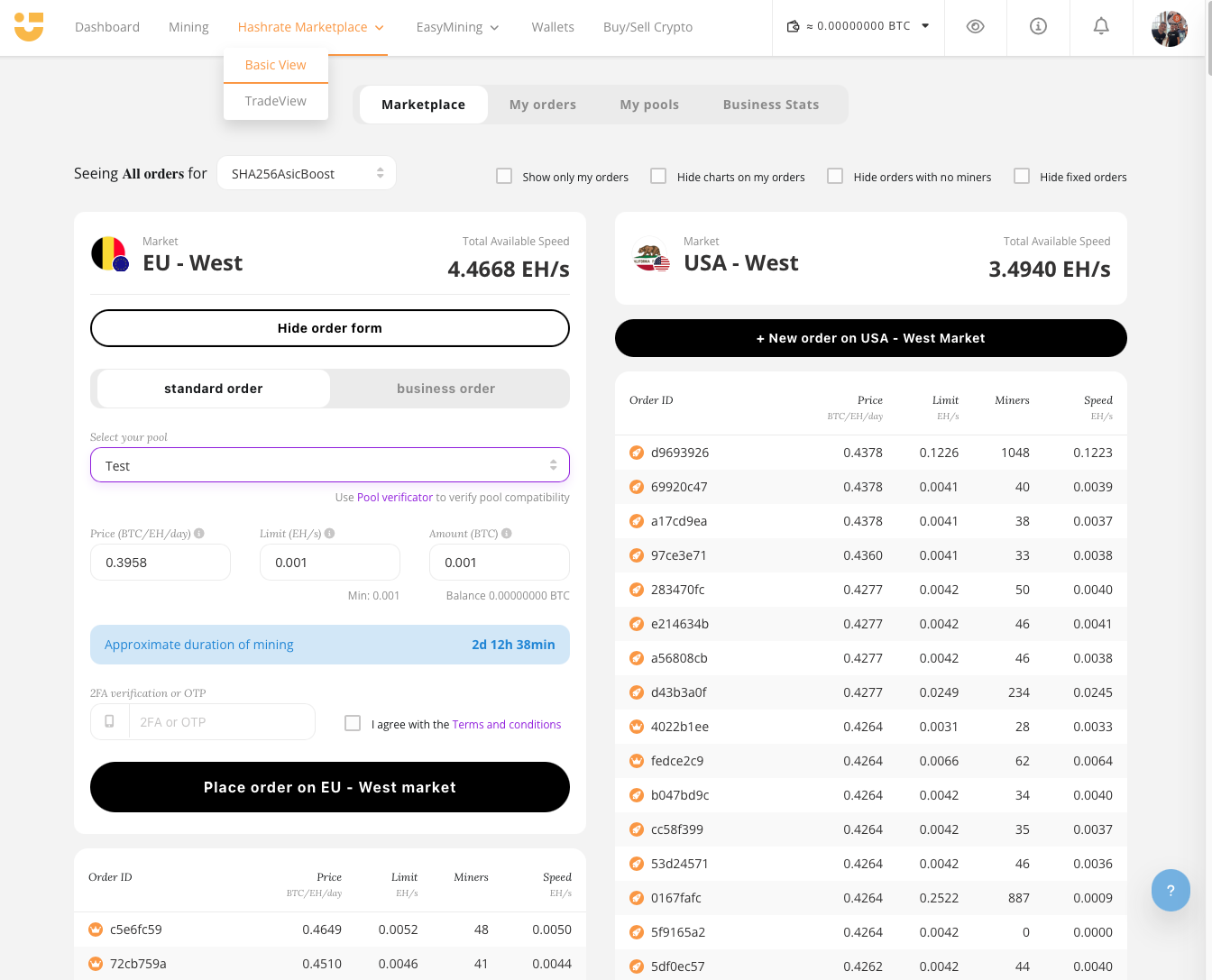
Select the appropriate algorithm for your chosen coin from the drop-down list. Choose the closest marketplace - either Europe or the USA - depending on your pool location.
There are three critical variables that you need to set to place your order: price, limit, and amount.
Price
Price is the number that puts you in the marketplace. If it is too low, you will not receive any hashing power. Note that the price does not determine the total amount you will spend on the order – a variable amount is used to calculate this. For example, if it states 1.5431 BTC/GH/day, that doesn't mean you will be charged 1.5431 BTC. The minimum price that would attract some miners has already been suggested to you. Please note that you can adjust the price as needed later.
Limit
The limit is the number that determines the maximum speed of your order. If you don't want to limit your speed, you can enter 0.00 in the limit field, and your speed will have no limit.
Amount
The amount is the variable expressed in bitcoins and determines how much you will spend for the given order.
When you set all three variables, the duration of your order is calculated accordingly. The maximum duration of the hashrate order is 10 days. If the order is canceled before completion, the remaining unspent amount is returned to your NiceHash wallet.
Please note that you can cancel the order at any time, and no cancellation fees will be applied. However, we charge a non-refundable 0.00001 BTC fee for each new order to prevent order spam. We also take a 3% fee only on the spent balance. If you cancel the order, we will return the entire remaining balance to your NiceHash wallet, and no fee will be applied to that balance.
Monitoring the order
After you place your order, you can see a small dashboard for your order.
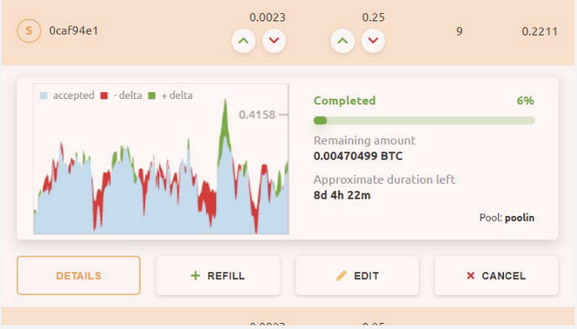
On the left, you have a mining graph – if there are many red-colored areas, then you should check why the speed at the pool is not acceptable.
You can increase and decrease the price and limit by clicking on the arrows beside the numbers or by clicking the edit button and changing one or both values. To refill your order, click the refill button and enter the amount you wish to add. To cancel your order, click on the cancel button. You can click on the last button to get more order details.
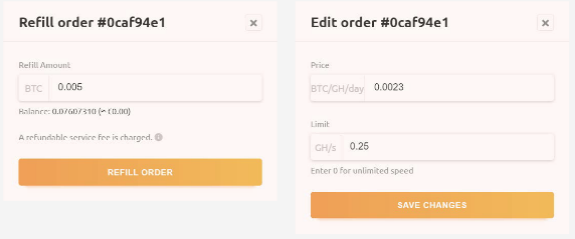
Note that if your placed order is colored red, it is dead. This could be due to different reasons, but the most common one is that the connection to the pool cannot be established.
You can also find your active and finished orders from the previous month by following Hashrate Marketplace > My orders (https://www.nicehash.com/my/marketplace/orders).
On the order details page, you will find your order ID number, type, algorithm, pool, username, and password for your order. In the balance section, you will find the date your order started, its lifetime (the amount of time available for you to complete the order), and the remaining time (the amount of time left for your order if it continues at the current pace). You can view the price you placed on the order, the amount you have already spent, the remaining amount of your deposit, and the completion percentage.
A history chart follows this information with live updates, which is split into three major parts:
1. The upper part will show your order's hashing speed. Your order must be successfully connected to the selected pool to view any information here. Miners start connecting and gain hashing power if the connection is successful and the order is paying highly enough (according to current NiceHash market prices).
2. The middle section shows eventual issues with pool rejects. There should be no pool rejects if the pool works correctly and is located close enough to the chosen NiceHash marketplace location.
3. The third lower part shows the difference between the actual reported pool speed and the speed you are paying for – also called delta. Please remember that Delta can swing up and down depending on your pool's luck. The graphs are generated using data from accepted shares, which only even out after at least 24 hours of mining – for shorter intervals, it is not possible to create exact graphs.
In the table below, you can see what is happening with the hashrate and how the pool processes it. Remember that you only pay for accepted shares. If you see any rejected shares, review the performance of your selected pool. If you don't see any rejects but still see a low delta, this is only related to low pool luck on your order chosen pool – in case of a significant negative delta, you should contact the pool operator of your chosen pool.
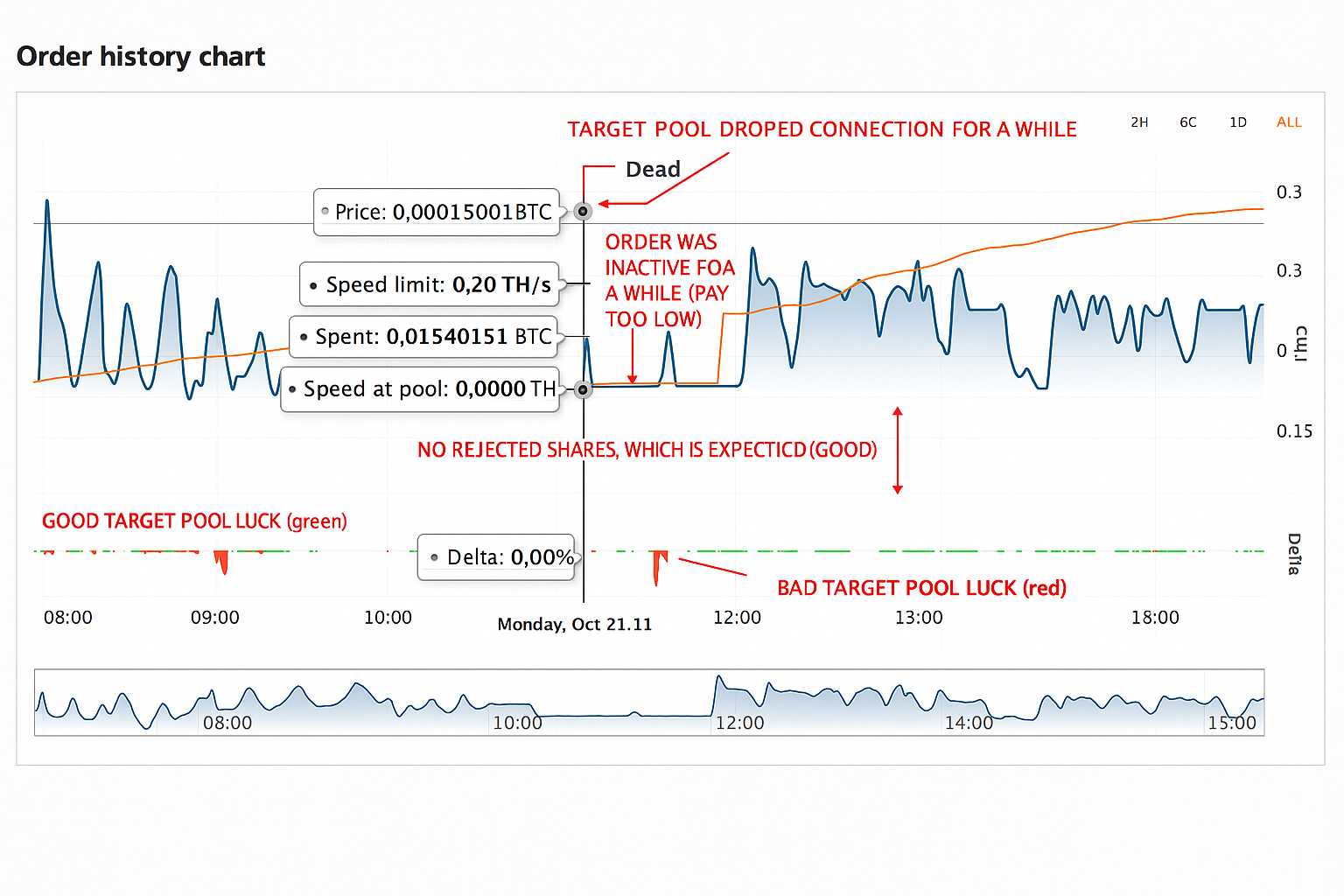
All statistics regarding mined coins can be found in the pool dashboard you selected in your order. NiceHash only stores information about the hashrate sent and cannot track any mined coins at the pool.
Check your income from purchased hashing power.
When you purchase hashrate (place an order), NiceHash distributes hashrate to your chosen pool. Your chosen pool generates income according to its payout scheme and/or the number of found blocks. You must refer to your chosen pool to view or collect your income.
NiceHash also does not guarantee you will make any income from the targeted pool. NiceHash only guarantees delivery of the hashrate you purchased. The chosen pool may not fully accept the hashrate due to technical obstacles of the selected pool.
Here is a quick summary of how to Buy hashrate
1. Find the coin you want to mine and the pool you want to mine that coin in. You can get help yourself from these two links: https://whattomine.com and https://www.coinwarz.com/cryptocurrency
2. Register at your chosen pool provider (https://www.nicehash.com/compatible-pools) and create a worker.
3. Copy your pool settings into your NiceHash dashboard: https://www.nicehash.com/my/marketplace/pools
Algorithm, Stratum, Port (some pools have a special NiceHash port, but usually you can find it at the end of the stratum server), Username (the name of the worker that you have created at the pool or coin wallet address), Password (password from your worker at the pool, usually that is x).
4. Test your pool settings with the pool verification.
Please note that some pools can be customized to set the worker's difficulty. Usually, that is the worker's password (password parameter). In that case, you need to enter d=16383 in the password window if the pool verification shows you that the minimum pool difficulty is 16383.
Example:
Pool difficulty too low (provided=2048, minimum=16383)
Worker = nicehashminer
Workers' password: d=16383
5. Go to the marketplace and create a new order.
- How to create a new order: https://bit.ly/2PFIJhd
- How does order sorting work: https://bit.ly/36qHJn1
If your order has a high difficulty, you should set a higher speed limit, and the order should last longer (24 hours or more).
6. Check your income at your chosen pool: https://bit.ly/2oDDV0v
Please note that the pool is responsible for your mining rewards. NiceHash only guarantees that you deliver the hashrate that you purchased. The chosen pool may not fully accept the hashing power due to technical obstacles in the selected pool.
How to calculate your profit/loss?
Very helpful website: https://whattomine.com/asic
Buying hashrate through NiceHash lets you mine PoW coins without owning mining hardware. To determine if your order was actually profitable, you must use the actual pool payout and include all costs (order, NiceHash fee, pool fee, and other fees), not just the order amount or an online calculator.
1. Basic formula
Real profit/loss = Value of coins received from pool
                   – (Order cost + NiceHash buyer fee + pool fee + other costs)
2. Steps to calculate
Step 1: Take the actual pool payout
After your order finishes, open your mining pool dashboard and check how many coins you actually received for the time when your NiceHash order was active. Do not rely only on public calculators – those show theoretical results.
Step 2: Add the full NiceHash order cost
In your NiceHash account, check:
- Order cost (spent) – BTC that was actually used for mining.
- NiceHash buyer/service fee – a small fee on top of the order.
These two together form your total cost.
Step 3: Subtract pool and payout fees
Most pools charge a 0.5–2% fee. Some also charge withdrawal or minimum-payout fees. Subtract these to get what you really received.
Step 4: Consider the coin price
If you value your result in BTC or in USD, use the price at the moment you received (or sold) the coins. A price move alone can turn a neutral order into a loss or a small profit.
Step 5: Ignore unused BTC
If the order did not spend all the deposited BTC, do not include the unused amount in the calculation — you still have it.
3. Example with a small profit
Below is a realistic example of a short NiceHash order that resulted in a small positive outcome.
| Item | Description | Amount (BTC) |
|---|---|---|
| A | Order cost (spent) | 0.001600 |
| B | NiceHash buyer fee (3%) | 0.000048 |
| C | Total cost (A + B) | 0.001648 |
| D | Pool payout (converted to BTC) | 0.001685 |
| E | Pool fee (1%) | 0.000017 |
| F | Exchange/withdrawal fee | 0.000005 |
| G | Net received (D – E – F) | 0.001663 |
| Final result (G – C) | +0.000015 BTC | |
If 1 BTC = 100,000 USD, then:
0.000015 BTC × 100,000 USD = 1.50 USD profit
This is a small but real profit. It also shows why many users see a difference between the calculator result and the final order result — calculators don’t include all fees.
4. Why results can differ from calculators
- Pool luck/variance: Short orders can earn slightly more or less.
- Network difficulty changes: higher difficulty → lower payout.
- Rejected/stale shares: if your rig or pool connection was unstable, the effective hashrate was lower.
- Coin price change: Mining was okay, but the coin's price dropped.
5. Quick checklist
- ✔ Did I use the actual pool payout?
- ✔ Did I add the NiceHash buyer fee to the order cost?
- ✔ Did I subtract the pool fee and withdrawal/exchange fee?
- ✔ Did I exclude unused BTC from the order?
- ✔ Did I value the coins at the correct price/time?
If all answers are “yes”, your profit/loss calculation is correct.
Advice from our user
First rule. Not all algorithms are profitable all the time (or even some of the time). It's essential to recognize that if the math doesn't add up, walk away. Patience is important.
Second rule. Always do the math.
Third rule. Continuously monitor the current price of the coin you're mining. It's really easy to go to bed with it running and wake up losing money because the price of the coin dropped.
Fourth rule. Look for the best opportunities and jump on them. Don't be anxious and feel like you have to buy right now, as that will lead to poor decisions. Again, be patient.
Fifth rule. Don't buy underfunded. Buying in small orders can lead to the loss of some or even all of your orders. Read up on the payment schemes, particularly PPLNS. The gist is that you are at the mercy of luck if you buy a small amount that runs to completion very quickly. A round that goes long can wipe out your entire investment (I've had it happen).
Sixth rule. You're going to lose money at first, as you learn. Just accept that. It's an expensive education. But what you learn will help you to become profitable. In many ways, you learn more from losing than winning.
The math is incredibly easy if you use a tool like Whattomine or Cryptocompare. All you have to do is look at what the price is going for on NiceHash, make a note of the hash unit being used (MH/GH/PH) and then enter that into Whattomine or Cryptocompare and find out what the coin is currently paying in rewards for 1 unit of the NiceHash price. If the NH price is significantly lower than the rewards, it's possible to make a profit... but I must caution you again... do not buy small or short orders. And do not "chase" after the hash.
Here's an example from right now: Cryptonight.
The current price on NiceHash is 0.2258 BTC/MH/Day, so at that price, you will pay 0.2258 BTC for 1MH/s for 24 hours.
Let's go to Whattomine and enter into the CryptoNight box 1000000 (one million H/s). Make sure you change the Sort by to "current profit" and the "difficulty for current revenue" to "current difficulty". And click Calculate.
Find the coin you want (in this case, probably Monero) and check the "Rev BTC" column, the top value. As of right now, this value is 0.25308. Now, 0.25308 - 0.2258 = 0.02728. So, this means that if you spent .2258 for 1MH/s for 24 hours, and the price of Monero stays steady (which it won't, but we'll just say, for example, sake), then you will make 0.02728BTC or about $166.
That sounds great, but what if you don't have .2258BTC? You can spend less, but you have to calculate the ratio. For instance, if you spend half (.1128), then that just means the order will last 12 hours instead of 24. And your rewards will also be half. I'm sure you can do the math for whatever ratio of reward to spend you want. Another option would be to drop the limit to 500KH/s, which would still make half the amount, but take 24 hours instead.
Why would you want to do that? Why not just crank it up to infinity? I asked the same question when learning. And there are several reasons why you don't want to. If you set your hash too high, you will suck up all the available hash, and other buyers will get mad at you and outbid you, possibly even to the point of being unprofitable.
The shorter your order, the more you are afected by luck. Depending on the payment scheme used, luck can destroy you. The only solution is to spread your order out over a long time (hours, maybe days) to try and average out the luck (this is called Variance).
Finally, the only way to make gain is to bid low and sell high. Bidding low endangers you of being outbid, and running out of hash. You may be tempted to raise your price to "chase" after it. This often starts a bidding war and drives the price way up.
Secondly, while you can increase the price to whatever you want, you can only decrease the price (as of the last few days) by .0001 every 10 minutes. The only way to lower your price more than that is to cancel your order and rebuy, but doing so will cost you 0.0001BTC in un-refundable fee.
It makes sense to simply find a price that you're comfortable with, and camp on it. If you lose hash, don't chase after it. wait for it to lower again. It may take hours or even days, but chances are it will happen. Bidding at a price that ensures you have hash all the time will not be profitable in the long run. You are in much more danger of the price of the coin dropping below profitable levels.
Also, be wary of pools and remember to calculate pool fees into your prices. Some charge 2%, some 1%, some less.. some even have 0 pool fees. NiceHash also charges a fee, .0001 + 3%. So, your spread (the difference between the rewards spent and those received) needs to be greater than the fees, and your order length needs to be long enough to counter Variance.
Some pools are also dishonest, and you won't get your full rewards from them. But, more likely, if you aren't earning what you expect, it's more likely luck (or bad luck). And remember that the reward estimations are just that, estimations.
And... you have to watch the price, because in the real world, the price changes. If the price goes down, you may have to lower your price (taking into account that .0001 per 10 minutes rule), cancel your order... or... another tactic is to lower your speed to the minimum speed and wait for the price to return to profitability.
Another tactic I've seen is to place several orders at different price points. Then you raise the speed limit on the price point that has hash, and lower all the others to the minimum. When you see a bunch of other orders at the minimum, that's probably what they're doing.
Finally, why are some people paying way more for their hash than the rewards they receive? The answer is likely that they are solo mining, and are willing to pay more in the hopes that they will find a block before they've spent the equivalent of a full block's rewards. It's basically gambling.