Why should you not power USB risers with SATA power connectors?
There has been a lot of warnings about not powering USB risers with SATA power cables. In this article, we are going to test some GPUs and see how much power can they draw via a USB riser.
Power specification for SATA, MOLEX, and PCIe 6+2 power connectors
There are three regularly used power connectors that miners use to power riser cables:
- SATA
- MOLEX
- PCIe 6+2
SATA power connectors can safely provide up to 54 Watts of power.
Molex power connectors can safely provide up to 132 Watts* of power.
PCIe 6 pin power connectors can safely provide up to 75 Watts of power.
PCIe 8 pin power connectors can safely provide up to 150 Watts of power.
* Molex has two power pins, 12V and 5V. Max current is 11A. This means that the theoretical limit is 187 Watts.
Note that the above-listed specifications are valid only for connectors. Wires might not necessarily be rated for such high loads. We suggest using high-quality power supplies with high-quality wires.
Where does the GPU draw power from?
GPUs mainly draw power from PCIe 6+2 power connectors. Depending on how power-hungry the GPU is. The GPU might also draw power via a PCIe x16 connector.
Some GPUs do not have PCIe power connectors and do not need external power connectors. This kind of low-end GPUs draw all the power from the PCIe x16 connector. PCIe x16 connector can provide up to 75 W of power to the GPU.
How much power does the GPU draw from the PCIe x16 slot?
There is no defined answer here. We have seen it ranging from 15 W up to 70 W. Remember, the amount of power that the GPU pulls via PCIe x16 slot will be also pulled via the PCIe USB riser.
If the GPU draws more than 54 W of power and it uses a SATA power connector, then there are high chances that the SATA connector or the wire will melt or catch on fire!
We suggest using MOLEX or PCIe 6 pin power connectors if possible. Only use SATA connectors on less power demanding GPUs like GTX 1060 6GB and if there is no other option available. Always check how much power does the GPU draws via the PCIe x16 slot before leaving the miner.
You can check the power draw via PCIe x16 slot by running GPU-Z and checking sensors as shown below.
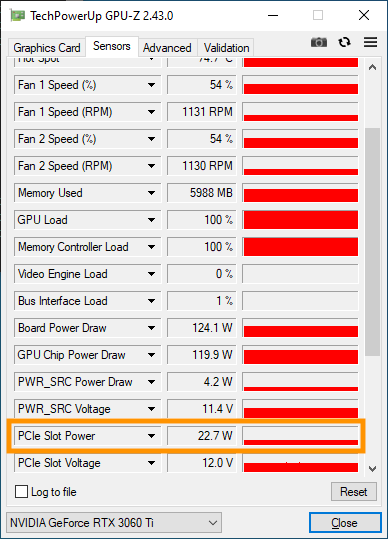
Here are the results of some of our GPUs (optimized):
| MODEL | PCIe x16 SLOT POWER DRAW |
|---|---|
| RTX 3060 | 11 W |
| RTX 3060 Ti | 23 W |
| RTX 3070 | 14 W |
| RTX 3080 Ti | 65 W |
| GTX 1070 Ti | 58 W |
| RTX 2080 Ti | 32 W |
Should I power GPU riser with SATA power connector?
If you have the ability to use MOLEX or PCIe power connectors, then you should use them. Using MOLEX or PCIe power connectors is definitely safer than using SATA power connectors as SATA was not made for higher workloads.
Only use SATA with GPUs that draw less power via PCIe x16 slot. You should test how much power it draws via PCIe x16 slot with software like GPU-Z. Also, be careful not to use more than 2 SATA connectors on one PSU cable outlet. Using all three or even four SATA connectors on a single cable output will greatly increase the chances of melting the wires or even fire.