What is Excavator?
In the past month, we have been working on bringing back the Excavator. Long-time users may remember Excavator but some newcomers might not be familiar with this powerful miner. Read this article to learn more about why you should start using it as your default miner.
Excavator
Excavator is a very lite NVIDIA mining software developed and signed by NiceHash. It delivers competitive hashrate performance and most importantly it has a 0% fee, unlike other 3rd party miners which generally charge a 1% development fee!
Supported OS:
- Windows 10 64-bit
Supported hardware:
- NVIDIA GeForce GTX 1000 series with minimal 6GB of RAM (Desktop editions)
- NVIDIA GeForce RTX 2000 series with minimal 6GB of RAM (Desktop editions)
- NVIDIA GeForce RTX 3000 series with minimal 6GB of RAM (Desktop editions)
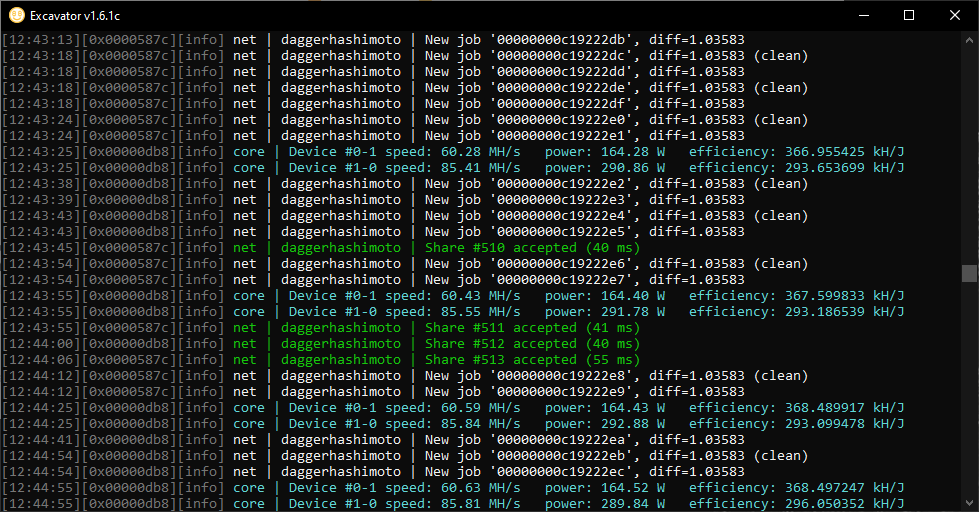
Above you can see Excavator during normal operation (mining). Apart from device speed and power consumption, the Excavator also shows efficiency. Higher efficiency means a better performance/watt ratio.
Other Excavator features:
- Special mining protocol - reduced issues with routers, firewalls.
- Reduced bandwidth usage and lower latency.
- In-house built miner which can be trusted because the authors are fully known.
- It keeps multiple DAG files in the GPU memory, thus switching from one DAG to another is blazingly fast and does not incur any downtime penalty.
- Overclocking capabilities via API.
Another Excavator speciality is that when overclocking via Excavator API the overclocks will be set to stock settings when the DAG is being generated. This allows for higher stable overclock settings. Note that unstable DAG generation causes permanently rejected shares until the miner restart.

Excavator is included in NiceHash Miner or it can be downloaded manually as a standalone miner from here.
In the table below you can see a hash-rate comparison with some other popular miners (Dagger-Hashimoto algorithm).
| GPU | Excavator | NBminer | PhoenixMiner |
|---|---|---|---|
| 1070 Ti | 26.4 MH/s | 26.7 MH/s | 26.9 MH/s |
| 1080 Ti | 44.2 MH/s | 44.6 MH/s | 44.3 MH/s |
| 2060 | 29.4 MH/s | 29.5 MH/s | 29.6 MH/s |
| 2070 | 36.4 MH/s | 36.8 MH/s | 36.7 MH/s |
| 2080 | 36.8 MH/s | 36.6 MH/s | 36.6 MH/s |
| 2080 Ti | 49.9 MH/s | 50.3 MH/s | 50.6 MH/s |
| 3060 Ti | 59.6 MH/s | 59.4 MH/s | 59.6 MH/s |
| 3070 | 52.9 MH/s | 52.9 MH/s | 53.1 MH/s |
| 3080 | 95.7 MH/s | 95.4 MH/s | 95.6 MH/s |
| 3090 | 105.8 MH/s | 106.6 MH/s | 106.4 MH/s |
Currently, only NVIDIA GPUs are supported. We are already working on AMD support.
How to enable Excavator in NiceHash Miner?
Excavator is currently supported by NVIDIA only. A requirement for enabling Excavator is to have at least 1 NVIDIA GPU in your rig.
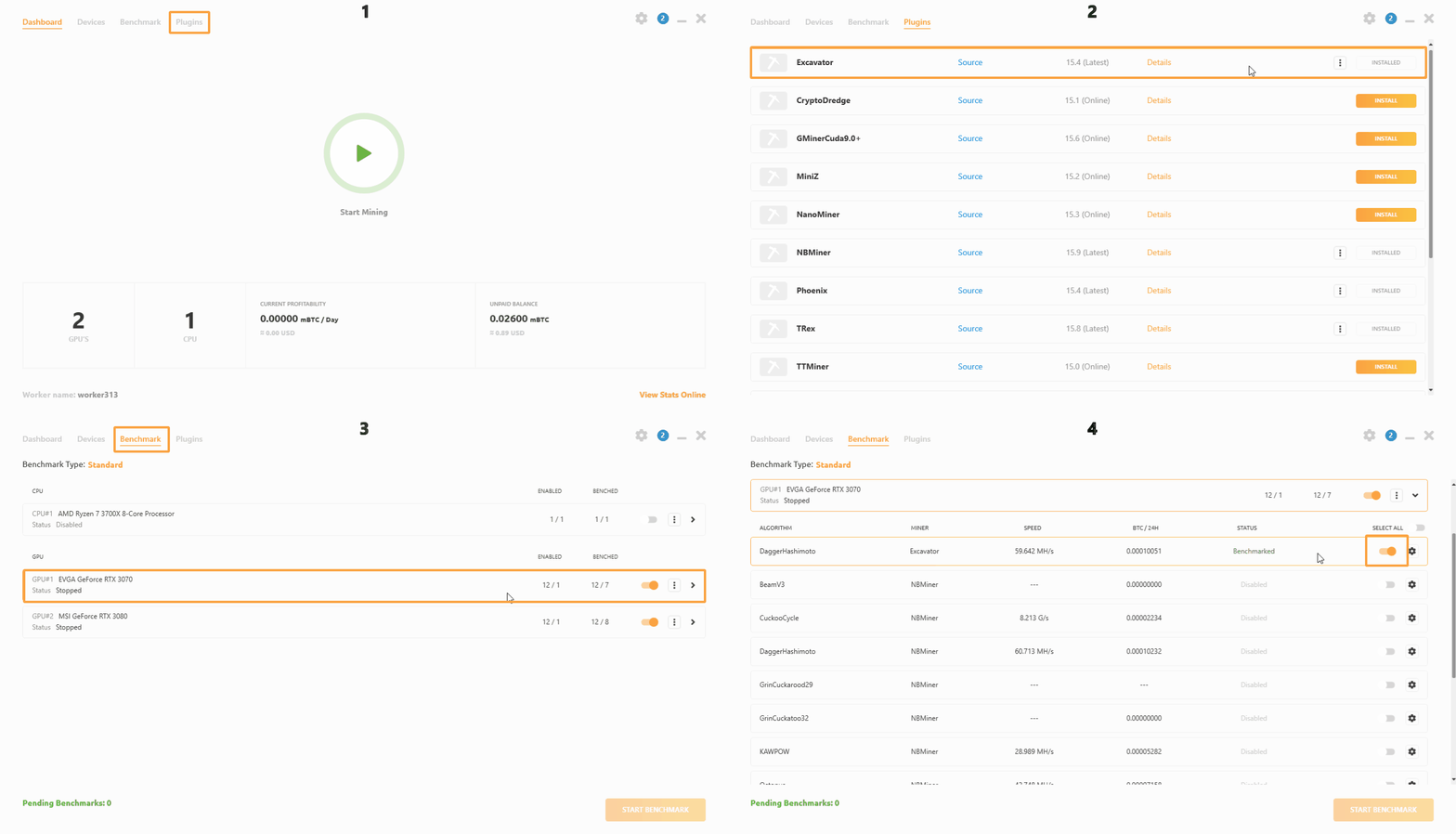
- Run NiceHash Miner
- Navigate to the Plugins tab and make sure that the Excavator is installed
- Navigate to the Benchmark tab and extend the GPU tile (click on the GPU)
- Locate Excavator and enable the toggle on the right side.
- Start mining