60 Day Rule: Set Up Your External Wallet
60-Day Rule on Collective NiceHash Wallet: Reasons and Implications for Users
With moving our headquarters to Switzerland, NiceHash AG became a financial intermediary which has to follow the rules of the underlying regulation.
To be compliant with these rules, NiceHash has to monitor, separate and manage user’s funds on the wallets. This is done by separating user funds between a Collective NiceHash Wallet and Individual NiceHash Wallets.
Collective NiceHash Wallet:
- This is the default wallet created inside your account upon meeting all the criteria for using NiceHash services and is provided by the NiceHash Wallet provider. User funds are aggregated on the Collective NiceHash Wallet on the same or several blockchain addresses controlled by NiceHash and funds may not be held on this wallet for a period longer than 60 days.
Individual NiceHash Wallet:
- This is a wallet created for a user upon meeting all the criteria for using NiceHash services and provided by the NiceHash Wallet provider, where individual user funds may be stored on such wallets on individual addresses for an unlimited duration.
Why the need for different wallet types?
As noted above, an individual wallet in the eyes of Swiss regulation is a wallet where funds can be stored for an unlimited time. Collective NiceHash Wallets are NOT Individual Wallets, and therefore funds may not be stored on them for longer than 60 days by law.
Collective NiceHash Wallets can be considered ‘service’ wallets, not ‘storage’ wallets. Meaning the purpose of Nicehash Collective Wallets and the funds there is the use of Nicehash’s services, primarily buying and selling hashpower, and not “storage” of the funds.
Collective wallet (services):
- Used for NiceHash services (receiving mining payouts, buying hashrate, etc..)
- Cannot be used to store funds for longer than 60 days
Individual wallet (storage):
- Cannot be used for services -> funds must be moved to your Collective Nicehash Wallet to use NiceHash platform services (receiving mining payouts, buying hashrate, etc..)
- Funds may be stored indefinitely
We highly recommend using your own external wallet address as a Default External wallet for the purpose of storing funds
Why do you need to set a default external wallet on NiceHash?
Due to Swiss Regulation where we are headquartered, explained above, digital assets cannot be held for longer than 60 days in storage on the Collective Nicehash Wallet.
Therefore you cannot use the Collective NiceHash wallet only for the storage of your digital assets.
Should you not use your funds for 50 days after depositing them on the Collective NiceHash wallet, your assets will be automatically sent to an Individual NiceHash wallet, and blockchain fees may apply for this procedure.
We highly recommend that you set up your own default External Wallet, where funds can be automatically sent after 50 days.
By setting this up to automatically transfer, you don’t have to worry about keeping track of when you deposited, since the system will automatically schedule and move any funds that are older than 50 days. In addition, this means you have full control over your assets at a wallet address of your choice.
Please note that if the inactive balance is less than 20,000 satoshis (about $20 at time of press), the balance will be less than the minimum transfer amount, and it will be deducted as an Inactive Fund Fee instead. We recommend you use the lightning network to withdraw small amounts.
If you are mining with NiceHash, use the Profit Splitting feature
NiceHash has a feature for miners that allows you to automatically send your mining payouts to a wallet of your choice, and even divide it to several addresses. This feature is called Profit Splitting, and you can set this up instead of / in addition to, the default external wallet. You can set any percentage of funds to be withdrawn from 1% to 100%. It is easy to use and set up, follow our guide here.
How do you know when funds need to be moved?
You will receive a notification by email 7 days before the funds will be moved. You can always check in the wallet section how much will be moved at any time.
You can see the amount that needs to be moved, and the time in days when this will take place.

How to add your External Wallet for withdrawals
Add directly from the wallet section
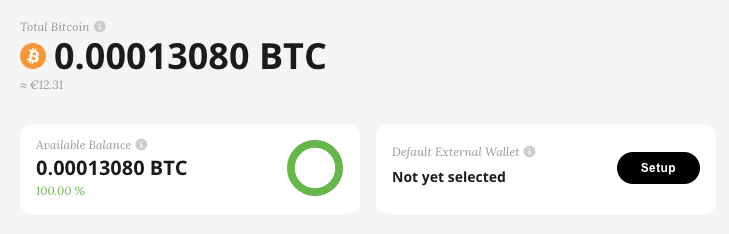
To add a Default External Wallet for withdrawal, go to your wallet tab inside the dashboard and select ‘Setup’:
This will prompt you to select a previously saved wallet address, or add a new one:
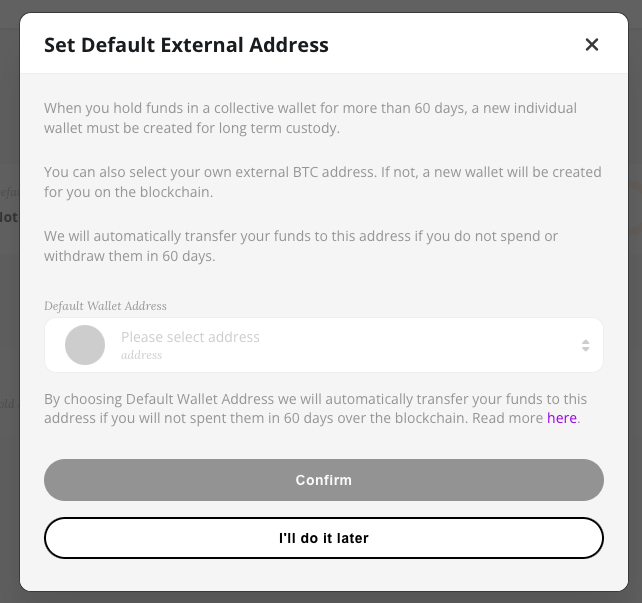
And you are done. Now every 50 days any assets that have not moved will be sent here automatically.