NVIDIA RTX 3000 series Overclocking Guide to Increase Mining Profits
In this guide, we are going to talk about overclocking NVIDIA RTX 3000 series for mining.
There has been a lot of questions about overclocking settings and reports of hashrate dropping after a couple of minutes of mining. We will explain why this is happening and how to solve it.
Overclocking is very important when mining. If you are not applying to overclock (or underclocking) you are losing profits! Read why you should overclock here.
If you are new to overclocking, we suggest you read this article where we show you how simple it is to overclock your GPU.
Why does the RTX 3080/3090 series hashrate drop after a few minutes?
Memory chips on the RTX 3080 and 3090 are not sufficiently cooled. This results in the GPU thermal throttling after a couple of minutes of mining. The GPU core temperature might still be very low, but the memory chips (with separate different sensors) are overheating.
How to check if the GPU is thermal throttling?
- Install GPUz
- Run GPUz
- Make sure that the correct GPU is selected (bottom left)
- Navigate to the Sensors tab
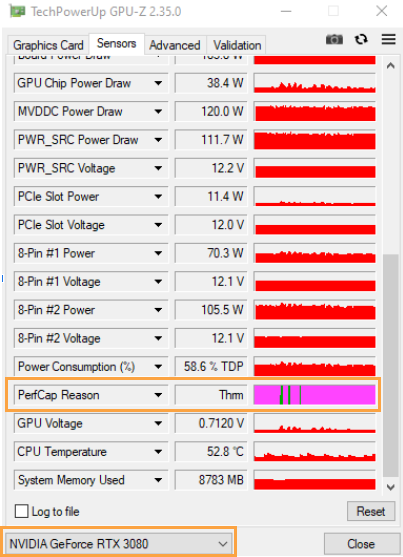
- Scroll down and locate the PerfCap Reason sensor (Performance Cap)
If you mouseover PerfCap Reason you will see possible causes for performance cap.
If the graph on the right side is coloured in violet the GPU is thermal throttling. If simultaneously the GPU temperature is below 70C, the reason for thermal throttling is overheated memory (RAM) chip.
How to fix RTX 3080/3090 memory overheating?
Increase the fan speed to 90% - 100%. This is the most straightforward solution.
Another solution is to add thermal pads on the back of the GPU. Between the GPU board and backplate where the memory chips are located. Follow this guide.
Disassembling the GPU might void the warranty or/and might permanently damage the GPU.
Overclock settings for mining with RTX 3060 Ti
| Core Clock Delta | Memory Clock Delta | Power Limit (W)/(%) | Speed (MH/s) |
|---|---|---|---|
| -500 | 1200 | 130W / 65% | 60 |
Overclock settings for mining with RTX 3070
| Core Clock Delta | Memory Clock Delta | Power Limit (W)/(%) | Speed (MH/s) |
|---|---|---|---|
| -600 | 1200 | 130W / 60% | 60 |
Overclock settings for mining with RTX 3080
| Core Clock Delta | Memory Clock Delta | Power Limit (W)/(%) | Speed (MH/s) |
|---|---|---|---|
| -150 | 900 | 220W / 68% | 96 |
Overclock settings for mining with RTX 3090
| Core Clock Delta | Memory Clock Delta | Power Limit (W)/(%) | Speed (MH/s) |
|---|---|---|---|
| -300 | 950 | 285W / 80% | 118 |
*Provided overclocks are modest and should work on (almost) any card. Higher speeds are possible with more aggressive settings. Always apply these settings in increments!
Join us at our Subreddit or Discord server to discuss overclock settings with other users!