NiceHash OS Flash Tool - User Guide
NiceHash OS Flash Tool is a USB flashing tool that allows you to create a bootable USB flash drive with NiceHash OS. It combines flashing and configuration with other cool features like auto-naming each next worker with 1 increment.
How to use NiceHashOS Flash Tool?
- Navigate to your Mining section.
- Click DOWNLOAD MINER button.
- Select NiceHash OS.
- Download NiceHash OS Flash Tool.
- Install NiceHash OS Flash Tool.
- Insert USB flash drive and select it.
- Enter your NiceHash BTC wallet address.
- Name your worker.
- Insert additional optional settings.
- Click the Flash button.
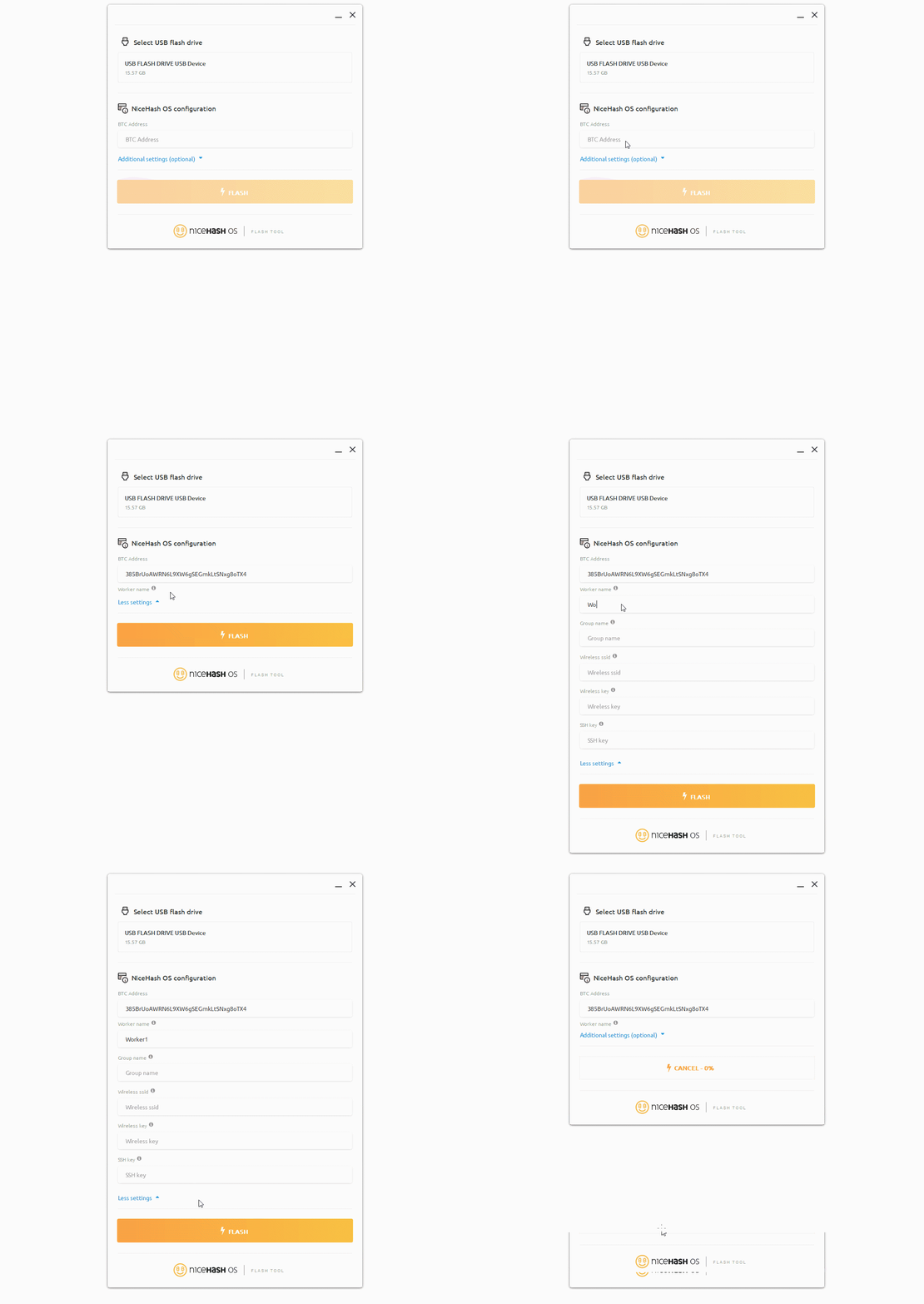
NiceHash OS Flash Tool will automatically download the latest NHOS version, extract it and flash it to your USB flash drive.
The worker name will be incremented for each next worker by 1 if the name is not changed manually.
笔者
Marko Tarman
Marko先生是NiceHash的挖矿硬件专家以及内容创作者,他最早于2012年第一批 ASIC矿机发布之前便开始挖矿,经历了显卡挖BTC、LTC再到VTC,甚至是DOGE等币种。Marko的挖矿座右铭:在挖矿生涯中碰到的99个问题,这些问题全部都是分线器(riser)的问题”