NiceHash OS Flash Tool - User Guide
NiceHash OS Flash Tool is a USB flashing tool that allows you to create a bootable USB flash drive with NiceHash OS. It combines flashing and configuration with other cool features like auto-naming each next worker with 1 increment.
How to use NiceHashOS Flash Tool?
- Navigate to your Mining section.
- Click DOWNLOAD MINER button.
- Select NiceHash OS.
- Download NiceHash OS Flash Tool.
- Install NiceHash OS Flash Tool.
- Insert USB flash drive and select it.
- Enter your NiceHash BTC wallet address.
- Name your worker.
- Insert additional optional settings.
- Click the Flash button.
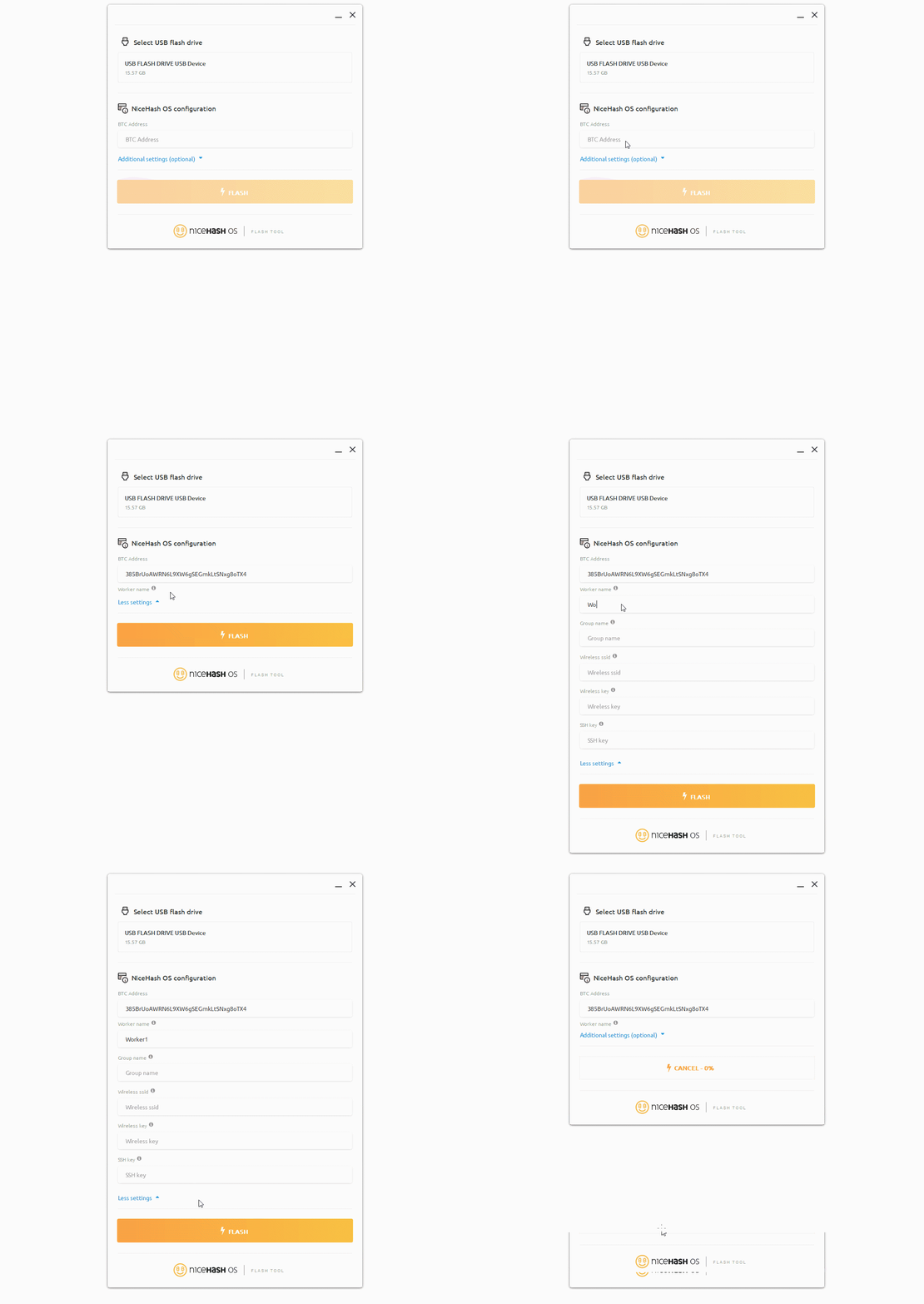
NiceHash OS Flash Tool will automatically download the latest NHOS version, extract it and flash it to your USB flash drive.
The worker name will be incremented for each next worker by 1 if the name is not changed manually.
執筆:
Marko Tarman
MarkoはNiceHashのマイニングマネージャーであり、コンテンツ・クリエーターです。彼は最初のASICがリリースされる前の2012年にマイニングを始め、GPUでBTC・LTC・VTCからDOGEまでもマイニングするようになりました。彼の座右の銘は「問題が99個あったとしても、ライザーの不具合がすべての原因だ」です。