Mining PSU (power supply) Buying Guide
Lately, there have been many questions about what power supply (PSU) to use for mining. In this guide, we are going to take a deep dive into the power supplies.
How strong should the PSU be for mining?
It is important to know how much power your system needs or if you are planning to assemble a mining rig. To read more about how to build a mining rig, click here.
How to calculate the maximum system power draw?
It's quite simple to calculate the maximum power draw of your system.
First, find out your graphic card TDP (TDP or 'thermal design power' is the maximum power draw of your GPU) and multiply it with the amount of GPUs you will use in your rig. Note that if you are using different GPUs, you need to sum the TDP of each GPU as not all GPUs have the same TDP.
For example, NVIDIA RTX 3080 has a TDP of 320W. If you are going to use two of them, the total GPU TDP will be 640W.
Secondly, add another 100W to the equation. This represents the motherboard, processor, and other peripherals.
In the above case, a maximum rig power draw will be around 740W.

Calculate PSU wattage based on the maximum rig power draw
Once you have calculated the maximum power draw of your rig, multiply it by at least 1.25.
The rule of thumb formula goes like this:
PSU Wattage = maximum rig power draw x 1.25
If we look at the above example of a rig with two RTX 3080s, we can calculate that the minimum PSU wattage should be at least 925W.
Connecting multiple PSUs to one mining rig
In case your rig needs a 1600W PSU, you can instead use two 800W PSU on the same rig.
To do this, all you need to do is connect the secondary PSU 24-pin to the 24-pin splitter.
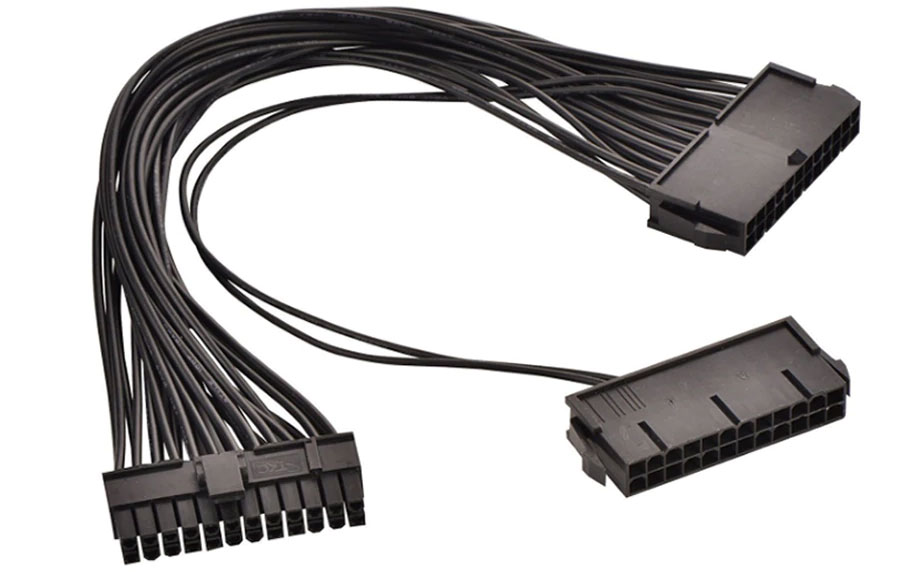
Note that you must power GPU and USB risers connected to the GPU from the same PSU or risk damaging the components.
Things to keep in mind
Does the PSU have enough 6+2 PCI-e connectors?
When buying a new PSU, keep an eye on the amount of 6+2 PCI-e connectors that it comes with. 6+2 PCI-e connectors are powering the GPU.
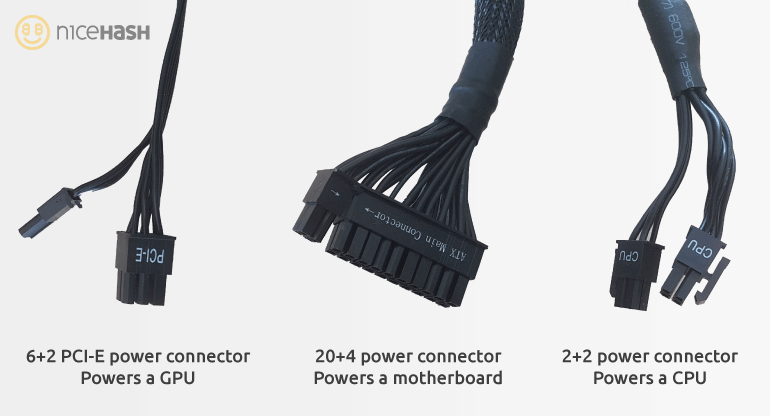
Please find out how many 6+2 PCI-e connectors you need by counting them on your GPU.
Never use Molex or SATA to PCI-e adapter!
PSU efficiency rating
Computer components need direct current (DC) to run. Power supplies convert DC to AC. Efficiency rating is the difference between the power drawn from the wall socket and the output (sent forward to power the components).
Keep the 1.25 coefficient in mind when reading forward. We used it earlier for calculating PSU wattage.
For example, PSU with 80% efficiency will draw 1000W of power from the wall socket but will forward only 800W of power to the computer. This means that 200W of energy is wasted in the conversion process.
There are different efficiency ratings. Check the below table for the efficiency of the PSU ratings.
| Load | 80 Plus | Bronze | Silver | Gold | Platinum | Titanium | |
| Efficiency | 20% | 80% | 82% | 85% | 87% | 90% | 90% |
| 50% | 80% | 85% | 88% | 90% | 92% | 92% | |
| 100% | 80% | 82% | 85% | 87% | 89% | 94% |
We hope that you have a better understanding of power supplies now! Happy mining!
Join us at our Subreddit or our Discord server!