Introducing NiceHash ASIC Manager - Monitor your ASIC data in NiceHash dashboard!
Dear NiceHash Community,
We are excited to introduce a new addition to our product suite for ASIC miners: NiceHash ASIC Manager!
ASIC Manager (AM) completes the full circle of software products needed to run a mining operation efficiently. With NiceHash ASIC Manager, you can now manage and monitor your ASIC machines inside the NiceHash platform, ensuring a full overview of your ASIC performance.
About NiceHash ASIC Manager
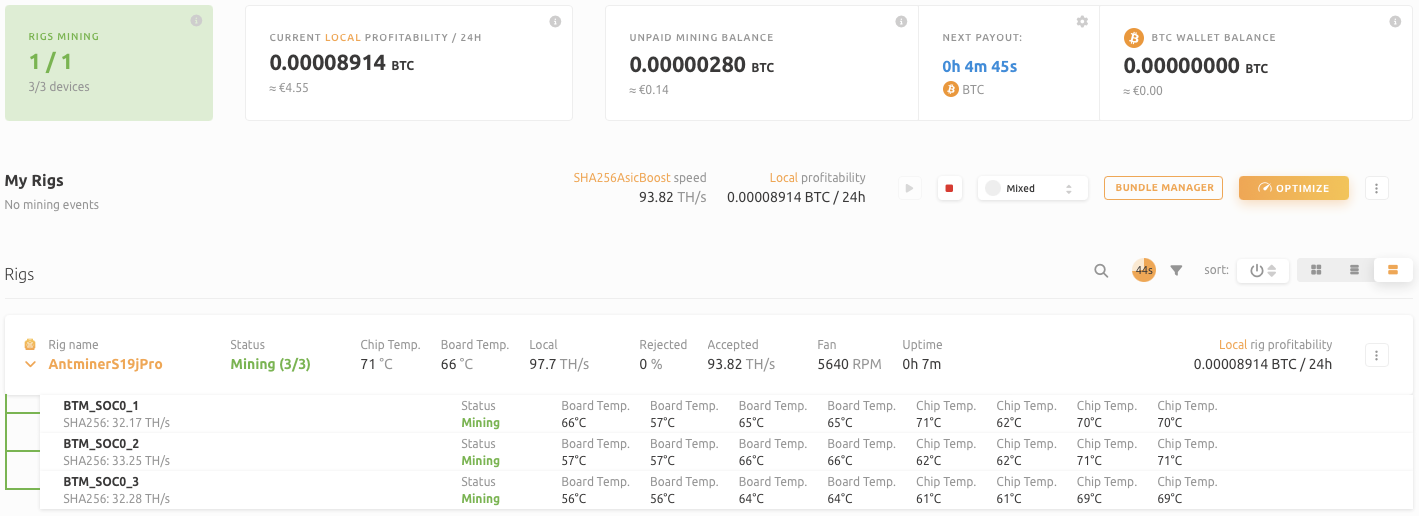
ASIC Manager is a locally run software developed by NiceHash that allows mining farms to monitor ASIC information, such as board and chip temperature, fan speeds, local hashrate, and more on NiceHash Rig Manager. It also allows actions like locate and reboot. At the moment, it is only supported on Windows machines.
NiceHash ASIC Manager is in an early stage of development. We have exciting plans to add more features in the future, enhancing its capabilities and providing even greater value to our users. Your valued feedback can be contributed here.
Getting Started with ASIC Manager
To start using ASIC Manager, follow these 3 simple steps:
- Download the NiceHash ASIC Manager from our Download Center.
- Install the software on a local machine within your local network.
- Scan your network and add ASIC machines to the ASIC Manager software.
For detailed installation instructions, please refer to our comprehensive ASIC Manager Installation Guide.
Change Tile Information Settings
The ASIC Manager reports ASIC local data to the Rig Manager, enabling efficient monitoring and management. Users can select and display up to 8 metrics at a time to focus on the most relevant data. At the moment, available metrics include:
- Chip Temperature
- Board Temperature
- Local Speed
- Rejected Speed
- Accepted Speed
- Power Consumption
- Fan Speed
- IP Address
- Uptime
Note that not all ASIC devices report the same data. If the ASIC Manager cannot retrieve specific information, those fields will remain blank.
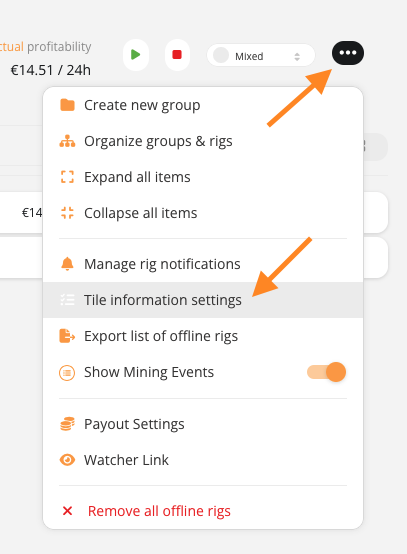
The above metrics are displayed within the worker tile and can be tailored to your preferences using the Tile Information Settings, ensuring a more personalized and efficient monitoring experience.
Frequently Asked Questions
Are there any fees involved for using NiceHash ASIC Manager?
No, ASIC Manager is completely free to use.
Can ASIC Manager be used on other platforms?
No, ASIC Manager can only be used on NiceHash.
Can ASIC Manager be installed on multiple computers in the same network?
No, only one instance of ASIC Manager should be running locally.
Can ASIC Manager support multiple mining addresses?
Yes, you can use one instance of ASIC Manager locally and it will report data for each mining address separately.
As we continue developing and improving NiceHash ASIC Manager, we plan to introduce additional features to further enhance your mining management experience. Stay tuned for updates and new functionalities!