How to transfer your funds from the old NiceHash platform to the NEW NiceHash platform?
NiceHash will close down the OLD platform on Tuesday, September 10, 2019. To read more details, please check this article.
Many of you have asked how to move your funds from the old NiceHash platform to the NEW NiceHash platform.
You have two options:
- You let us move your funds automatically (NO FEES) at the end of the transition.
- You move your funds manually (withdrawal fees do apply) before the transition is over.
All of your funds will be automatically moved from the old to the new platform at the end of the transition without any charge (NO WITHDRAW FEES and NO MINIMUM AMOUNT) - so basically you don’t have to do anything, you won't be charged for anything and you will not lose anything, just wait for the announcement that transition is over.
If you do not want to wait until the end of the transition, you can move your funds manually, however in that case you have to have enough funds in your wallet and you will be a charged standard withdraw fee.
HOW YOUR FUNDS WILL MOVE AUTOMATICALLY
If you decide not to withdraw your funds manually, we will automatically transfer all of your funds (wallet balance, unpaid mining balance, repayment program balance) at the end of the transition period. This process will work IF YOU USE THE SAME EMAIL ADDRESS ON THE NEW PLATFORM (account email on the old and the new platform must be the same)!!
If you have decided to register a new account with a different email address, you will not get your funds transferred to this new account automatically.
HOW TO MOVE YOUR FUNDS MANUALLY
If you wish to transfer your funds manually, please make sure you have an active account on both platforms (old and new). If you still don't have an account on the NEW NiceHash platform, just reset your password here, and you can start using the new platform.
FOLLOW THESE STEPS:
1. Open your Wallet page on the OLD NiceHash platform.
2. Click Withdraw button.
3. Click Withdraw to my BTC wallet button.
4. Open your BTC Wallet page on the NEW NiceHash platform.
5. Click Deposit button.
6. Select Bitcoin (BTC) and click Show (BTC) Address button.
7. Copy your BTC deposit address.
8. Paste your BTC deposit address into the wallet address field on the OLD platform!
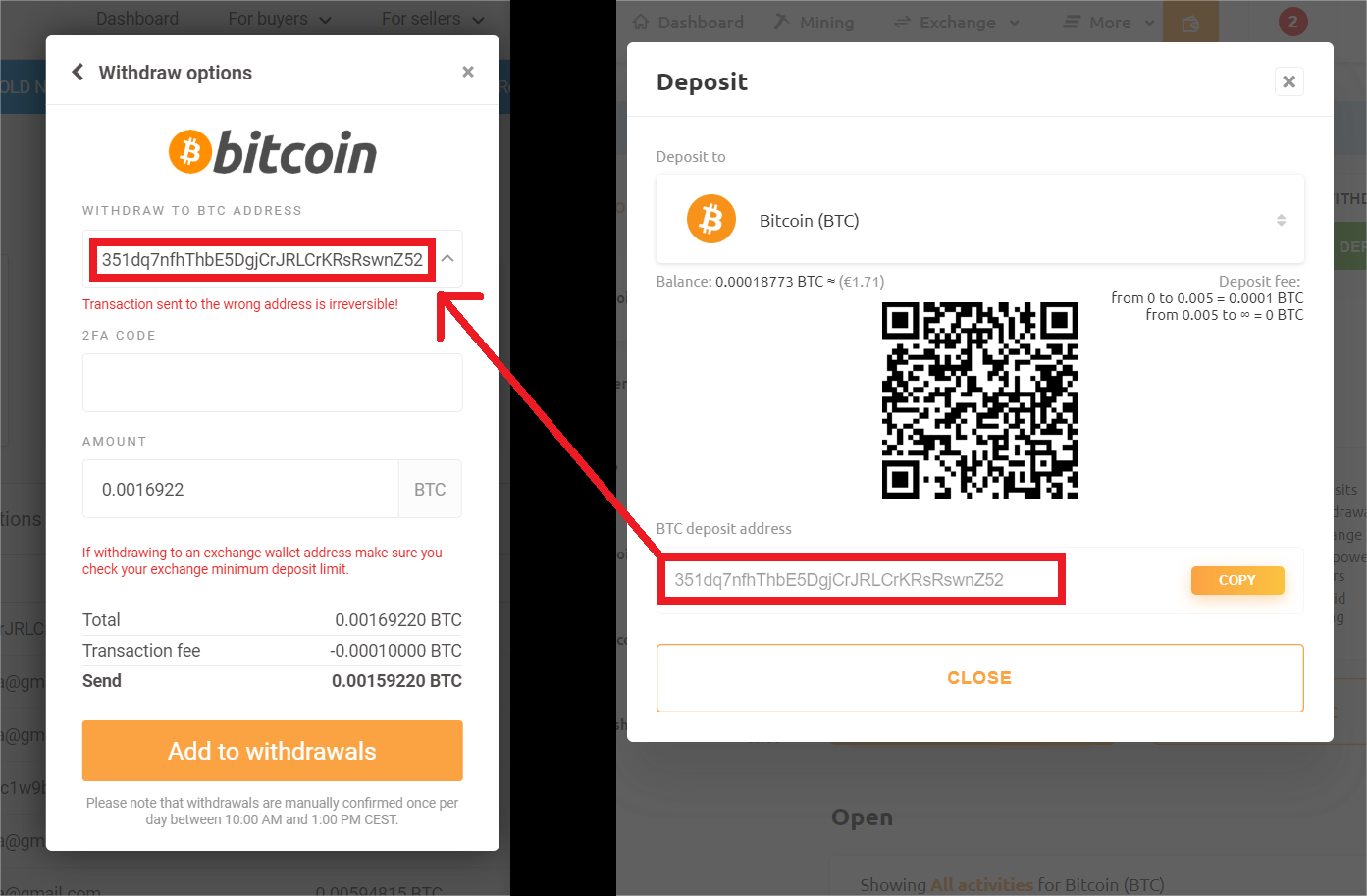
9. Select your amount and click Add to withdrawals.
WHAT IF I'M USING EXTERNAL WALLET ADDRESS FOR MINING?
After the transition, you will be able to follow your earnings and payments here (by entering your mining address).
If you have any further questions about this topic, do not hesitate to contact us! Please follow our social media channels for the latest information regarding the transition to the new NiceHash platform. We will regularly update you on the status of the development, and if you have any questions, do not hesitate to contact us. Our reps are also available on our official subreddit and Discord.