How to optimize CPU mining performance for Monero? (UPDATED)
In the following days, Monero will fork to a new algorithm called RandomX. In this guide, we go through the CPU overclocking process as this will help you maximize your profits when mining the RandomX algorithm.
DISCLAIMER: Before proceeding, you must understand that by doing a CPU overclocking you could damage your CPU or motherboard and you will not be able to use it anymore. Also, in most cases, the warranty is voided by doing so. We do not take any responsibilities if you happen to damage your hardware.
To start mining all you have to do is install NiceHash Miner and enable your CPU device. NiceHash Miner installation guide can be found here.
It is worth noticing, that most likely you will not have the same hashrate, even with the same CPU. RandomX mining is dependent on RAM frequency and latency. Our tests with different RAM frequencies and latencies on Ryzen 7 3700X yielded different results. Tests were performed on a system with an Asrock x570 Steel Legend motherboard with huge pages enabled.
First of all, make sure that you updated your BIOS on the motherboard. You can find a guide on how to update motherboard BIOS here.
RAM frequency and timing settings for Monero mining
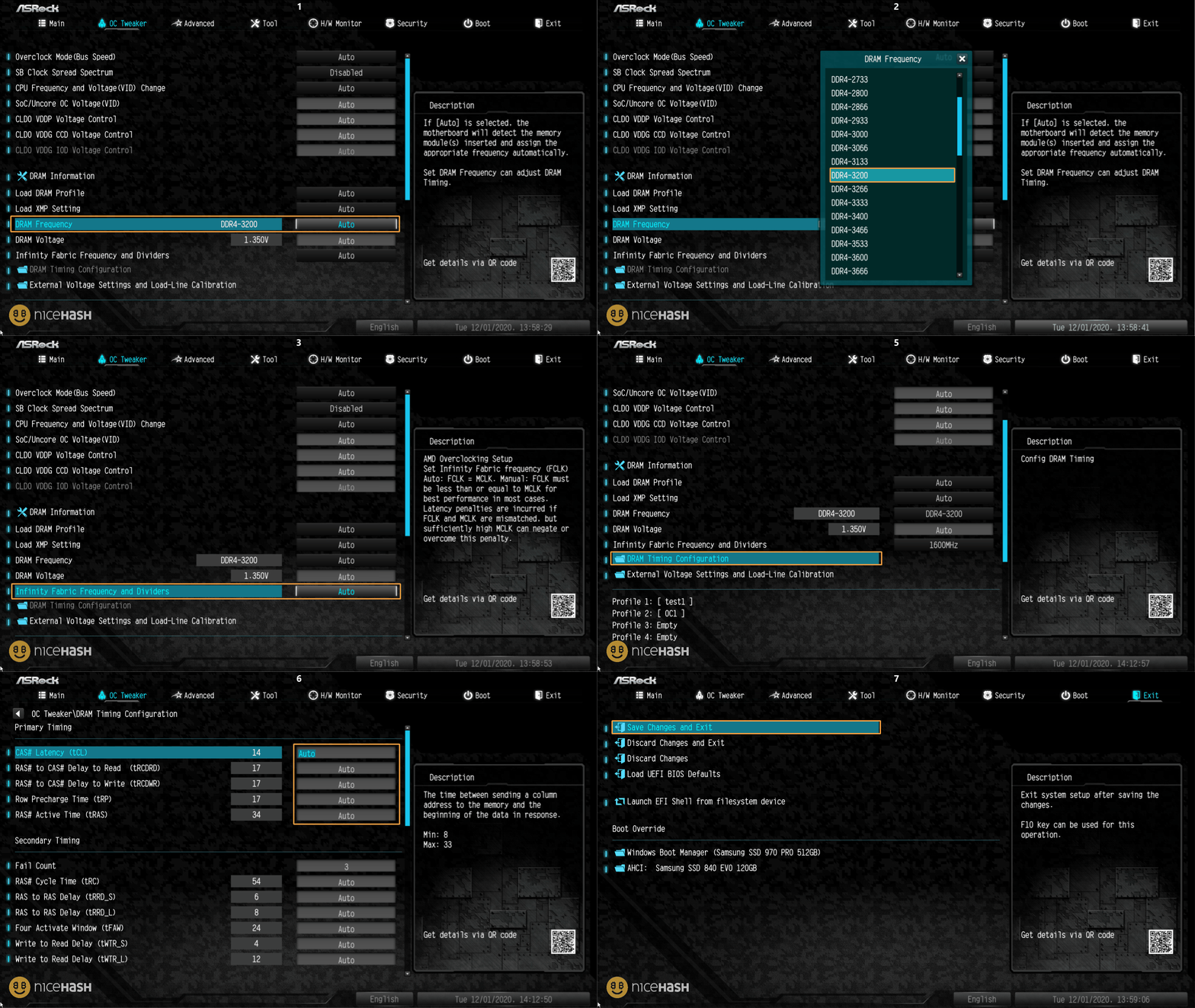
Note that setting XMP might not be the most optimal setting for mining. We suggest setting RAM frequency to 3200 MHz, Infinity fabric to 1600 MHz, and RAM timings to auto. These should be default OC values for every RAM model when mining the RandomXMonero algorithm.
Follow these steps to optimize RAM for mining RandomXMonero:
- Restart or turn on the system,
- Repeatedly press the F2 or DELETE button to enter the BIOS,
- If you are located in EZ mode, press F7 to open Advanced mode,
- Navigate to the OC Tweaker tab (or its equivalent),
- Set DRAM frequency to 3200 MHz
- Set Infinity Fabric Frequency to 1600 MHz
- Make sure that the DRAM Timings are set to Auto
- Save and exit BIOS.
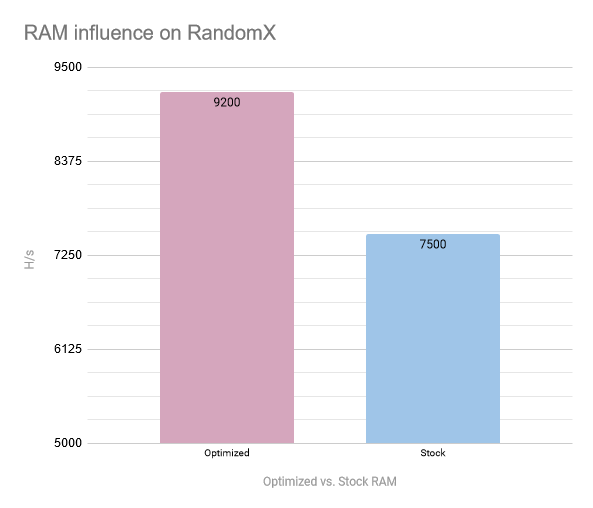
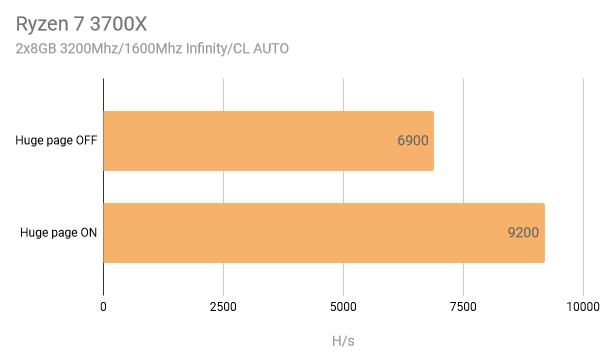
Now you will need to enable Lock Pages in Memory. This will greatly increase your hashrate! For us, this increased hashrate from around 6900 H/s to 9200 H/s on optimized RAM settings.
To enable Lock Pages in Memory, follow these steps when logged in to your Windows account:
- Click Start and type "run" and press Enter.
- Type gpedit.msc in the Run dialog and press Enter.
- Navigate to Computer Configuration > Windows Settings > Security Settings > Local Policies > User Rights Assignment
- On the right panel, scroll down until you find Lock pages in memory.
- Click Add User or Group.
- Type your PC name in the empty text box.
- Press OK & restart your PC.
- Start NHM with Administrator Rights
NOTE: If you want to use a huge page for better mining performance, install XMRIG PLUGIN via plugin tab in NHM. XmrStakRX only enables huge page if it is ran as System Administrator.
Results after enabling Lock Pages:
Next thing is to download AMD Ryzen Master. This is an overclocking tool that allows you to change CPU core speed and lower or increase voltage. Ryzen Master tool also allows you to overclock RAM.
Setting Core Speed and Peak Core(s) Voltage
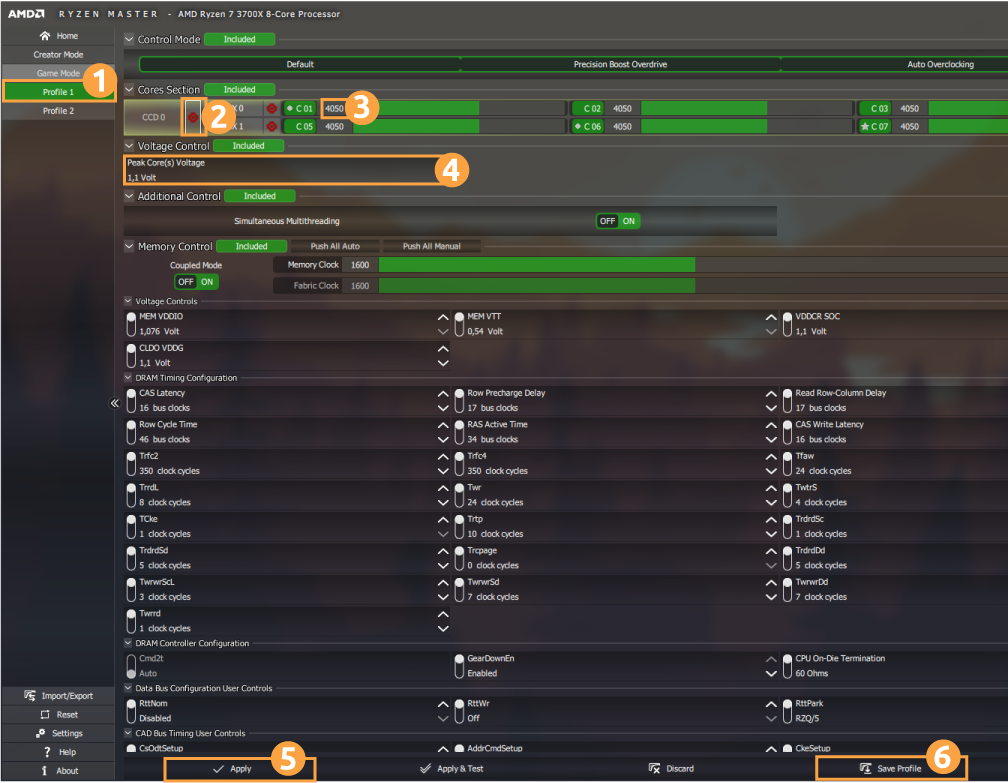
- Select Profile 1 (1).
- Enable Speed Mirroring of one core to all other cores (2).
- Increase core speed (3) by 50Mhz. This depends on your CPU capabilities.
- Click Apply (5).
- Start mining. Enable only CPU devices in NHM at this point.
- If you do not experience any issues, repeat this process until your PC becomes unstable. If the PC restarts on itself, the Ryzen Master settings will be set to default. This is why we prefer to overclock the CPU via Ryzen Master instead of directly through BIOS.
- If you run into an unstable PC, you can increase Peak Core(s) Voltage (4). Doing this will allow higher Core Speed, but will yield in higher power usage and higher temperatures.
- When the overclocks are stable, click one Save Profile (6).
If you wish to limit threads (cores) on the CPU so that you can keep on using your PC for office work or web browsing while mining, check this guide.
If you have any questions regarding overclocking, what core speeds to use, feel free to join our Reddit or Discord server where you can ask other users for advice, or even share your hash rates with the community.