How to measure mining rig power usage?
In this guide, we will show you how to measure your hardware power usage. Measuring power usage comes in handy for example when you want to predict if your mining will be profitable at the end of the month.
There are 2 different ways of measuring your rig electricity consumption.
- Measuring electricity consumption with software,
- Measuring electricity consumption with a Wattmeter.
Measuring electricity consumption with software
For measuring power consumption via software, all you need to do is install software that displays power consumption. We prefer using the TechPowerUp GPU-Z. It is free software that reads GPU information. Please note that this method is measuring power consumption only for your graphics cards!
Follow these steps to measure power consumption via GPU-Z:
- Install & run GPU-Z.
- Navigate to Sensors-
- Locate GPU Chip Power Draw.
- You can see the current power consumption on the right side.
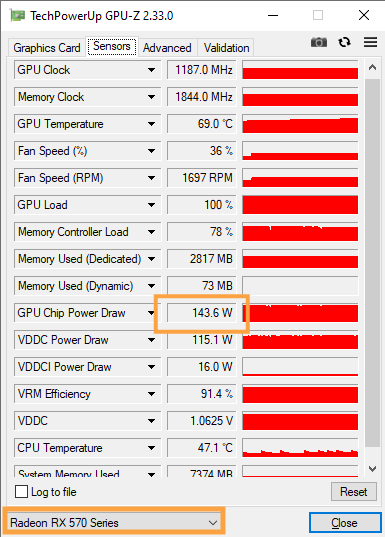
Note: If you are using multiple GPUs in the same rig, you can select each of them individually in the bottom left corner.
Measuring electricity consumption with Wattmeter
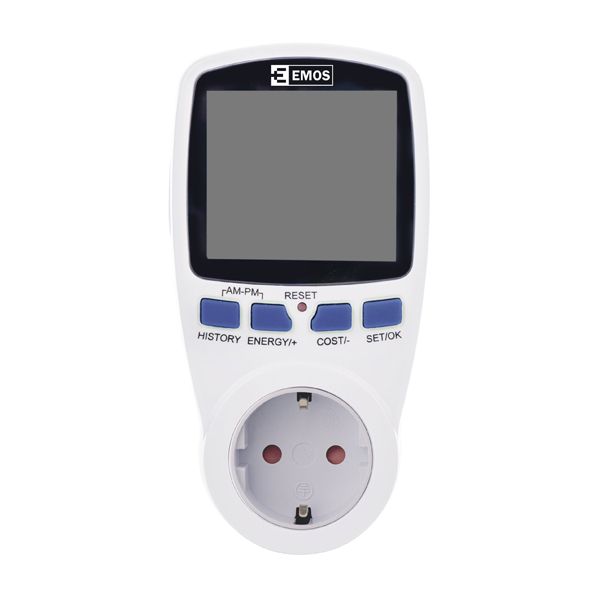
The most accurate way of measuring your entire rig power consumption is using a so-called wattmeter. The wattmeter is a device that is plugged into an electrical outlet and your power cord from the PSU is plugged into it.
The digital display will show the amount of electricity consumed. You can view the power usage in Watt or Amps. Below you can see a typical wattmeter that is usually sold in every tech store.
If you want to discuss mining rig power usage with other miners, join our official Reddit or our Discord server.