How to manually update miner (Plugin) in NiceHash Miner?
The NiceHash Miner developer team constantly keeps track of new 3rd party miner releases like Claymore, Phoenix Miner, NBminer, etc. But sometimes we do not include a new version due to reasons like potential issues with an update, lower miner stability, or other justifiable reasons.
In this guide, we will show you how to manually update a 3rd party miner (Plugin) in NiceHash Miner.
First, download the required miner from the official source, then all you need to do is to copy the new miner files to the NiceHash Miner folder.
Follow these steps to manually update the miner:
1. Navigate to the NiceHash Miner folder; this can be located in AppData > Local > Programs > NiceHash Miner if you are using the installer version of NHM, or it will be located wherever you have it located if you are using a ZIP version
2. Inside the NiceHash Miner folder, navigate to miner_plugins folder
3. Locate the miner folder that contains your miner
4. Inside miner folder, open bins folder and the highest number folder name
5. Inside this folder, you will find your miner folder
6. Replace the old miner files with new miner files
7. Restart NiceHash Miner
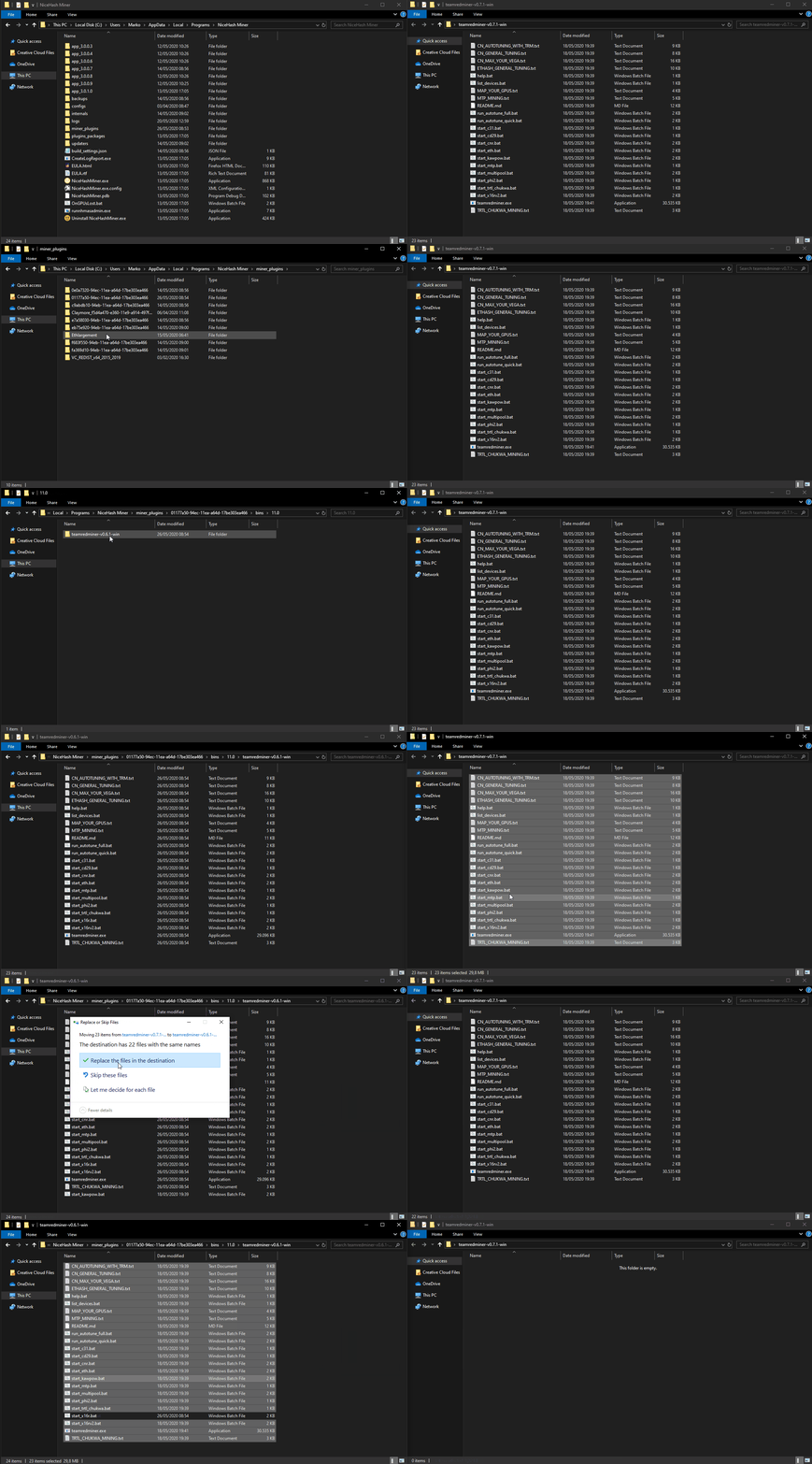
Right-click > View Image on the above gif to view it in full size.
Make sure that the folder name remains the same as before because NiceHash Miner will look for the path to the older miner folder name.