How to fix the Windows Management Instrumentation Error (WMI)?
If you are experiencing issues with NiceHash Miner or any other software and the issue is related to the Windows Management Instrumentation Error (WMI), then you might want to try this method before reinstalling the Windows OS.
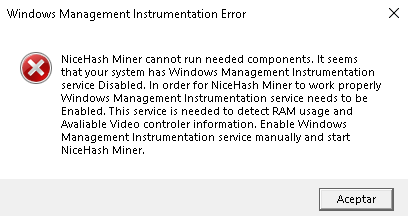
What is Windows Management Instrumentation Error or WMI?
WMI repository is a set of specifications that Windows uses to consolidate the management of devices. The service is required to detect RAM usage and GPU information.
You can find the repository here: %windir%\System32\Wbem\Repository

How to repair or resolve Windows Management Instrumentation Error (WMI)?
First, run Command Prompt with elevated privileges (run as administrator).
#1 Verify the repository
Run this command to verify the repository.
winmgmt /verifyrepository
If the return is “Repository is not consistent”, then there is an issue with the repository. If the return is “Repository is consistent”, then the issue should not be related to the WMI corruption. You can still try running the below commands and see if it helps.
#2 Salvage the repository
Run this command in the elevated command prompt.
winmgmt /salvagerepository
Wait for a couple of seconds and then run the verify command from the first step again to see if the repository is consistent now. If not, proceed with the next step.
#3 Reset the repository
Run this command in the elevated command prompt.
winmgmt /resetrepository
At the end, verify the repository as explained on the first step. Hopefully the repository is fixed now and you can start using NiceHash Miner!
If you are still experiencing issues, I suggest you navigate to our Reddit page and Discord server where our company representatives and other users will be happy to help!