How to enable compute mode on AMD cards and double your hash rate?
Enabling compute workloads on some AMD cards will double the hashrate of your GPU. Note that not all AMD graphic cards have this option. For example, the RX Vega series do not allow you to change between workloads.
Make sure that you have the latest AMD drivers installed before proceeding.
Follow these steps to enable compute workloads:
1. Open Radeon Software
2. In the top right corner click on Settings

3. In the top left part of the screen select Graphics

4. Select your GPU. Note that you have to repeat this process for each GPU.
5. Scroll down and click on > Advanced
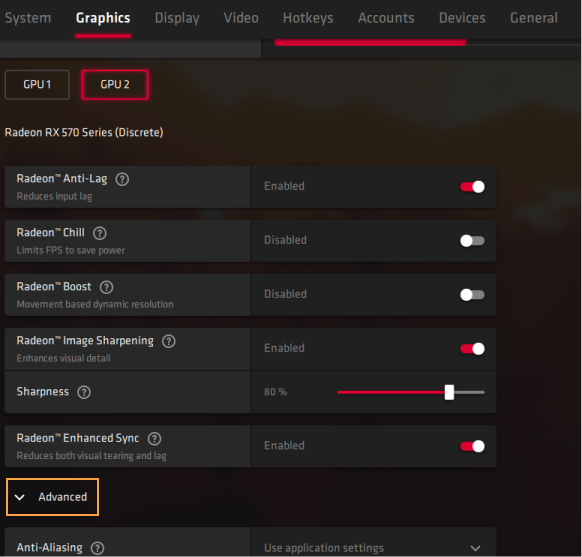
6. Change GPU Workload from Graphics to Compute
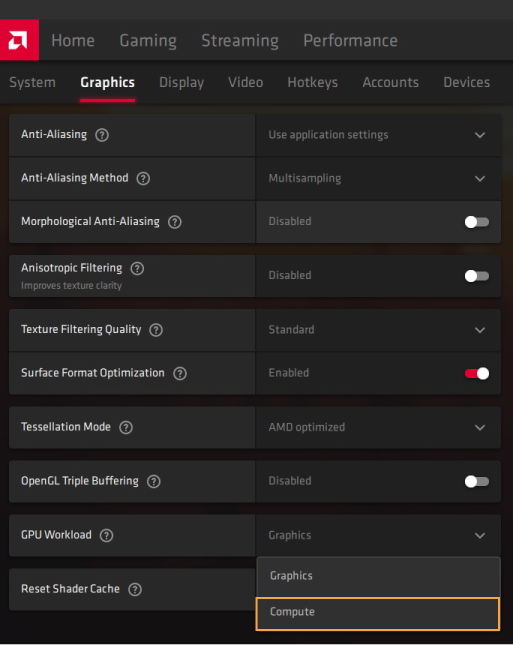
7. Agree to restart the Radeon Software
8. Repeat the process for each GPU
笔者
Marko Tarman
Marko先生是NiceHash的挖矿硬件专家以及内容创作者,他最早于2012年第一批 ASIC矿机发布之前便开始挖矿,经历了显卡挖BTC、LTC再到VTC,甚至是DOGE等币种。Marko的挖矿座右铭:在挖矿生涯中碰到的99个问题,这些问题全部都是分线器(riser)的问题”