How to enable compute mode on AMD cards and double your hash rate?
Enabling compute workloads on some AMD cards will double the hashrate of your GPU. Note that not all AMD graphic cards have this option. For example, the RX Vega series do not allow you to change between workloads.
Make sure that you have the latest AMD drivers installed before proceeding.
Follow these steps to enable compute workloads:
1. Open Radeon Software
2. In the top right corner click on Settings

3. In the top left part of the screen select Graphics

4. Select your GPU. Note that you have to repeat this process for each GPU.
5. Scroll down and click on > Advanced
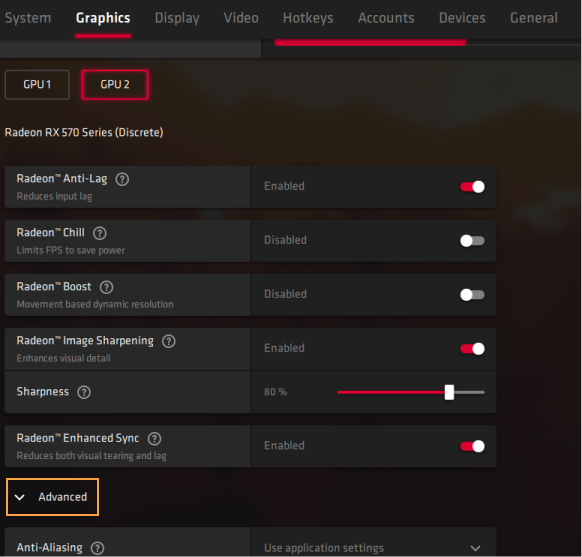
6. Change GPU Workload from Graphics to Compute
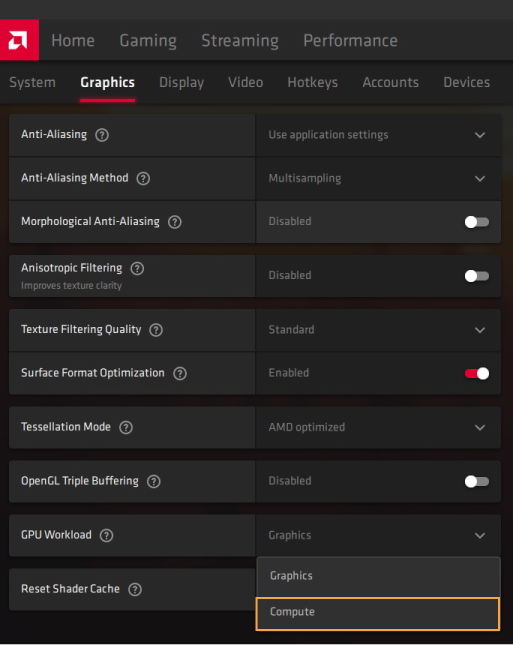
7. Agree to restart the Radeon Software
8. Repeat the process for each GPU
執筆:
Marko Tarman
MarkoはNiceHashのマイニングマネージャーであり、コンテンツ・クリエーターです。彼は最初のASICがリリースされる前の2012年にマイニングを始め、GPUでBTC・LTC・VTCからDOGEまでもマイニングするようになりました。彼の座右の銘は「問題が99個あったとしても、ライザーの不具合がすべての原因だ」です。