How to do a network trace for the miner?
We can offer you better customer support if we can pinpoint the exact source of your problem. To help us do this, we usually require a network trace. A trace is a log of your network traffic and trace tools that help us identify the source of issues when communicating with NiceHash servers.
Follow these steps to do a network trace:
1. Download Wireshark tool here.
2. Install Wireshark on your mining rig (only works on Windows).
3. Open Wireshark and do the following procedure (leave the trace running for at least 2 minutes):
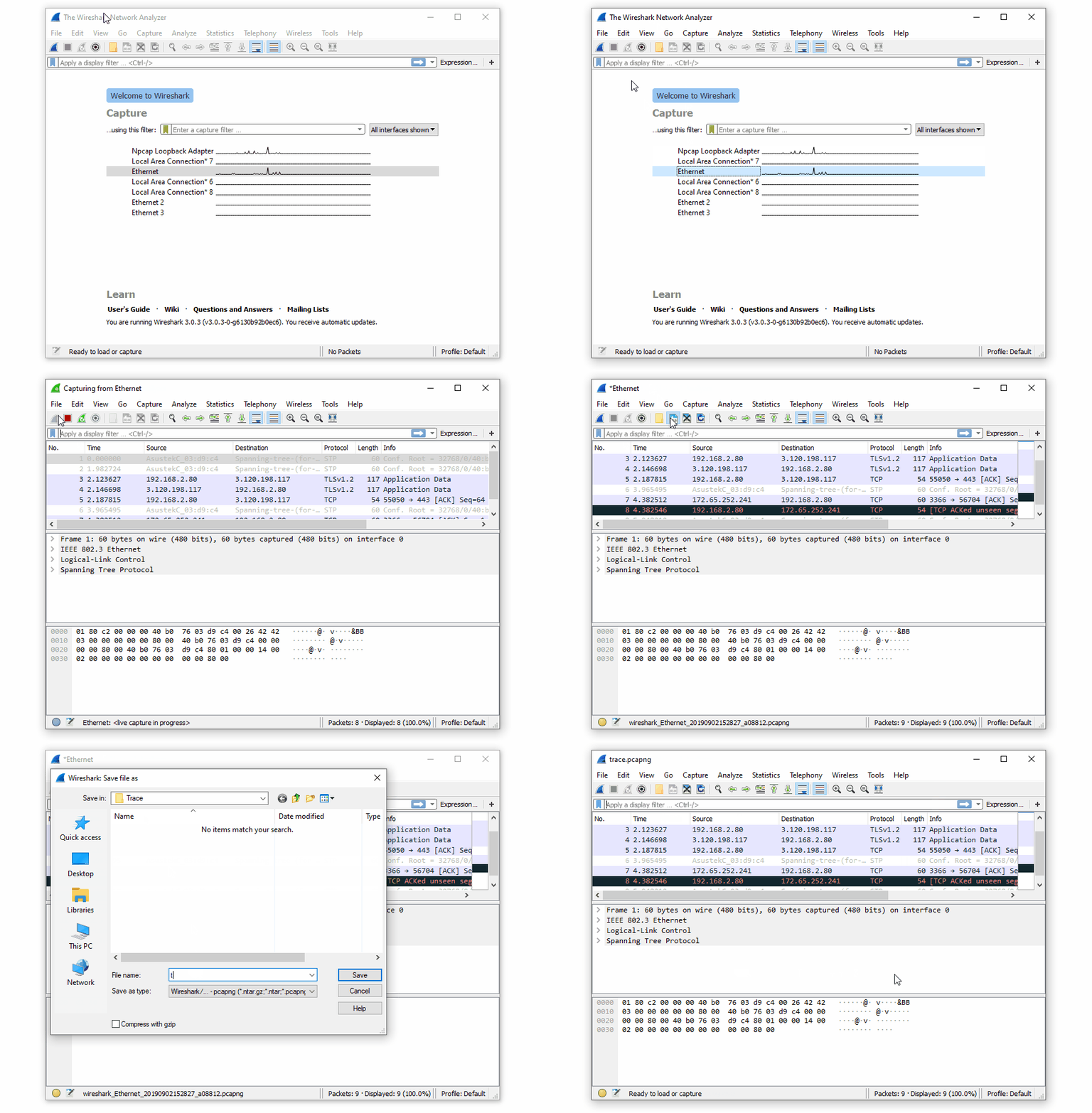
4. Save the trace file.
5. Attach the trace file when submitting a customer support ticket or send the file to support@nicehash.com
笔者
Marko Tarman
Marko先生是NiceHash的挖矿硬件专家以及内容创作者,他最早于2012年第一批 ASIC矿机发布之前便开始挖矿,经历了显卡挖BTC、LTC再到VTC,甚至是DOGE等币种。Marko的挖矿座右铭:在挖矿生涯中碰到的99个问题,这些问题全部都是分线器(riser)的问题”