How to do a network trace for the miner?
We can offer you better customer support if we can pinpoint the exact source of your problem. To help us do this, we usually require a network trace. A trace is a log of your network traffic and trace tools that help us identify the source of issues when communicating with NiceHash servers.
Follow these steps to do a network trace:
1. Download Wireshark tool here.
2. Install Wireshark on your mining rig (only works on Windows).
3. Open Wireshark and do the following procedure (leave the trace running for at least 2 minutes):
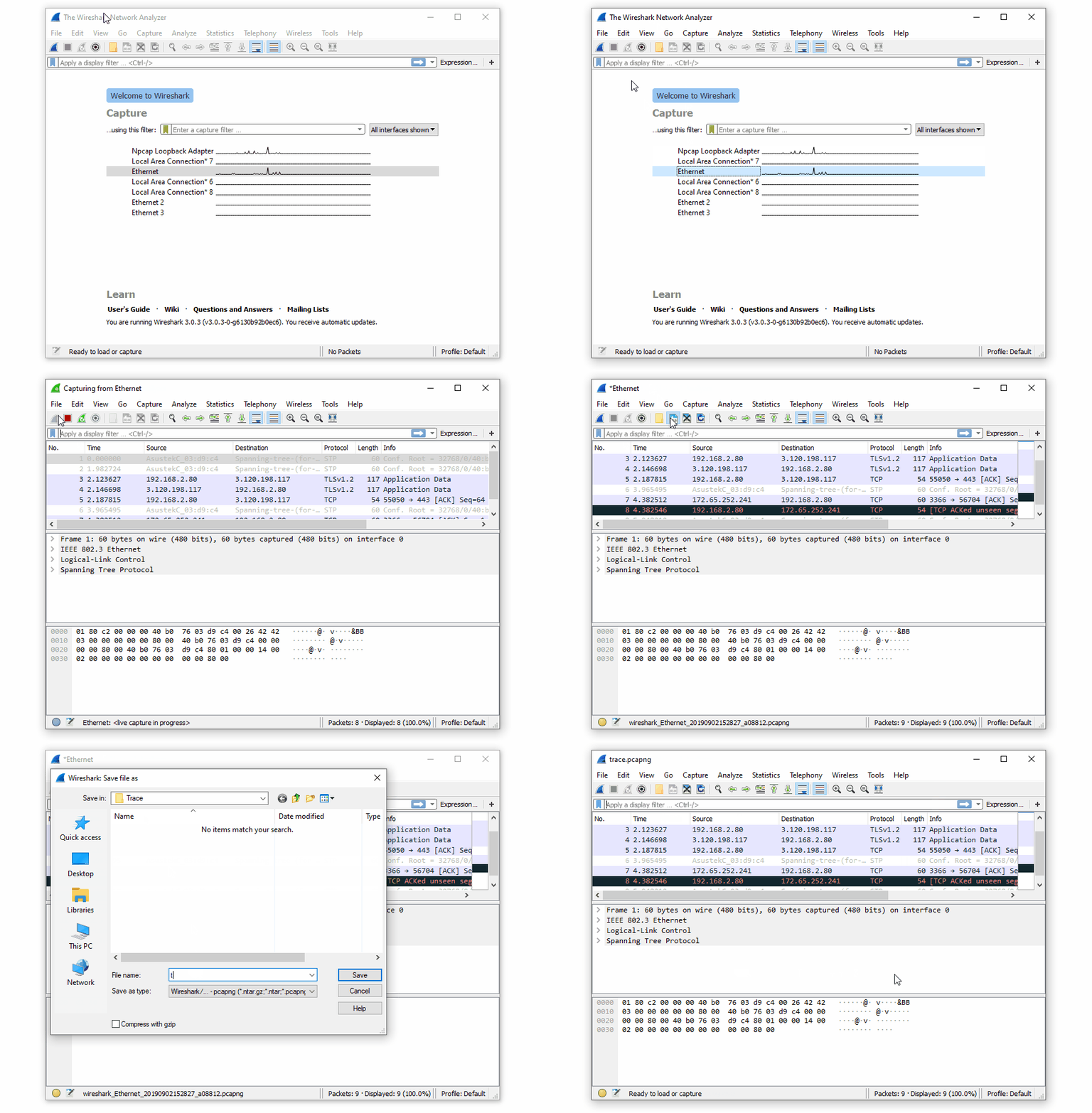
4. Save the trace file.
5. Attach the trace file when submitting a customer support ticket or send the file to support@nicehash.com
ESCRITO POR
Marko Tarman
Marko é especialista em hardware de mineração e criador de conteúdo da NiceHash. Ele começou a minar em 2012, antes do lançamento dos primeiros ASICs. Ele passou de mineração de GPU BTC, LTC para VTC e até mesmo DOGE. O seu lema de mineração: "Tenho 99 problemas, um riser mau são todos eles".