How to do a network trace for the miner?
We can offer you better customer support if we can pinpoint the exact source of your problem. To help us do this, we usually require a network trace. A trace is a log of your network traffic and trace tools that help us identify the source of issues when communicating with NiceHash servers.
Follow these steps to do a network trace:
1. Download Wireshark tool here.
2. Install Wireshark on your mining rig (only works on Windows).
3. Open Wireshark and do the following procedure (leave the trace running for at least 2 minutes):
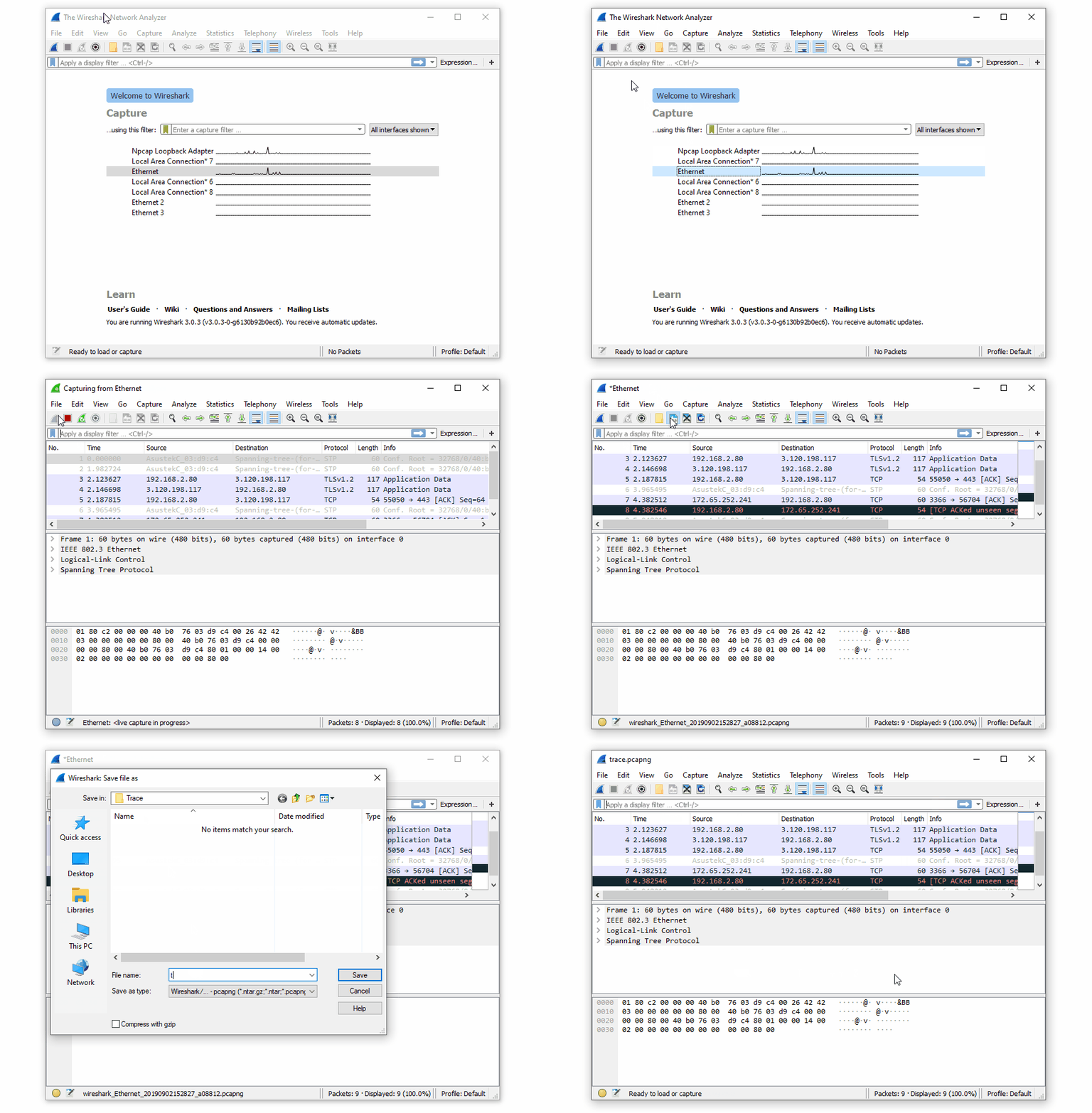
4. Save the trace file.
5. Attach the trace file when submitting a customer support ticket or send the file to support@nicehash.com
WRITTEN BY
Marko Tarman
Marko is NiceHash's Mining Manager and Content Creator. He started mining back in 2012 before the first ASICs were released. He went from GPU mining BTC, LTC to VTC, and even DOGE. His mining motto: "I've got 99 problems, a bad riser is all of them"