How to disable onboard GPU?
When building a mining rig it is important to check the motherboard BIOS settings. It is recommended to disable the onboard GPU on your mining rig. It is known that onboard GPUs cause issues on the NiceHash OS system in terms of not showing GPU temperatures or fan speeds correctly.
In this guide, we will show you how to disable the onboard GPU. Not all CPUs support video output. Most Intel processors and just a few AMD ones support it. If your CPU does not provide integrated video support, then this guide is not relevant for you.
Note that each motherboard manufacturer has a slightly different BIOS layout. Therefore disabling the onboard GPU might be named a bit different or located somewhere else than what is shown in this guide.
First of all, you will need to access your motherboard BIOS. Follow these steps to access it.
- Reboot your rig.
- When rig turns on, press DEL, F2, F8, or F12 repeatedly. Note that not every motherboard has the same button to access the BIOS. Check your motherboard’s manual for more information.
Once you are in the BIOS, in most modern BIOSes you will first need to navigate to Advanced mode. This can be normally done by pressing the F7 button.
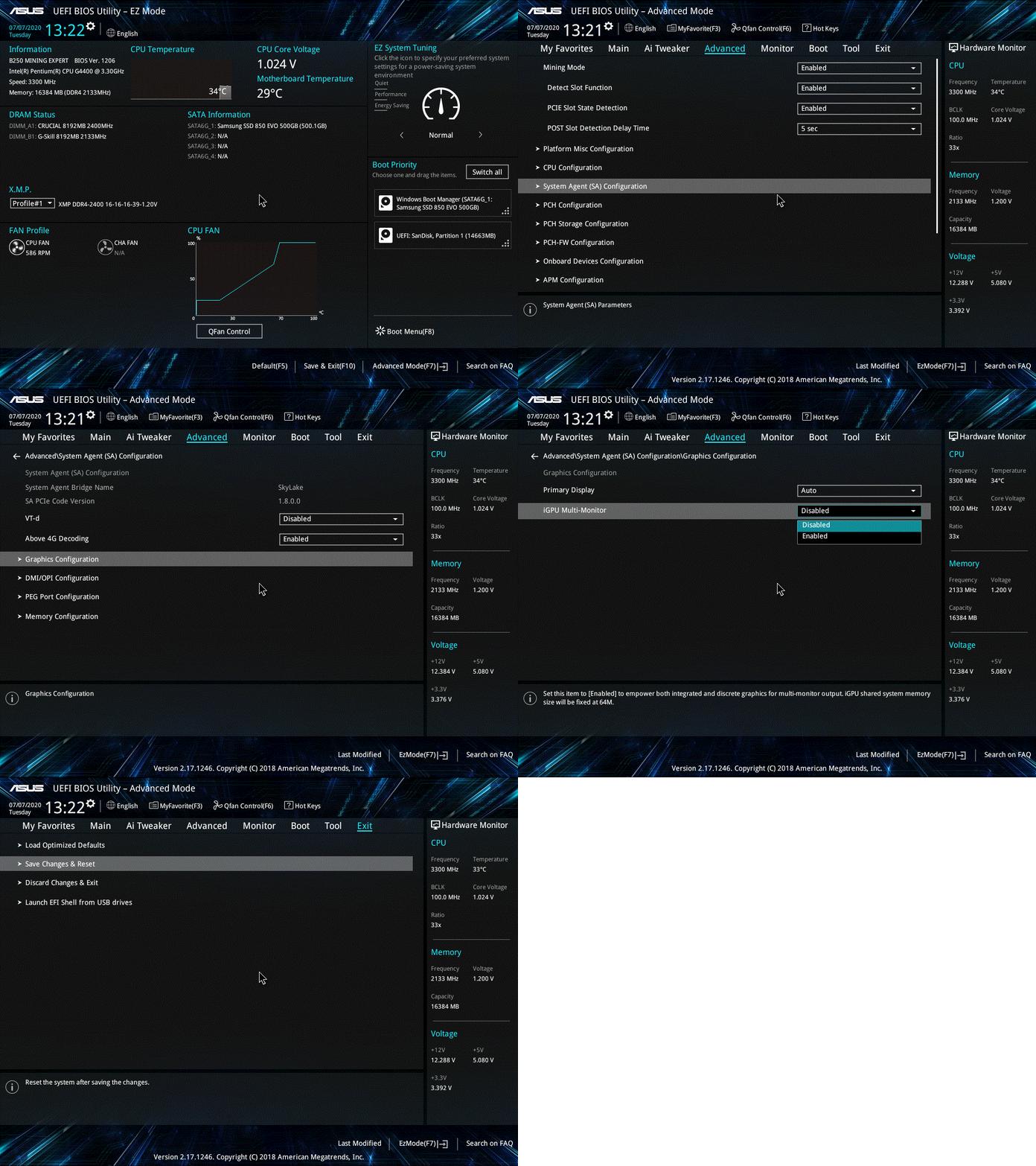
Example of disabling onboard GPU on ASUS motherboard.
Disable onboard GPU on ASUS motherboard bios
- Navigate to Advanced tab.
- Navigate to System Agent (SA) Configuration.
- Navigate to Graphics Configuration.
- Locate iGPU Multi-Monitor and set it to Disabled.
Disable onboard GPU on Asrock motherboard bios
- Navigate to Advanced tab.
- Navigate to Chipset Configuration.
- Locate iGPU Multi-Monitor and set it to Disable.
Disable onboard GPU on MSI motherboard bios
- Navigate to Settings > Advanced tab.
- Navigate to Integrated Graphics Configuration.
- Set Initiate Graphic Adapter to PEG.
- Locate IGD Multi-Monitor and set it to Disabled.
Disable onboard GPU on Gigabyte motherboard bios
- Navigate to Chipset tab.
- Locate Integrated Graphics and set it to Disabled.
Note that the monitor should be connected to your physical GPU now, as connecting it to the motherboard will not work.
Make sure you also check our guide on how to flash your motherboard BIOS.