How to create a log report with NiceHash Miner?
If you run into an issue related to NiceHash Miner you can send us a log report automatically generated by NiceHash Miner.
When experiencing an issue, try to make a log report as soon as the issue happened. If the issue happened 2 days ago and you were mining afterwards, it makes it harder for us to find the error.
Follow these steps to create a log report:
1. Open NiceHash Miner.
2. Navigate to Settings (gear icon) > General.
3. Scroll down and click on Create a log report button.
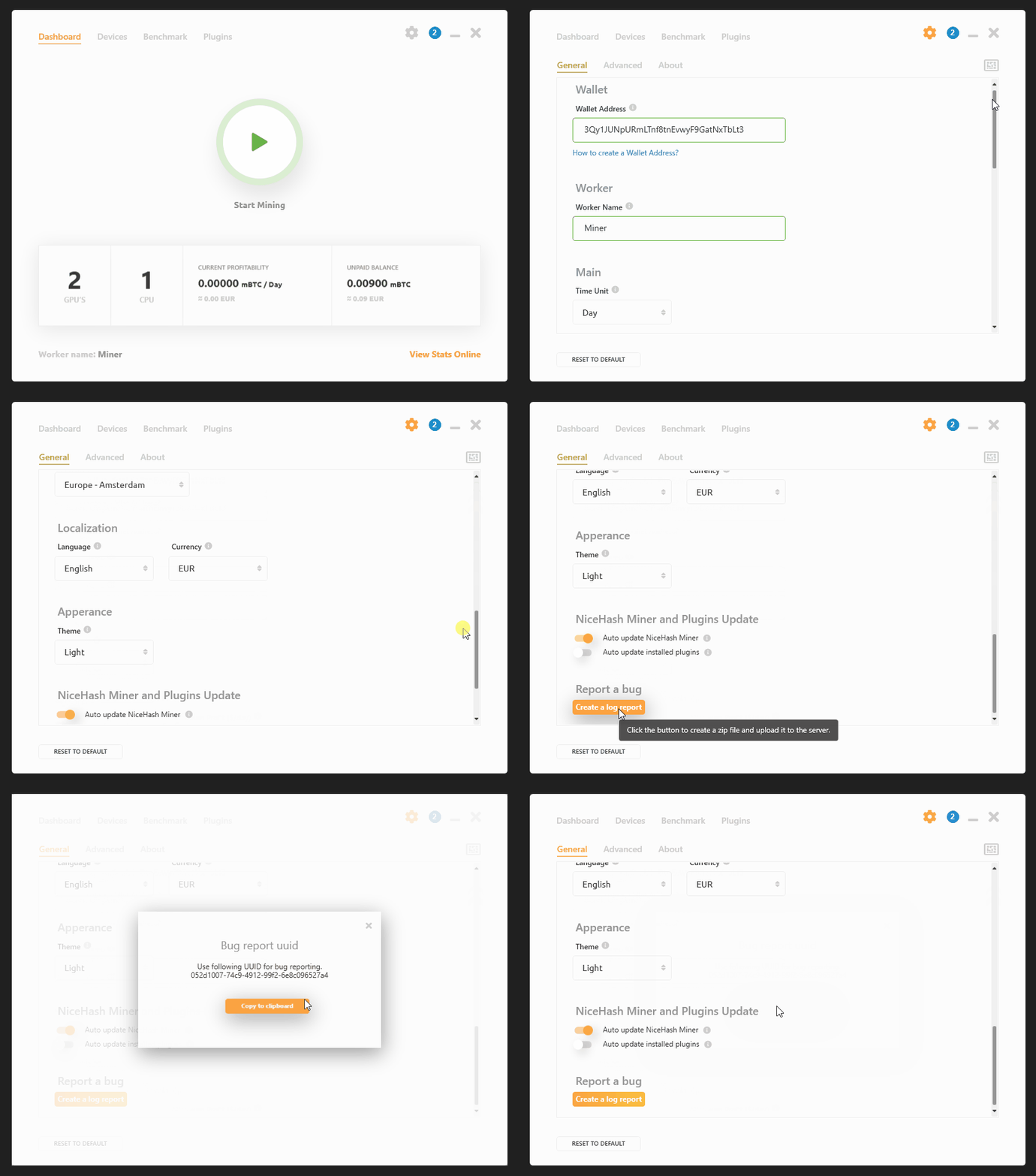
Upon agreeing, log files will be sent to our servers. Make sure that you send the UUID to our support agent.
笔者
Marko Tarman
Marko先生是NiceHash的挖矿硬件专家以及内容创作者,他最早于2012年第一批 ASIC矿机发布之前便开始挖矿,经历了显卡挖BTC、LTC再到VTC,甚至是DOGE等币种。Marko的挖矿座右铭:在挖矿生涯中碰到的99个问题,这些问题全部都是分线器(riser)的问题”