How to create a log report with NiceHash Miner?
If you run into an issue related to NiceHash Miner you can send us a log report automatically generated by NiceHash Miner.
When experiencing an issue, try to make a log report as soon as the issue happened. If the issue happened 2 days ago and you were mining afterwards, it makes it harder for us to find the error.
Follow these steps to create a log report:
1. Open NiceHash Miner.
2. Navigate to Settings (gear icon) > General.
3. Scroll down and click on Create a log report button.
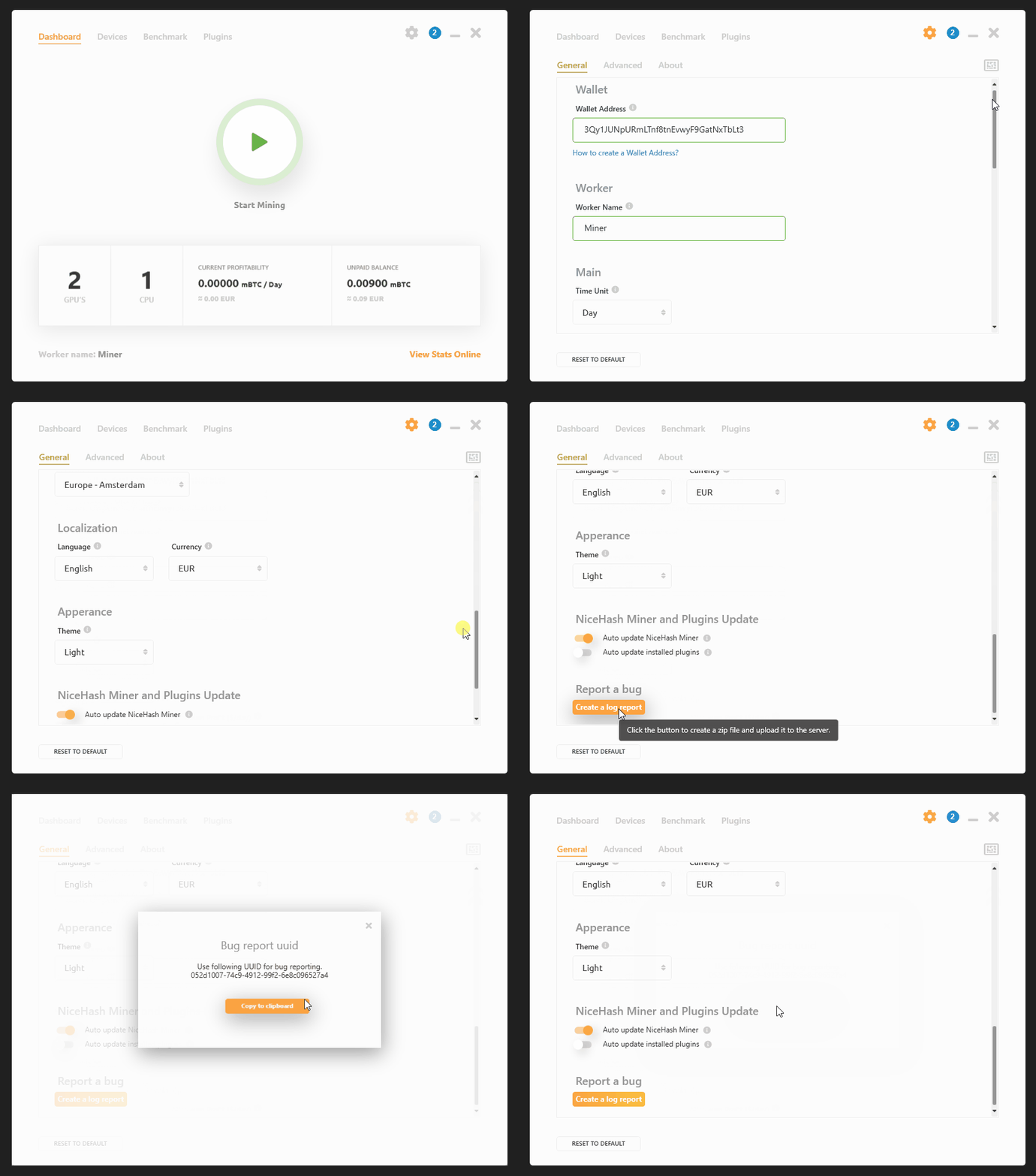
Upon agreeing, log files will be sent to our servers. Make sure that you send the UUID to our support agent.
執筆:
Marko Tarman
MarkoはNiceHashのマイニングマネージャーであり、コンテンツ・クリエーターです。彼は最初のASICがリリースされる前の2012年にマイニングを始め、GPUでBTC・LTC・VTCからDOGEまでもマイニングするようになりました。彼の座右の銘は「問題が99個あったとしても、ライザーの不具合がすべての原因だ」です。