How to create a log report with NiceHash Miner?
If you run into an issue related to NiceHash Miner you can send us a log report automatically generated by NiceHash Miner.
When experiencing an issue, try to make a log report as soon as the issue happened. If the issue happened 2 days ago and you were mining afterwards, it makes it harder for us to find the error.
Follow these steps to create a log report:
1. Open NiceHash Miner.
2. Navigate to Settings (gear icon) > General.
3. Scroll down and click on Create a log report button.
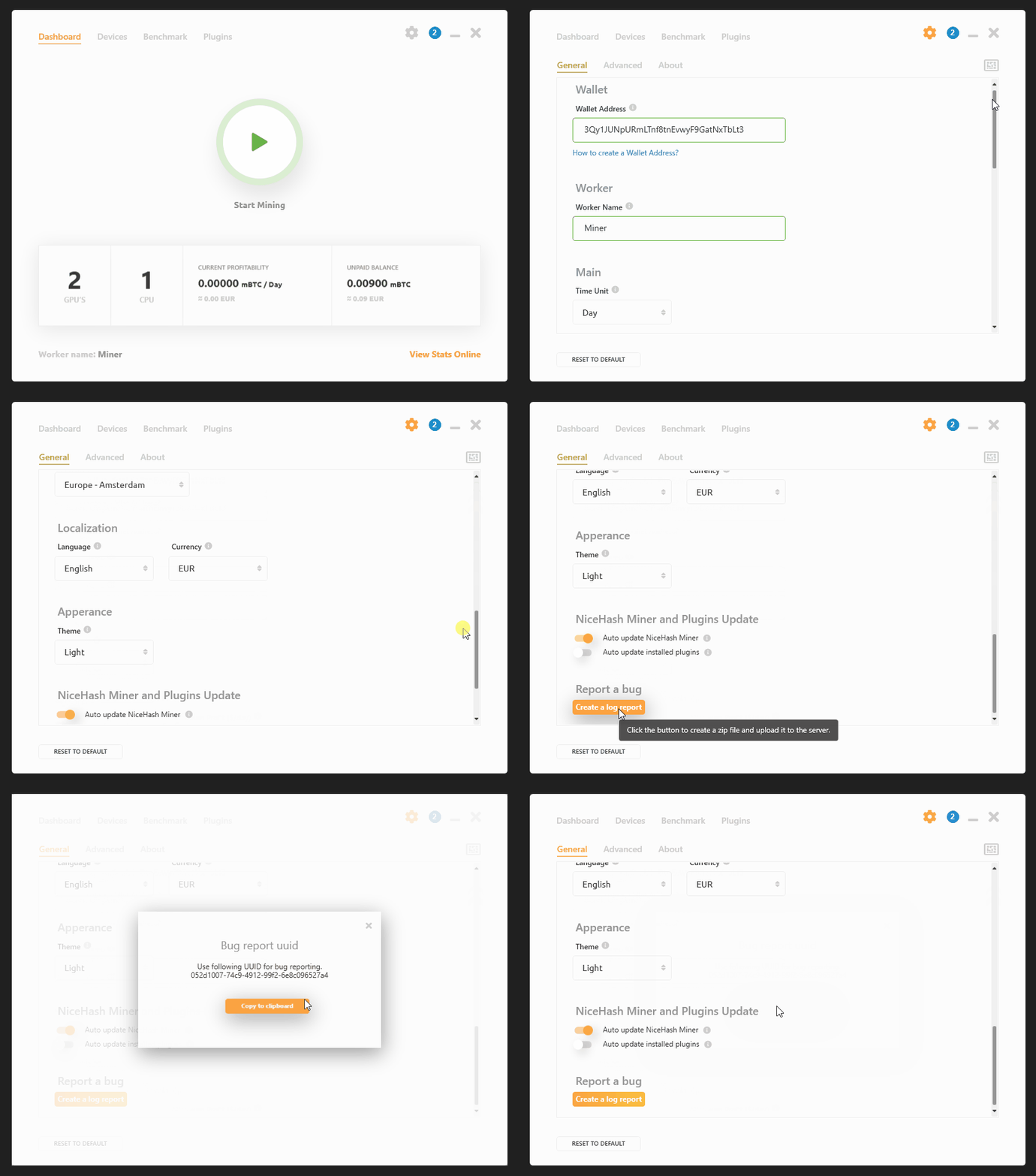
Upon agreeing, log files will be sent to our servers. Make sure that you send the UUID to our support agent.
ÉCRIT PAR
Marko Tarman
Marko est le spécialiste du matériel de minage et le créateur de contenu de NiceHash. Il a commencé à miner en 2012 avant la sortie des premiers ASIC. Il est passé de GPU mining BTC, LTC à VTC, et même DOGE. Sa slogan de minage: "J'ai 99 problèmes, un mauvais riser est tout"