How to connect NiceHash Miner with NiceHash account?
In this guide, we are going to show you how to connect NiceHash Miner with your NiceHash account. There are three possible methods:
1. Using the login credentials
2. Using your Bitcoin wallet address
3. Using your NiceHash mobile app
1. Login credentials
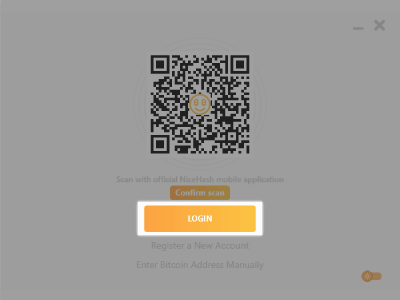
Simply run NiceHash Miner for the first time. You will be prompted to log in. Click on the login button and sign in. NiceHash Miner will be automatically connected to your account. It may take a few minutes for your PC or mining rig to appear in the rig manager.
2. Using your NiceHash Bitcoin Wallet address
This is a second method of connecting NiceHash Miner to your NiceHash account.
- Sign in to your NiceHash account on your preferred web browser.
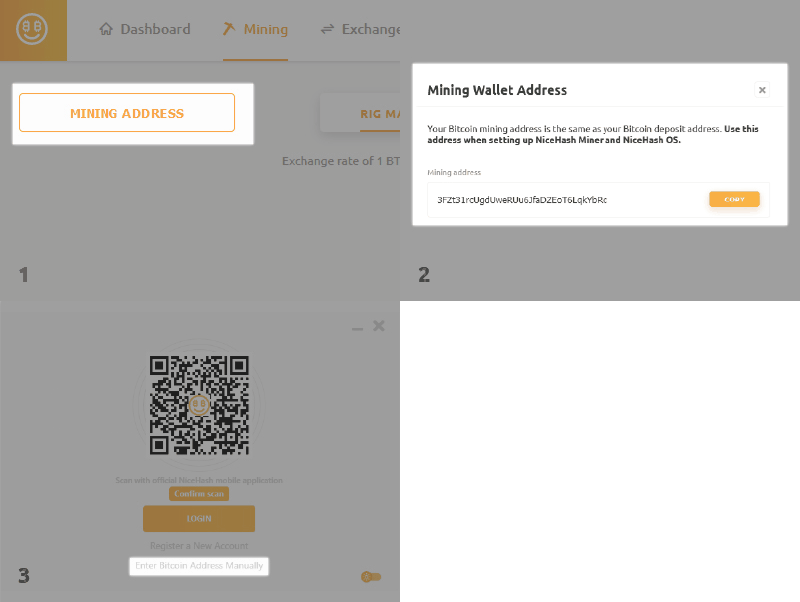
- Navigate to the Mining tab - this is rig manager.
- Look for the MINING ADDRESS button in the top-left part of the rig manager.
- Run NiceHash Miner and instead of logging in, click the Enter Bitcoin Address Manually button.
- Copy the Bitcoin wallet address to NiceHash Miner.
If you want to use your own Bitcoin wallet address please read this article.
3. Scan QR code with your mobile phone
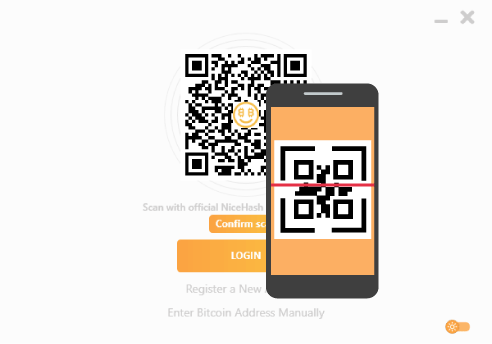
- Download NiceHash iOS or Android application and sign in with your NiceHash account.
- Click on the QR icon on the top right part of the mining tab in your mobile app.
- Scan the QR code provided by NiceHash Miner on your PC.
- Click Confirm scan in NiceHash Miner.
執筆:
Marko Tarman
MarkoはNiceHashのマイニングマネージャーであり、コンテンツ・クリエーターです。彼は最初のASICがリリースされる前の2012年にマイニングを始め、GPUでBTC・LTC・VTCからDOGEまでもマイニングするようになりました。彼の座右の銘は「問題が99個あったとしても、ライザーの不具合がすべての原因だ」です。