How to add NiceHash Miner to AVAST antivirus exclusion?
Last updated September 2022
Many anti-virus (AV) programs can interfere with the proper operation of the NiceHash Miner. It is recommended to exclude the NiceHash Miner folder from your AV scanning.
First of all, you need to determine if you are using the installation or ZIP version of NHM.
The installation version is located in the following path:
C:\Users\YourWinUser\AppData\Local\Programs\NiceHashMiner, where YourWinUser is your Windows username.
The ZIP version is located wherever you have extracted it on your first setup. Use the root folder of NiceHash Miner. It should look something like this:...path to folder\nhm_windows_3.0.0.3
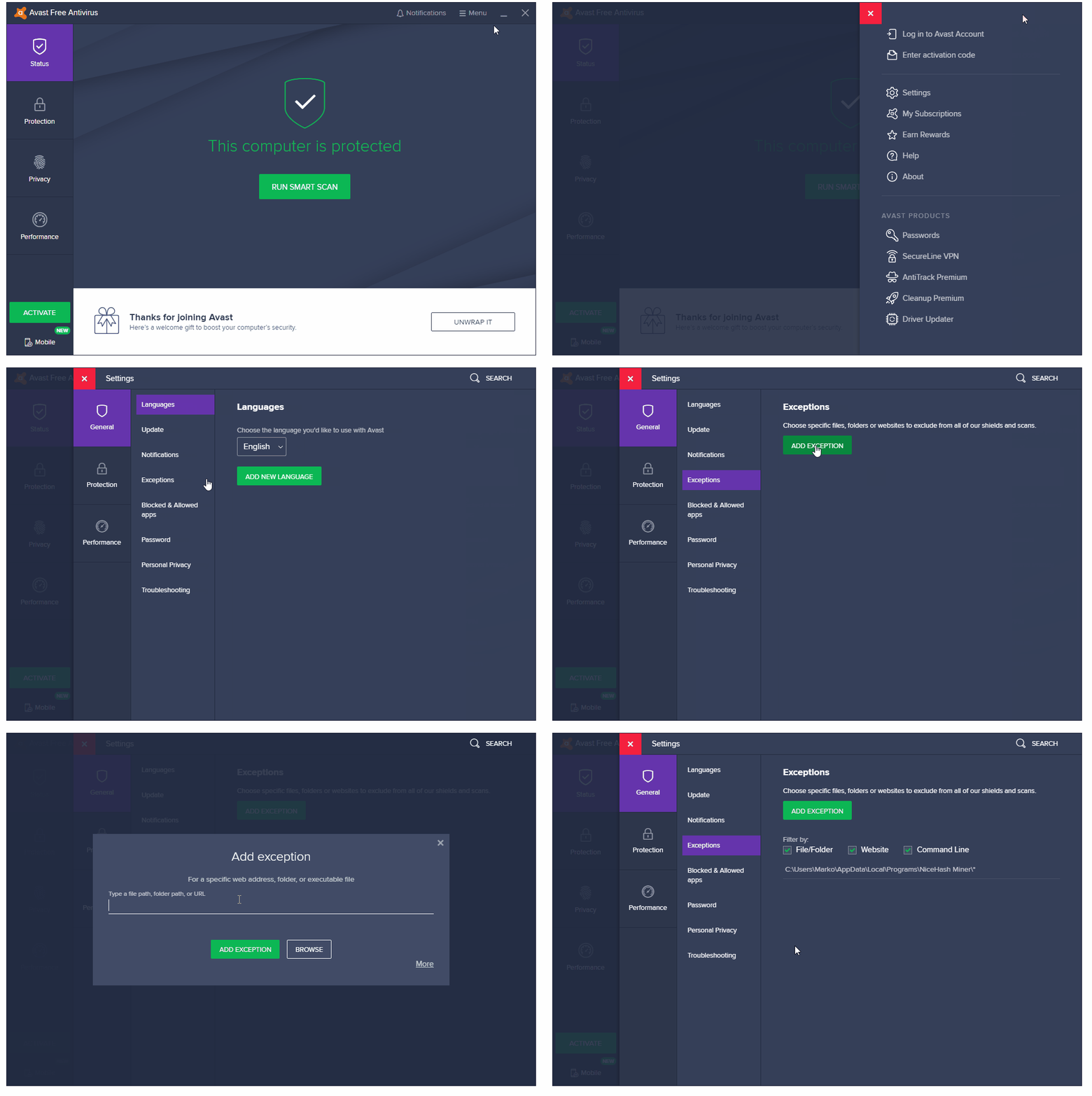
Follow these steps to add the NiceHash Miner folder to the AVAST exclusion list:
1. Open AVAST
2. Click on Menu (top right)
3. Click on Settings
4. Navigate to General > Exceptions > Add Exception
5. Select path to NiceHash Miner folder
- If you are using NIceHash Miner install version, use this path: C:\Users\YourWinUser\AppData\Local\Programs\NiceHashMiner. NOTE: YourWinUser should be different for you. This is your Windows username.
- If you are using the NiceHash Miner zip version, use the NiceHash Miner folder wherever it is located on your PC.
6. Click Add Exception