Problèmes de Minage Avec Antminer Z15 Pro sur NiceHash ? Lisez Ceci
Si vous utilisez un Antminer Z15 Pro et souhaitez miner sur NiceHash, veuillez lire ceci en premier. Une étape de configuration simple permet d’éviter les problèmes lors du minage sur NiceHash.
Cela concerne uniquement le Z15 Pro. Le Z15 standard fonctionne normalement.
Le problème
Certains propriétaires de Z15 Pro ont rencontré des problèmes lors du minage sur NiceHash. Dans les cas que nous avons étudiés, les câbles des hashboards étaient branchés sur les mauvais ports de la carte de contrôle. Les cartes étaient connectées à CH3 ou aux emplacements 1 à 3 au lieu de 0 à 2.
Après avoir corrigé l’ordre des câbles et mis à jour le firmware, les mineurs ont fonctionné normalement.
La correction
Cette instruction provient de Bitmain :
Connectez les hashboards 0, 1, 2 aux ports CH0, CH1, CH2 de la carte de contrôle dans l’ordre.
Ainsi, le hashboard 0 va sur CH0, le hashboard 1 sur CH1 et le hashboard 2 sur CH2. Ouvrez l’appareil, vérifiez les câbles ruban sur la carte de contrôle et échangez-les s’ils sont branchés sur les mauvais ports.
Assurez-vous également que le type de mineur et le type de firmware correspondent avant de mettre à jour le firmware.
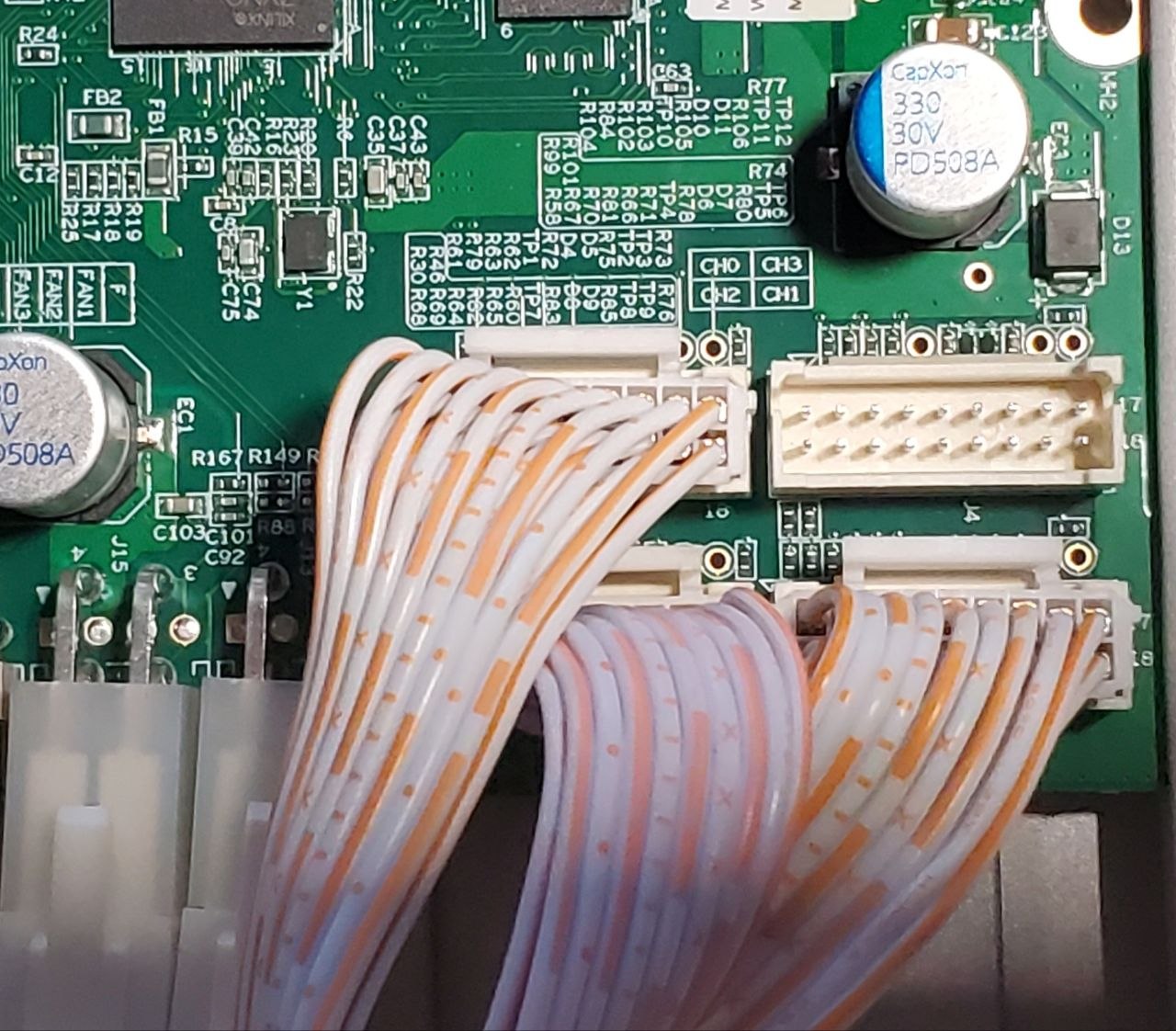
(source: bitcap.co)
Liste de vérification rapide
- Éteignez et débranchez le mineur.
- Ouvrez l’appareil et localisez la carte de contrôle.
- Confirmez que les hashboards 0, 1, 2 vont aux ports CH0, CH1, CH2 dans l’ordre.
- Rebranchez les câbles ruban si nécessaire.
- Refermez, mettez à jour le firmware et commencez à miner.
Vous pouvez trouver les instructions officielles Bitmain et le firmware ici : https://service.bitmain.com/support/download
Remarque de sécurité
Ces instructions proviennent de Bitmain. Travailler à l’intérieur d’un mineur implique des composants électroniques et de la chaleur, soyez donc prudent. NiceHash n’est pas responsable des dommages ou blessures pouvant survenir lors de l’ouverture ou de la maintenance de votre matériel. Si vous ne vous sentez pas à l’aise pour effectuer cette opération, faites appel à un technicien qualifié.
Pourquoi miner le Z15 Pro sur NiceHash
Une fois les câbles correctement connectés, votre Z15 Pro fonctionne comme prévu sur NiceHash. L’avantage est que vous êtes payé en Bitcoin au lieu de Zcash. Vous continuez à miner le même algorithme, mais vos récompenses sont versées en BTC. Pour de nombreux mineurs, c’est la principale raison de passer sur NiceHash.