Нужна помощь?
Теперь вы являетесь владельцем части сети Биткоин.
Наслаждайтесь миром
Добро пожаловать в
Майнинг биткоинов с BitAxe
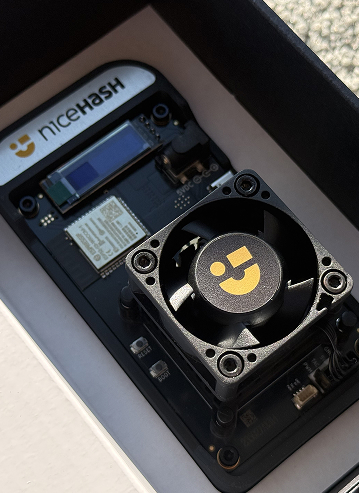
Поздравляем с получением вашего
BitAxe Solo Miner
Теперь вы являетесь владельцем части сети Биткоин.
Это устройство позволяет вам добывать биткоины из дома или офиса. Его можно использовать двумя основными способами:
Часть 1
Подключите ваше устройство
(Обязательно)
Before choosing a mining mode, put your BitAxe online.
-
Power On:
- Plug in your BitAxe using the provided power supply.
-
Connect to the Device:
- On your phone or laptop, open your Wi-Fi settings.
- Look for a temporary network named Bitaxe_XXXX (the suffix is unique to your device). Connect to it.
-
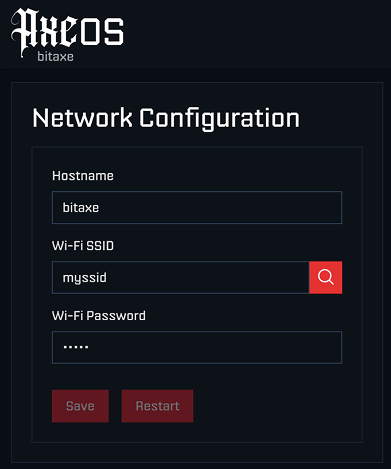
Configure Wi-Fi:
- A setup page should open automatically. (If not, type
192.168.4.1into your web browser). - Click the "Search Icon" and select available Wi-Fi networks.
- Crucial Step: Select your home/office Wi-Fi name (SSID) from the list.
- Enter Your Wi-Fi Password: Enter the password for your home/office internet connection.
- Click Save.
- Click Restart - The device must reboot before next step.
- A setup page should open automatically. (If not, type
-
Find Your IP:
- Look at the small screen on the BitAxe. It will verify the connection and display an IP Address (e.g.,
192.168.1.55).
- Look at the small screen on the BitAxe. It will verify the connection and display an IP Address (e.g.,
-
Access BitAxe Dashboard:
- Make sure your phone/computer is back on your regular Wi-Fi.
- Type that IP address into your web browser to access your BitAxe dashboard.
Часть 2
Выберите свою стратегию
Option A: Steady Earnings (NiceHash)
Choose this option if you want guaranteed, small daily payments for your device's contribution.
-
Get Your Address:
- Log in to your NiceHash account and copy your Mining Address (found in the "Mining" tab).
-
Configure BitAxe:
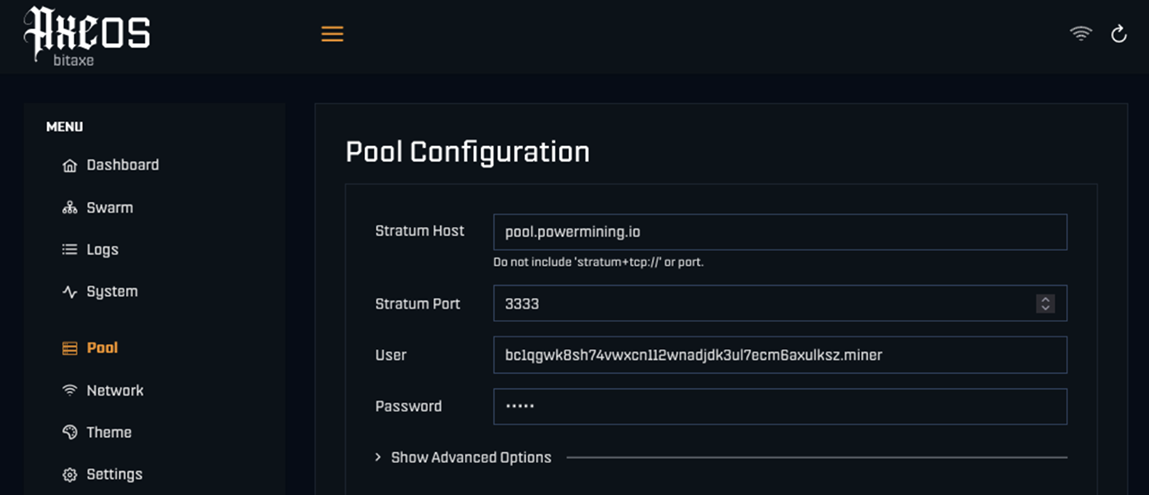
- In the BitAxe dashboard, go to the Pool tab.
- Stratum URL:
stratum+tcp://sha256asicboost.auto.nicehash.com:9200 - Stratum User:
YourMiningAddress.WorkerName - Example:
NHLp...7x.Bitaxe01 - Stratum Password:
x
-
Start:
- Click Save and Restart.
Option B: The "Lottery" (Solo Mining)
Choose this for the thrill. You will likely earn $0 on most days, but you are running a 24/7 attempt to find a Bitcoin block yourself and win the full reward (3.125 BTC or ~$300,000+ USD).
Recommended Pools:
-
PowerMining Pool
- Stratum URL:
stratum+tcp://pool.powermining.io - Stratum Port:
3333 - Stratum User:
YourBitcoinAddress - Important: Use a real Bitcoin wallet address (e.g., from your Ledger, Trezor, or Exchange).
- Stratum Password:
x
- Stratum URL:
-
Solo CKPool
- Stratum URL:
stratum+tcp://solo.ckpool.org - Stratum URL:
3333 - Stratum User:
YourBitcoinAddress - Stratum Password:
x
- Stratum URL:
To activate: Enter the details into the BitAxe "Pool" settings, then click Save and Restart.
Tip: You can monitor the pool-side performance by using your Bitcoin wallet address on PowerMining, CKpool website, or inside the NiceHash mining dashboard.
Часть 3
Управление шумом и теплом
Optimize the device for your environment in the Settings tab.
💡 PRO TIP: SILENT OFFICE MODE Want the device quiet enough for your office desk?
- Set Minimum Fan Speed to 10% or 5%.
- Set Frequency and Core Voltage to their minimum values.
Note: This slightly lowers mining speed, but makes the device nearly silent and very cool.
For Standard Tuning:
- To reduce noise: Lower the Frequency (e.g., 400 or 490).
- To maximize performance: Increase the Frequency (Warning: this increases fan noise).
- Fan Control: Ensure "Automatic Fan Control" is checked.
Always click Save and Restart to apply changes.
Наслаждайтесь миром
майнинга криптовалют!
Этот веб-сайт использует куки для обеспечения наилучшего опыта.